
• 中文版
  • BM
  • News
  • Deals
  • Reviews
    • First Impressions
    • Hands-on
    • Comparisons
  • Tech
    • Mobile
    • Computers
    • Cameras
    • Wearables
    • Audio
    • Drones
  • Telco
    • Celcom
    • Digi
    • Maxis
    • Time
    • Tune Talk
    • U Mobile
    • Unifi
    • Yes
  • Cars
  • Contribute
  • Jobs
Menu
  • 中文版
  • BM
  • News
  • Deals
  • Reviews
    • First Impressions
    • Hands-on
    • Comparisons
  • Tech
    • Mobile
    • Computers
    • Cameras
    • Wearables
    • Audio
    • Drones
  • Telco
    • Celcom
    • Digi
    • Maxis
    • Time
    • Tune Talk
    • U Mobile
    • Unifi
    • Yes
  • Cars
  • Contribute
  • Jobs
Search
  • Tech
    • News
    • Mobile
    • Computers
    • Cameras
    • Wearables
    • Audio
    • Drones
  • Telco
    • Celcom
    • Digi
    • Maxis
    • Time
    • U Mobile
    • Unifi
    • Yes
  • Reviews
    • First Impressions
    • Hands-on
    • Comparisons
  • Buyer’s Guide
  • Opinions
  • Digital Life
  • Video
  • Deals
  • How-To
  • Cars
  • Bahasa Melayu
  • EV
  • Contribute
  • Advertise
Menu
  • Tech
    • News
    • Mobile
    • Computers
    • Cameras
    • Wearables
    • Audio
    • Drones
  • Telco
    • Celcom
    • Digi
    • Maxis
    • Time
    • U Mobile
    • Unifi
    • Yes
  • Reviews
    • First Impressions
    • Hands-on
    • Comparisons
  • Buyer’s Guide
  • Opinions
  • Digital Life
  • Video
  • Deals
  • How-To
  • Cars
  • Bahasa Melayu
  • EV
  • Contribute
  • Advertise
Search
Close
Home News

Digi releases mobile data management feature built right into Android

  • BY soyacincau
  • 8 January 2019
  • 11:31 am
  • Comment
Share on FacebookShare on Twitter

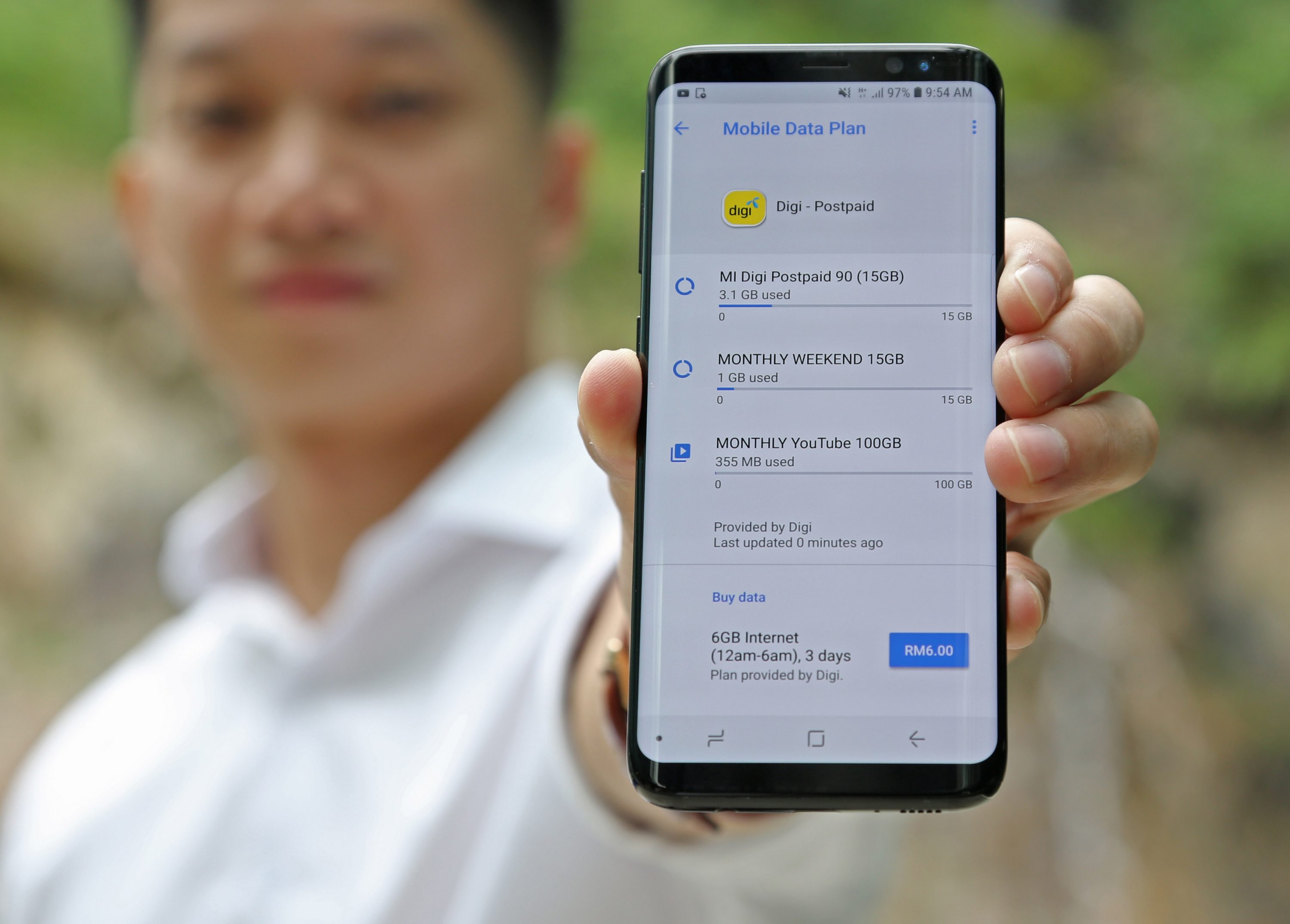
Digi mobile data users will soon be able to monitor and manage their mobile data consumption directly from within the settings menu of their Android devices.

The new feature is the result of a collaboration between Google and Digi’s parent company, Telenor Group, and will be made available to Digi customers in phases.

With the feature, Digi customers with Android devices can manage and receive alerts about their respective data plans. They can even view and purchase Digi mobile data packs on offer directly from the Android settings menu without having to install an app.

This feature can be accessed directly in the phone settings via the Mobile Data Plan function in Android and is available for Digi customers using Android 4.0 and above.

In 2016, Telenor and Google collaborated on a Mobile Data Plan API, which alerted Telenor customers in Thailand and Malaysia when they are reaching the end of their data quota while watching content in the YouTube app, and enabled them to easily buy data directly from within the app user interface. The new feature is an expansion of this effort, and now enables customers to manage price plans from their carrier directly from Android settings rather than within a specific app

Tags: AndroidDiGigoogleMobilemobile data
soyacincau

soyacincau

POPULAR

Digi releases mobile data management feature built right into Android

January 8, 2019
Rear view of the OPPO Find X9 Ultra in Tundra Umber standing vertically on a stone surface with a lush green bokeh background. The device features an eco-friendly vegan leather back with a classic stitching design , vertically oriented Hasselblad and OPPO logos , and a large circular Master Lens camera module with a bronze-toned knurled ring.

Clearing Every Expectation: How the OPPO Find X9 Ultra Redefines the Modern Flagship Experience

April 16, 2026
Proton EV Plant, Tanjung Malim

MITI says EVs won’t become more expensive, but can Malaysia’s CKD industry fill the gap?

May 10, 2026

Maxis Home Solar now offers outright purchase option, with up to 80% electricity bill savings

May 11, 2026

Vibe Mobile is U Mobile’s latest MVNO partner for 5G services

May 11, 2026
Denza B8 PHEV

Denza B8 to debut in Malaysia this month

May 11, 2026

Copyright © 2025 · SoyaCincau.com
Mind Blow Sdn Bhd (1076827-P)

  • ADVERTISE
  • DISCLAIMER

Copyright © 2026 · SoyaCincau.com – Mind Blow Sdn Bhd (1076827-P)

  • ADVERTISE
  • DISCLAIMER





