• 中文版
  • BM
  • News
  • Deals
  • Reviews
    • First Impressions
    • Hands-on
    • Comparisons
  • Tech
    • Mobile
    • Computers
    • Cameras
    • Wearables
    • Audio
    • Drones
  • Telco
    • Celcom
    • Digi
    • Maxis
    • Time
    • Tune Talk
    • U Mobile
    • Unifi
    • Yes
  • Cars
  • Contribute
  • Jobs
Menu
  • 中文版
  • BM
  • News
  • Deals
  • Reviews
    • First Impressions
    • Hands-on
    • Comparisons
  • Tech
    • Mobile
    • Computers
    • Cameras
    • Wearables
    • Audio
    • Drones
  • Telco
    • Celcom
    • Digi
    • Maxis
    • Time
    • Tune Talk
    • U Mobile
    • Unifi
    • Yes
  • Cars
  • Contribute
  • Jobs
Search
  • Tech
    • News
    • Mobile
    • Computers
    • Cameras
    • Wearables
    • Audio
    • Drones
  • Telco
    • Celcom
    • Digi
    • Maxis
    • Time
    • U Mobile
    • Unifi
    • Yes
  • Reviews
    • First Impressions
    • Hands-on
    • Comparisons
  • Buyer’s Guide
  • Opinions
  • Digital Life
  • Video
  • Deals
  • How-To
  • Cars
  • Bahasa Melayu
  • EV
  • Contribute
  • Advertise
Menu
  • Tech
    • News
    • Mobile
    • Computers
    • Cameras
    • Wearables
    • Audio
    • Drones
  • Telco
    • Celcom
    • Digi
    • Maxis
    • Time
    • U Mobile
    • Unifi
    • Yes
  • Reviews
    • First Impressions
    • Hands-on
    • Comparisons
  • Buyer’s Guide
  • Opinions
  • Digital Life
  • Video
  • Deals
  • How-To
  • Cars
  • Bahasa Melayu
  • EV
  • Contribute
  • Advertise
Search
Close
Home News

If you don’t like Bixby, Samsung finally has a fix for you

  • BY Alexander Wong
  • 19 September 2017
  • 10:39 am
  • Comment
Share on FacebookShare on Twitter

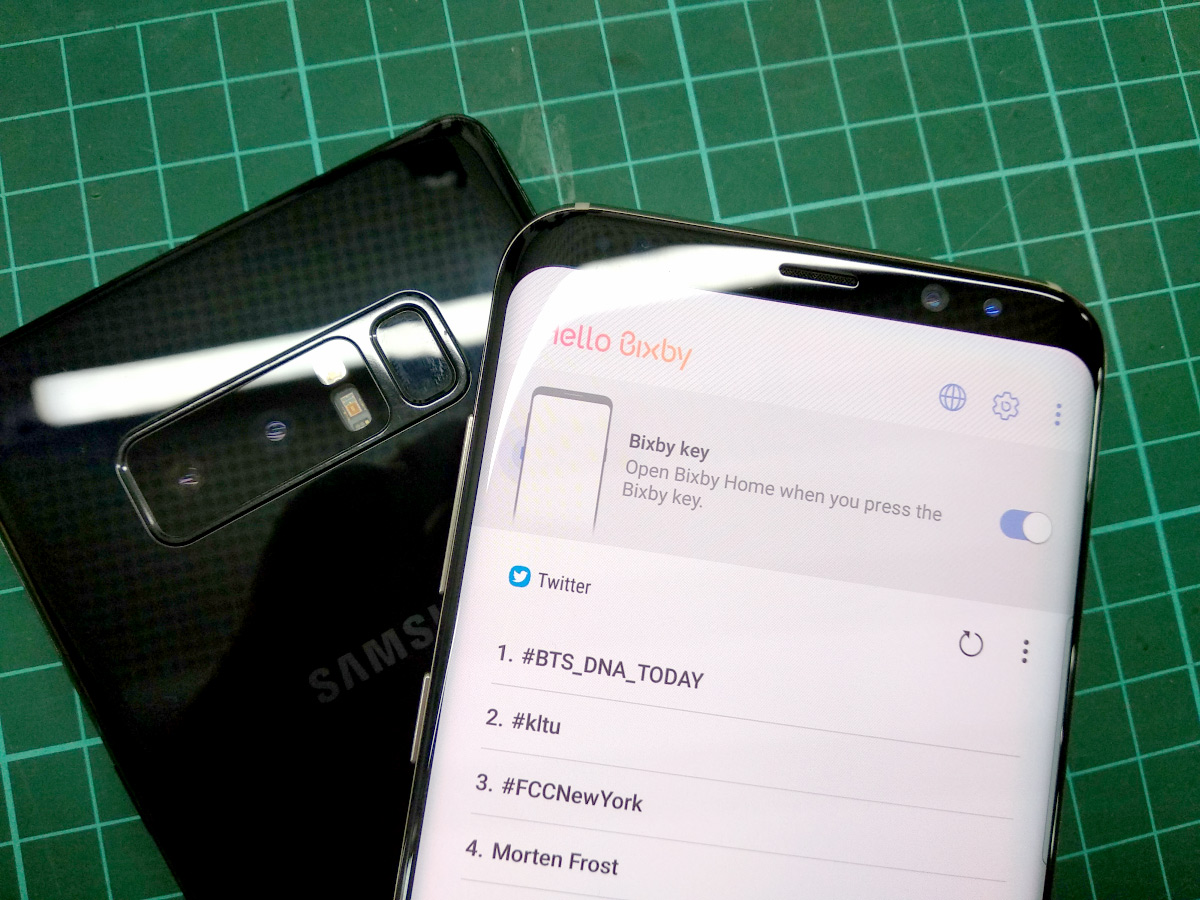
Disable Bixby Button by Samsung

Love it or hate it, Samsung’s Bixby assistant is still here to stay. The extra button found on the Galaxy S8, S8+ and Note8 makes it easier to trigger Bixby but there are those who find it annoying as it is often mistaken for the volume down button.

For those who don’t want to use this feature, Samsung has finally released an official solution. You can finally disable the one press Bixby key after receiving a software update.
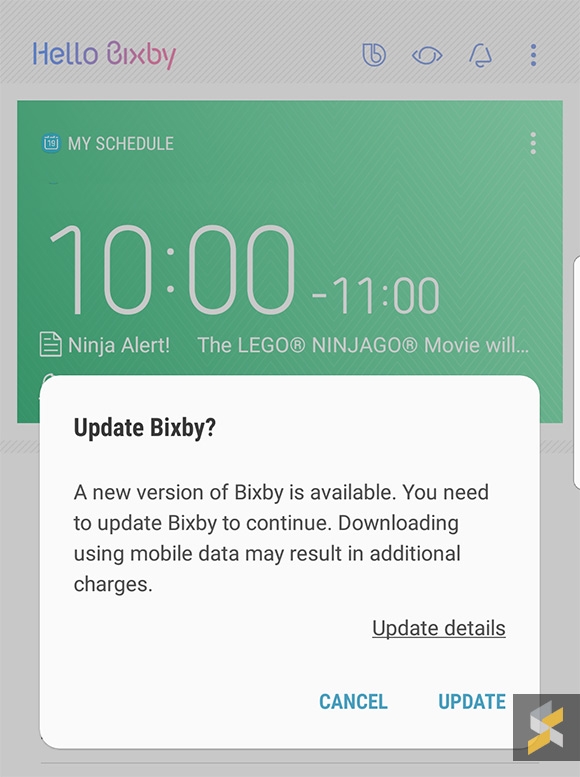
To get this feature, just launch Bixby (single press on the Bixby key) and check if you have received any software update notification on the top right of the screen. Once you’ve updated to the latest version, you should see there’s a new gear icon on the top right of the screen.
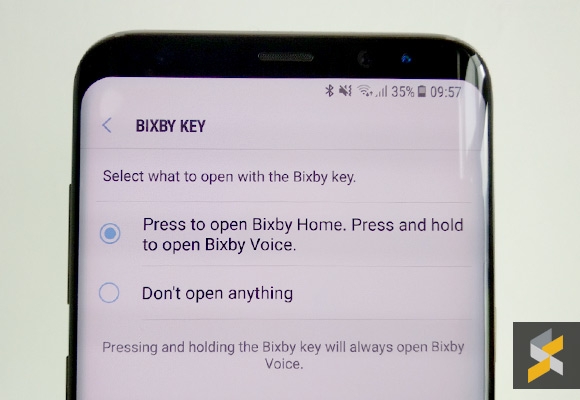
This will let you disable/enable launching Bixby when you press its dedicated button. Alternatively, you can find this setting under Bixby Settings > Bixby key.

Do note that long pressing the Bixby button will still summon the Bixby voice assistant. At least, that’s harder to trigger compared to a single press.

[ SOURCE ]

Tags: BixbyBixby buttonBixby MalaysiaDisable BixbyDisable Bixby buttonSamsungSamsung BixbySamsung Galaxy Note8 MalaysiaSamsung Galaxy S8Samsung Galaxy S8 MalaysiaSamsung Galaxy S8 Plus
Alexander Wong

Alexander Wong

POPULAR

U Mobile ULTRA5G: Fast 5G That Actually Works Indoors

May 29, 2026

If you don’t like Bixby, Samsung finally has a fix for you

September 19, 2017

Why Pay More for a Flagship? Can the Xiaomi 17T Deliver the Same Experience for Less?

May 29, 2026
Honda e:N1 Sighting - KTMB HQ - Sept 2025

You can now buy Honda e:N1 for as low as RM107k

June 17, 2026

Tesla prices to go up from July due to MITI’s CBU EV rules?

June 21, 2026

RM32 Per Line with 1TB Shared Data? Inside U Mobile’s New ULTRA Family Suite

May 7, 2026

Copyright © 2025 · SoyaCincau.com
Mind Blow Sdn Bhd (1076827-P)

  • ADVERTISE
  • DISCLAIMER

Copyright © 2026 · SoyaCincau.com – Mind Blow Sdn Bhd (1076827-P)

  • ADVERTISE
  • DISCLAIMER