• 中文版
  • BM
  • News
  • Deals
  • Reviews
    • First Impressions
    • Hands-on
    • Comparisons
  • Tech
    • Mobile
    • Computers
    • Cameras
    • Wearables
    • Audio
    • Drones
  • Telco
    • Celcom
    • Digi
    • Maxis
    • Time
    • Tune Talk
    • U Mobile
    • Unifi
    • Yes
  • Cars
  • Contribute
  • Jobs
Menu
  • 中文版
  • BM
  • News
  • Deals
  • Reviews
    • First Impressions
    • Hands-on
    • Comparisons
  • Tech
    • Mobile
    • Computers
    • Cameras
    • Wearables
    • Audio
    • Drones
  • Telco
    • Celcom
    • Digi
    • Maxis
    • Time
    • Tune Talk
    • U Mobile
    • Unifi
    • Yes
  • Cars
  • Contribute
  • Jobs
Search
  • Tech
    • News
    • Mobile
    • Computers
    • Cameras
    • Wearables
    • Audio
    • Drones
  • Telco
    • Celcom
    • Digi
    • Maxis
    • Time
    • U Mobile
    • Unifi
    • Yes
  • Reviews
    • First Impressions
    • Hands-on
    • Comparisons
  • Buyer’s Guide
  • Opinions
  • Digital Life
  • Video
  • Deals
  • How-To
  • Cars
  • Bahasa Melayu
  • EV
  • Contribute
  • Advertise
Menu
  • Tech
    • News
    • Mobile
    • Computers
    • Cameras
    • Wearables
    • Audio
    • Drones
  • Telco
    • Celcom
    • Digi
    • Maxis
    • Time
    • U Mobile
    • Unifi
    • Yes
  • Reviews
    • First Impressions
    • Hands-on
    • Comparisons
  • Buyer’s Guide
  • Opinions
  • Digital Life
  • Video
  • Deals
  • How-To
  • Cars
  • Bahasa Melayu
  • EV
  • Contribute
  • Advertise
Search
Close
Home News

Digi enables Voice over WiFi for clearer calls at poor reception areas

  • BY Alexander Wong
  • 6 June 2017
  • 1:00 pm
  • Comment
Share on FacebookShare on Twitter

Digi Voice over WiFi

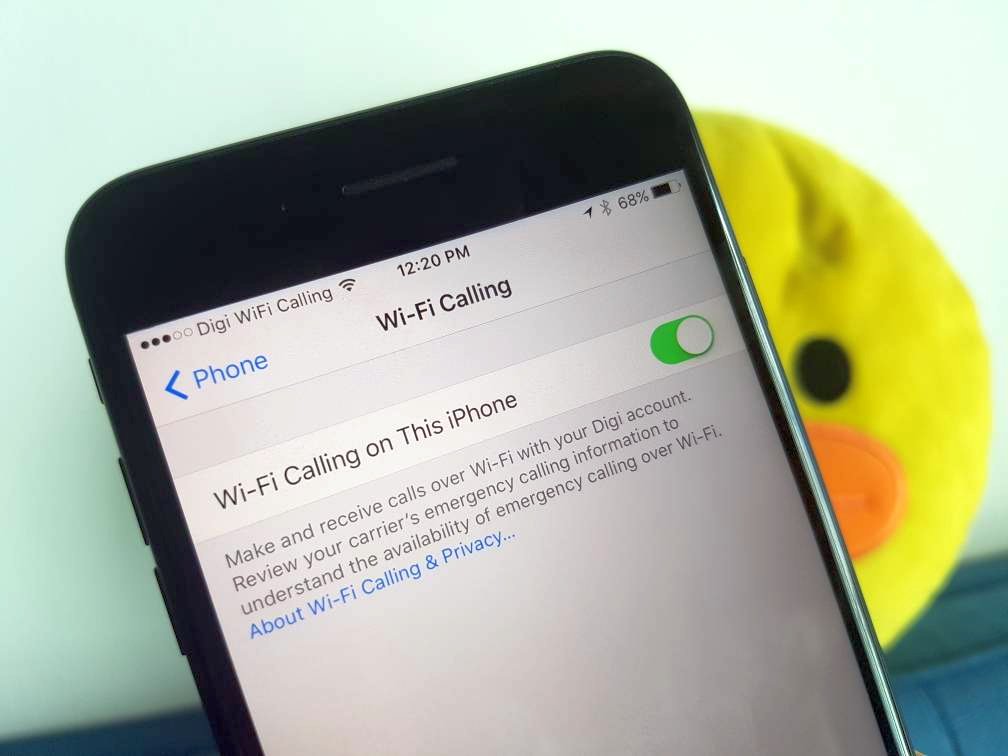
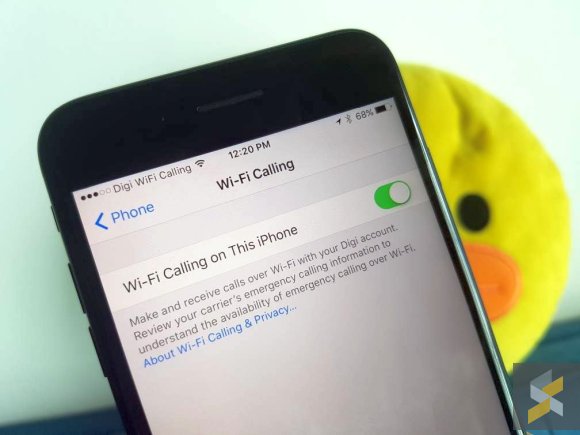
After activating VoLTE (Voice over LTE), Digi has finally enabled VoWiFi (Voice over WiFi) for its users. This new feature which is also known as WiFi Calling would allow subscribers to make and receive calls in bad reception areas as long as you’re connected to WiFi.

At the moment, it appears to be enabled for iPhone users only and it is applicable for both postpaid and prepaid subscribers. To enable WiFi Calling, just go to Settings > Phone and select WiFi Calling. Once you’ve enabled WiFi Calling, wait a couple of seconds and you should notice the operator label at the top change from “Digi” to “Digi WiFi Calling” as shown below.

If you don’t have this option, please check if you’ve received a carrier settings update. Take note that WiFi calling for Apple is currently supported on the iPhone 5C/5S and above.

While VoLTE offers HD voice calls over 4G LTE, VoWiFi is a great alternative for subscribers that can’t get a reliable signal indoors. So if you’re at an underground train station or in a building with no signal, you can still make and receive calls loud and clear as long as there’s a WiFi connection.

Thanks Vincent for the tip!

Tags: DiGiDigi VoWiFiDigi Wifi CallingiPhonevoice over wifiVoWiFiWiFi Calling
Alexander Wong

Alexander Wong

POPULAR

Digi enables Voice over WiFi for clearer calls at poor reception areas

June 6, 2017
Apple Store - The Exchange TRX

Malaysia’s second Apple Store is opening in Putrajaya?

August 8, 2026

U Mobile leads in 5G quality, coverage and experience before leaving DNB, according to Opensignal

August 10, 2026

Honor Pad 20 series coming to Malaysia: 12.1-inch display, Snapdragon 7 Gen 3 and 10,100mAh battery

August 11, 2026

Ask Maps is rolling out in Malaysia: A new Google Maps experience powered by Gemini

August 7, 2026

Sony Xperia 1 VIII arrives in Malaysia for RM6,499, comes with free WF-1000XM6 earbuds

August 5, 2026

Copyright © 2026 · SoyaCincau.com
Mind Blow Sdn Bhd (1076827-P)

  • ADVERTISE
  • DISCLAIMER

Copyright © 2026 · SoyaCincau.com – Mind Blow Sdn Bhd (1076827-P)

  • ADVERTISE
  • DISCLAIMER