• 中文版
  • BM
  • News
  • Deals
  • Reviews
    • First Impressions
    • Hands-on
    • Comparisons
  • Tech
    • Mobile
    • Computers
    • Cameras
    • Wearables
    • Audio
    • Drones
  • Telco
    • Celcom
    • Digi
    • Maxis
    • Time
    • Tune Talk
    • U Mobile
    • Unifi
    • Yes
  • Cars
  • Contribute
  • Jobs
Menu
  • 中文版
  • BM
  • News
  • Deals
  • Reviews
    • First Impressions
    • Hands-on
    • Comparisons
  • Tech
    • Mobile
    • Computers
    • Cameras
    • Wearables
    • Audio
    • Drones
  • Telco
    • Celcom
    • Digi
    • Maxis
    • Time
    • Tune Talk
    • U Mobile
    • Unifi
    • Yes
  • Cars
  • Contribute
  • Jobs
Search
  • Tech
    • News
    • Mobile
    • Computers
    • Cameras
    • Wearables
    • Audio
    • Drones
  • Telco
    • Celcom
    • Digi
    • Maxis
    • Time
    • U Mobile
    • Unifi
    • Yes
  • Reviews
    • First Impressions
    • Hands-on
    • Comparisons
  • Buyer’s Guide
  • Opinions
  • Digital Life
  • Video
  • Deals
  • How-To
  • Cars
  • Bahasa Melayu
  • EV
  • Contribute
  • Advertise
Menu
  • Tech
    • News
    • Mobile
    • Computers
    • Cameras
    • Wearables
    • Audio
    • Drones
  • Telco
    • Celcom
    • Digi
    • Maxis
    • Time
    • U Mobile
    • Unifi
    • Yes
  • Reviews
    • First Impressions
    • Hands-on
    • Comparisons
  • Buyer’s Guide
  • Opinions
  • Digital Life
  • Video
  • Deals
  • How-To
  • Cars
  • Bahasa Melayu
  • EV
  • Contribute
  • Advertise
Search
Close
Home Digital Life

Google Maps makes it easier to return to your car

  • BY Alexander Wong
  • 21 March 2017
  • 3:49 pm
  • Comment
Share on FacebookShare on Twitter

Google Maps is getting more useful with every new update. For those who always have problems locating their vehicle at the carpark, this latest version is just what you need.
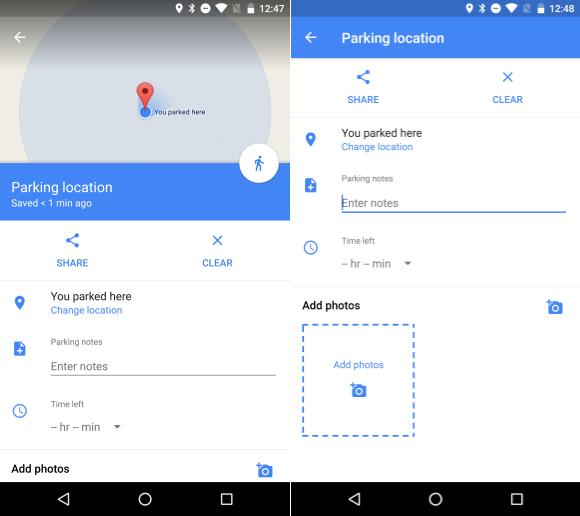
With the latest Google Maps v9.49, they are adding a couple of parking features to make it easier to locate your ride. After you end your navigation, Google allows you to save your location manually for easy reference. All you’ll need to do is to tap on the blue dot and select save your parking.
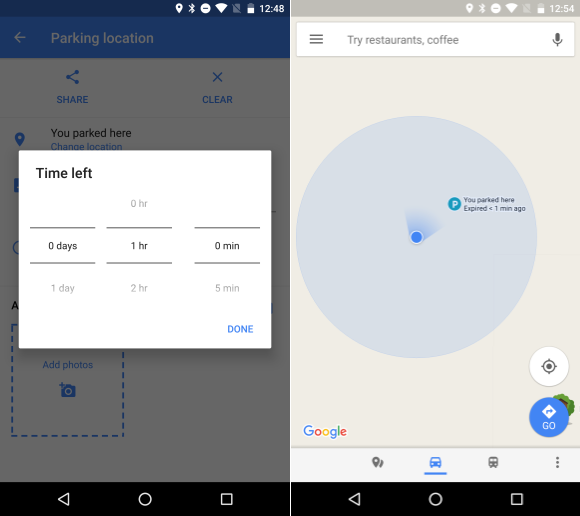
On top of that, you can add notes which are useful for multi-storey car parks and you can even add photos to guide you. If your parking is a metered one, the new update even lets you add a timer so you can keep track of your parking duration to avoid fines. Unfortunately, it doesn’t alert you but it will tell you that your parking has expired under notification.

If you can’t wait, you can try the beta app over here. Take note that this isn’t final so proceed at your own risk.

[ SOURCE ]

Tags: googleGoogle MapsGoogle Maps v9.49Google Maps v9.49 betaParkingParking AppParking Features
Alexander Wong

Alexander Wong

POPULAR

Google Maps makes it easier to return to your car

March 21, 2017
vivo V70 FE 200MP camera phone in Malaysia - Best value alternative for phones under RM2,000

High-Resolution Meets High-Endurance: A Closer Look at the vivo V70 FE

April 10, 2026

Zeekr 009 upgraded for 2026: 900V architecture, 912hp, swiveling seats and 10-80% charge in 10 minutes

April 26, 2026
Apple Tap To Pay on iPhone Malaysia

Apple’s Tap to Pay on iPhone is now in Malaysia

April 22, 2026

Can you and your family enjoy a 100% electric drive without ever plugging in?

April 23, 2026

Huawei MatePad Mini: Compact tablet with 8.8″ OLED PaperMatte Display, now available for RM2,199

April 22, 2026

Copyright © 2025 · SoyaCincau.com
Mind Blow Sdn Bhd (1076827-P)

  • ADVERTISE
  • DISCLAIMER

Copyright © 2026 · SoyaCincau.com – Mind Blow Sdn Bhd (1076827-P)

  • ADVERTISE
  • DISCLAIMER