• 中文版
  • BM
  • News
  • Deals
  • Reviews
    • First Impressions
    • Hands-on
    • Comparisons
  • Tech
    • Mobile
    • Computers
    • Cameras
    • Wearables
    • Audio
    • Drones
  • Telco
    • Celcom
    • Digi
    • Maxis
    • Time
    • Tune Talk
    • U Mobile
    • Unifi
    • Yes
  • Cars
  • Contribute
  • Jobs
Menu
  • 中文版
  • BM
  • News
  • Deals
  • Reviews
    • First Impressions
    • Hands-on
    • Comparisons
  • Tech
    • Mobile
    • Computers
    • Cameras
    • Wearables
    • Audio
    • Drones
  • Telco
    • Celcom
    • Digi
    • Maxis
    • Time
    • Tune Talk
    • U Mobile
    • Unifi
    • Yes
  • Cars
  • Contribute
  • Jobs
Search
  • Tech
    • News
    • Mobile
    • Computers
    • Cameras
    • Wearables
    • Audio
    • Drones
  • Telco
    • Celcom
    • Digi
    • Maxis
    • Time
    • U Mobile
    • Unifi
    • Yes
  • Reviews
    • First Impressions
    • Hands-on
    • Comparisons
  • Buyer’s Guide
  • Opinions
  • Digital Life
  • Video
  • Deals
  • How-To
  • Cars
  • Bahasa Melayu
  • EV
  • Contribute
  • Advertise
Menu
  • Tech
    • News
    • Mobile
    • Computers
    • Cameras
    • Wearables
    • Audio
    • Drones
  • Telco
    • Celcom
    • Digi
    • Maxis
    • Time
    • U Mobile
    • Unifi
    • Yes
  • Reviews
    • First Impressions
    • Hands-on
    • Comparisons
  • Buyer’s Guide
  • Opinions
  • Digital Life
  • Video
  • Deals
  • How-To
  • Cars
  • Bahasa Melayu
  • EV
  • Contribute
  • Advertise
Search
Close
Home Digital Life

Can’t open Messages on your iPhone? Just summon Siri for help

  • BY soyacincau
  • 29 May 2015
  • 3:40 pm
  • Comment
Share on FacebookShare on Twitter

150529-apple-responds-message-ios-iphone-unicode-bug

Currently there’s a bug with iOS Messages where a single message is able to crash the iPhone, iPad and even the Apple Watch. This is due to its difficulty to render specific unicodes which results a crash or a reboot.

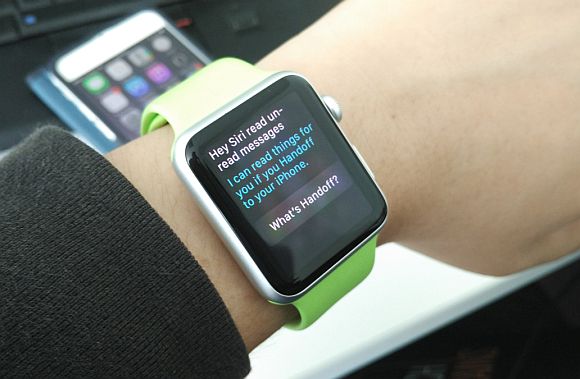
Apple has acknowledged the issue and they are working on a new software update. In the time being if you’ve received such message and couldn’t open Message properly, Apple wants you to ask Siri for help.

To be able to re-open Messages, Apple recommends the following steps:

1. Ask Siri to “read unread messages.”
2. Use Siri to reply to the malicious message. After you reply, you’ll be able to open Messages again.
3. In Messages, swipe left to delete the entire thread. Or tap and hold the malicious message, tap More, and delete the message from the thread.

So far there’s no timeline on the new iOS software update but if you want to prevent further random crashes, another temporary remedy is to disable lock scren notifications for messages.


[ SOURCE, VIA ]

Tags: AppleApple WatchCrashiMessageiOS BugiPadiPhoneiPhone 6iPhone 6 PlusSiriUnicode Bug
soyacincau

soyacincau

POPULAR

Tune Talk introduces #TheRealTuney campaign, highlights focus on all-day Ultra Fast 5G Connectivity for 2026

January 23, 2026

Is your TNG eWallet suspended? Here’s what you should do

January 27, 2026

Can’t open Messages on your iPhone? Just summon Siri for help

May 29, 2015

Xiaomi TV Stick 4K Second Gen: Google TV on a stick, priced at RM219

February 19, 2026

Astro drops HBO channels after nearly 30 years, introduces 4 new channels under Astro One Epic Pack

February 16, 2026

GWM Wey G9 PHEV: The latest Alphard fighter in Malaysia, locally assembled in Melaka

February 19, 2026

Copyright © 2025 · SoyaCincau.com
Mind Blow Sdn Bhd (1076827-P)

  • ADVERTISE
  • DISCLAIMER

Copyright © 2026 · SoyaCincau.com – Mind Blow Sdn Bhd (1076827-P)

  • ADVERTISE
  • DISCLAIMER