• 中文版
  • BM
  • News
  • Deals
  • Reviews
    • First Impressions
    • Hands-on
    • Comparisons
  • Tech
    • Mobile
    • Computers
    • Cameras
    • Wearables
    • Audio
    • Drones
  • Telco
    • Celcom
    • Digi
    • Maxis
    • Time
    • Tune Talk
    • U Mobile
    • Unifi
    • Yes
  • Cars
  • Contribute
  • Jobs
Menu
  • 中文版
  • BM
  • News
  • Deals
  • Reviews
    • First Impressions
    • Hands-on
    • Comparisons
  • Tech
    • Mobile
    • Computers
    • Cameras
    • Wearables
    • Audio
    • Drones
  • Telco
    • Celcom
    • Digi
    • Maxis
    • Time
    • Tune Talk
    • U Mobile
    • Unifi
    • Yes
  • Cars
  • Contribute
  • Jobs
Search
  • Tech
    • News
    • Mobile
    • Computers
    • Cameras
    • Wearables
    • Audio
    • Drones
  • Telco
    • Celcom
    • Digi
    • Maxis
    • Time
    • U Mobile
    • Unifi
    • Yes
  • Reviews
    • First Impressions
    • Hands-on
    • Comparisons
  • Buyer’s Guide
  • Opinions
  • Digital Life
  • Video
  • Deals
  • How-To
  • Cars
  • Bahasa Melayu
  • EV
  • Contribute
  • Advertise
Menu
  • Tech
    • News
    • Mobile
    • Computers
    • Cameras
    • Wearables
    • Audio
    • Drones
  • Telco
    • Celcom
    • Digi
    • Maxis
    • Time
    • U Mobile
    • Unifi
    • Yes
  • Reviews
    • First Impressions
    • Hands-on
    • Comparisons
  • Buyer’s Guide
  • Opinions
  • Digital Life
  • Video
  • Deals
  • How-To
  • Cars
  • Bahasa Melayu
  • EV
  • Contribute
  • Advertise
Search
Close
Home News

A single Message can crash your iPhone, iPad and your Apple Watch. Here’s how to prevent it temporarily

  • BY soyacincau
  • 27 May 2015
  • 11:18 pm
  • Comment
Share on FacebookShare on Twitter

150527-iphone-message

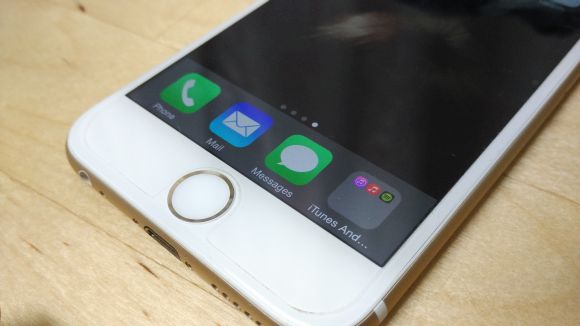
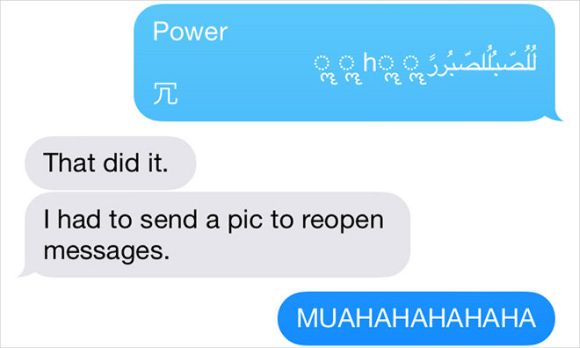
Apparently there’s a little iOS bug that could cause any iPhone, iPad and even the Apple Watch to crash or reboot. The cause? A specific line of unicode that looks like random mix of arabic and other characters. This is due to iOS difficulty of rendering them on the notification screen and pranksters are using this to annoy iOS users until an official fix is released.
150527-ios-unicode-bug

To prevent yourself from being a repeat victim, the folks at iMore had shared a few remedial steps which you can take right now. Since the bug is triggered automatically from the notification screen, the obvious fix is to disable message notifications from appearing.

For iPhone and iPad users, you can do this by heading over to Settings > Notifications > Messages, and disable “Show on Lock Screen”. The Apple Watch isn’t spared either, so you would need to do the same from the Apple Watch App under Notifications > Messages, and disable “Show Alerts”. Chances are, not many would be affected but who knows if you have that one friend who would take this opportunity to annoy you to the max.

If you do receive the troublesome line of unicode, you won’t be able to load the Messages app until you receive a fresh new message. To do this, you can get a friend to send you a clean message or send a photo to yourself from Photos.


[ SOURCE 2 ]

Tags: AppleApple WatchCrashiMessageiOS BugiPadiPhoneiPhone 6iPhone 6 PlusUnicode Bug
soyacincau

soyacincau

POPULAR

This Phone Has a 10,000mAh BlueVolt Battery That Can Power Your Other Devices | vivo V80 Lite 5G

September 4, 2026

A single Message can crash your iPhone, iPad and your Apple Watch. Here’s how to prevent it temporarily

May 27, 2015
Screenshot

iPhone 18 Pro Malaysia: Same starting price from RM5,499, pre-order starts 12 Sept

September 10, 2026

More Data, More Value with UNI5G Postpaid: Enjoy 500GB FREE Data!

August 20, 2026

Looking for Massive 5G Data and Built-In Overseas Roaming? Here Is What U Mobile’s ULTRA Lineup Offers

August 20, 2026

iPhone Duo: Apple’s first foldable coming to Malaysia on 23 Oct, priced from RM9,499

September 10, 2026

Copyright © 2026 · SoyaCincau.com
Mind Blow Sdn Bhd (1076827-P)

  • ADVERTISE
  • DISCLAIMER

Copyright © 2026 · SoyaCincau.com – Mind Blow Sdn Bhd (1076827-P)

  • ADVERTISE
  • DISCLAIMER