• 中文版
  • BM
  • News
  • Deals
  • Reviews
    • First Impressions
    • Hands-on
    • Comparisons
  • Tech
    • Mobile
    • Computers
    • Cameras
    • Wearables
    • Audio
    • Drones
  • Telco
    • Celcom
    • Digi
    • Maxis
    • Time
    • Tune Talk
    • U Mobile
    • Unifi
    • Yes
  • Cars
  • Contribute
  • Jobs
Menu
  • 中文版
  • BM
  • News
  • Deals
  • Reviews
    • First Impressions
    • Hands-on
    • Comparisons
  • Tech
    • Mobile
    • Computers
    • Cameras
    • Wearables
    • Audio
    • Drones
  • Telco
    • Celcom
    • Digi
    • Maxis
    • Time
    • Tune Talk
    • U Mobile
    • Unifi
    • Yes
  • Cars
  • Contribute
  • Jobs
Search
  • Tech
    • News
    • Mobile
    • Computers
    • Cameras
    • Wearables
    • Audio
    • Drones
  • Telco
    • Celcom
    • Digi
    • Maxis
    • Time
    • U Mobile
    • Unifi
    • Yes
  • Reviews
    • First Impressions
    • Hands-on
    • Comparisons
  • Buyer’s Guide
  • Opinions
  • Digital Life
  • Video
  • Deals
  • How-To
  • Cars
  • Bahasa Melayu
  • EV
  • Contribute
  • Advertise
Menu
  • Tech
    • News
    • Mobile
    • Computers
    • Cameras
    • Wearables
    • Audio
    • Drones
  • Telco
    • Celcom
    • Digi
    • Maxis
    • Time
    • U Mobile
    • Unifi
    • Yes
  • Reviews
    • First Impressions
    • Hands-on
    • Comparisons
  • Buyer’s Guide
  • Opinions
  • Digital Life
  • Video
  • Deals
  • How-To
  • Cars
  • Bahasa Melayu
  • EV
  • Contribute
  • Advertise
Search
Close
Home Digital Life

Latest WhatsApp with Google Drive Backup is now available for Android

  • BY soyacincau
  • 20 April 2015
  • 8:58 am
  • Comment
Share on FacebookShare on Twitter

150420-whatsapp-android-backup-google-drive-01

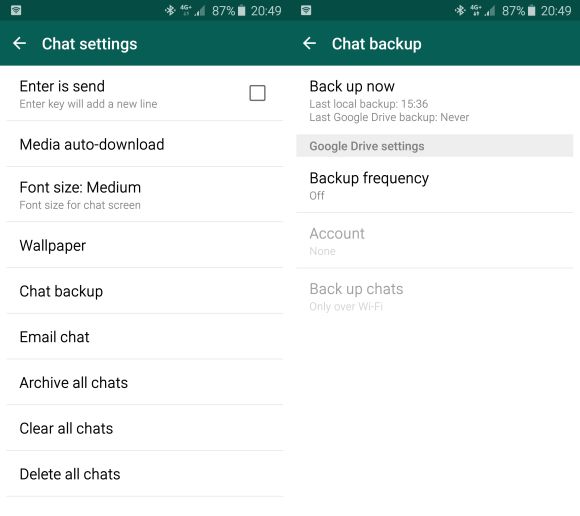
After introducing WhatsApp for Web and WhatsApp Voice, their upcoming feature would be good news for those that switch phones often. If you’re tired of manually copying WhatsApp database files, their new version now supports direct cloud backup with Google Drive integration.

At time of writing, it isn’t available officially on our Google Play Store but you may download the latest WhatsApp version 2.12.45 as an APK download.
150420-whatsapp-android-backup-google-drive-02

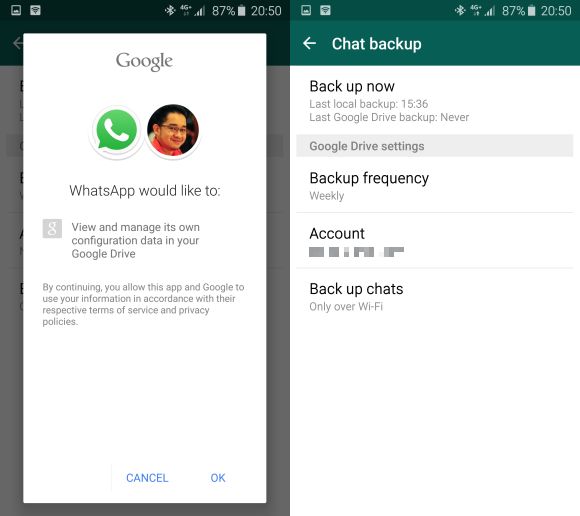
After installing the latest version, you’ll notice a new Material Design UI and you can find the cloud storage backup feature under Settings > Chat Settings > Chat Backup. From here, you’ll need to associate a Google Drive account to WhatsApp. If you’re afraid of consuming your precious mobile data, you’re also able to set to backup over WiFi only.

In terms of backup, WhatsApp would upload incremental updates after its initial upload. This means it will only backup subsequent bite size changes instead of the entire backup file periodically. You are able to set the frequency of the backup from daily, weekly or monthly. Only chat conversations and photos are saved, so you’ll still need to backup videos the old fashion way. The next time you install WhatsApp on a fresh smart phone, you’ll be asked if you have a Google Drive account to restore.

If you want to try it out now, you can download the latest APK file here.

[ SOURCE, VIA ]

Tags: BackupGoogle DriveInstant MessagingWhatsappWhatsApp BackupWhatsApp Cloud StorageWhatsApp for AndroidWhatsApp Google Drive Backup
soyacincau

soyacincau

POPULAR

Latest WhatsApp with Google Drive Backup is now available for Android

April 20, 2015

How Do You Want to Pay for Your iPhone 18 Pro? 3 Ways to Get More Value

September 18, 2026

Here is how to turn your unused GrabCoins balance into real discounts today

August 13, 2026

Proton to launch 2 new cars by end of 2026: Saga Cross and e.MAS EV sedan?

October 5, 2026

U Mobile introduces SIM-based Phone Number Verification, lets apps verify your number securely without SMS OTP

October 9, 2026

BOMBA: JB City Square car park fire did not start from an EV

October 7, 2026

Copyright © 2026 · SoyaCincau.com
Mind Blow Sdn Bhd (1076827-P)

  • ADVERTISE
  • DISCLAIMER

Copyright © 2026 · SoyaCincau.com – Mind Blow Sdn Bhd (1076827-P)

  • ADVERTISE
  • DISCLAIMER