• 中文版
  • BM
  • News
  • Deals
  • Reviews
    • First Impressions
    • Hands-on
    • Comparisons
  • Tech
    • Mobile
    • Computers
    • Cameras
    • Wearables
    • Audio
    • Drones
  • Telco
    • Celcom
    • Digi
    • Maxis
    • Time
    • Tune Talk
    • U Mobile
    • Unifi
    • Yes
  • Cars
  • Contribute
  • Jobs
Menu
  • 中文版
  • BM
  • News
  • Deals
  • Reviews
    • First Impressions
    • Hands-on
    • Comparisons
  • Tech
    • Mobile
    • Computers
    • Cameras
    • Wearables
    • Audio
    • Drones
  • Telco
    • Celcom
    • Digi
    • Maxis
    • Time
    • Tune Talk
    • U Mobile
    • Unifi
    • Yes
  • Cars
  • Contribute
  • Jobs
Search
  • Tech
    • News
    • Mobile
    • Computers
    • Cameras
    • Wearables
    • Audio
    • Drones
  • Telco
    • Celcom
    • Digi
    • Maxis
    • Time
    • U Mobile
    • Unifi
    • Yes
  • Reviews
    • First Impressions
    • Hands-on
    • Comparisons
  • Buyer’s Guide
  • Opinions
  • Digital Life
  • Video
  • Deals
  • How-To
  • Cars
  • Bahasa Melayu
  • EV
  • Contribute
  • Advertise
Menu
  • Tech
    • News
    • Mobile
    • Computers
    • Cameras
    • Wearables
    • Audio
    • Drones
  • Telco
    • Celcom
    • Digi
    • Maxis
    • Time
    • U Mobile
    • Unifi
    • Yes
  • Reviews
    • First Impressions
    • Hands-on
    • Comparisons
  • Buyer’s Guide
  • Opinions
  • Digital Life
  • Video
  • Deals
  • How-To
  • Cars
  • Bahasa Melayu
  • EV
  • Contribute
  • Advertise
Search
Close
Home News

Konami code your lock screen, if you own an S6

  • BY Sirap Bandung
  • 13 April 2015
  • 12:44 pm
  • Comment
Share on FacebookShare on Twitter

150413-samsung-galaxy-s6-direction-lock

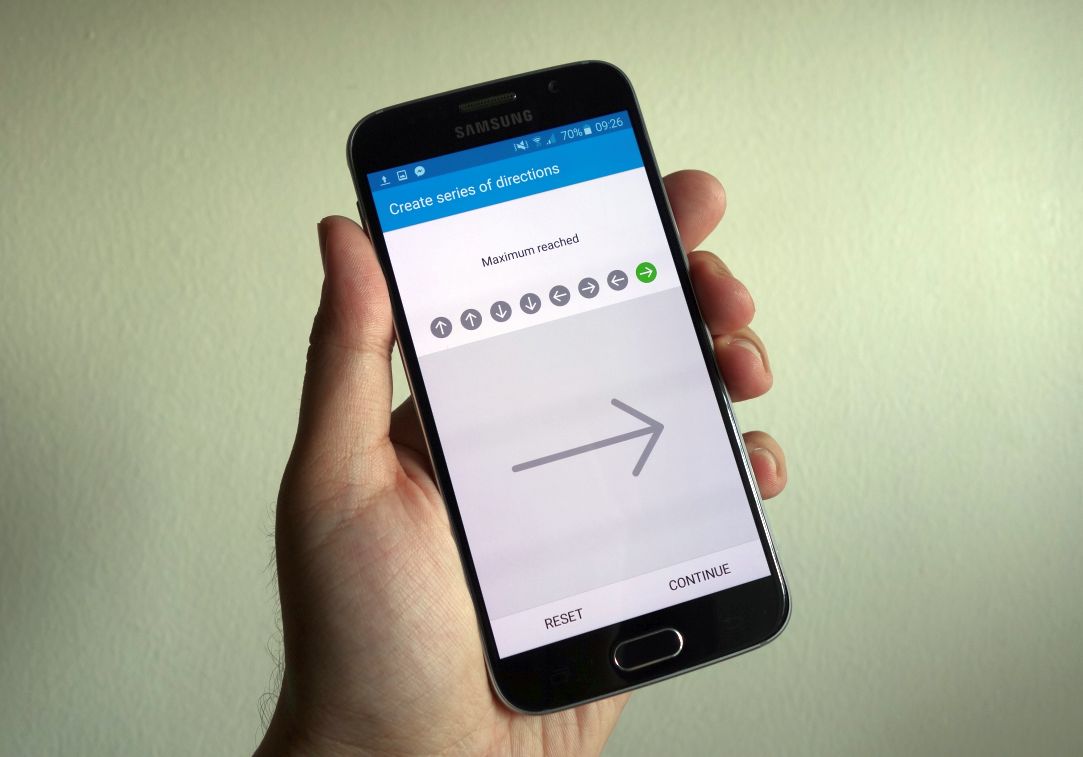
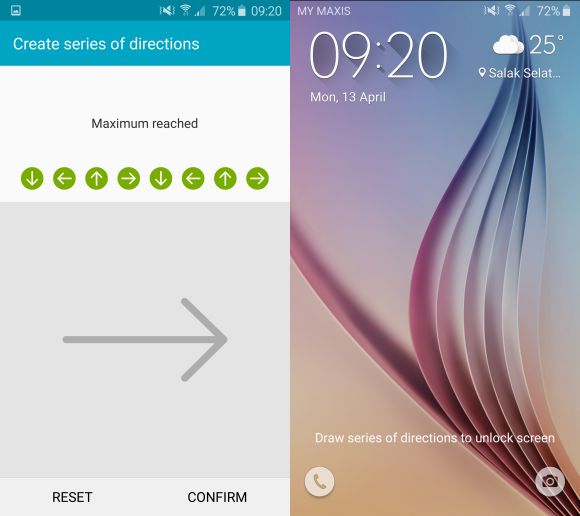
If Samsung’s fingerprint scanner on the Samsung Galaxy S6 and S6 edge isn’t your thing, then you have just been given the option to employ the Konami code (or any of your favourite swiping motions – up, down, left, right) as a means to unlock your device.

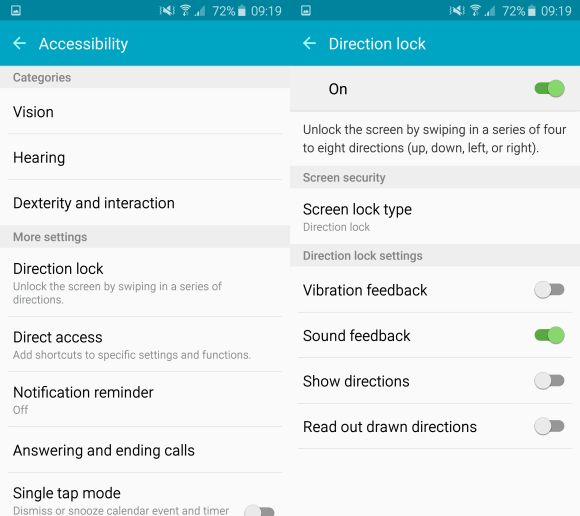
The new security feature is called Direction Lock, and it lets you swipe from four to eight times to unlock your phone. It’s pretty convenient (and not to mention, kinda fun) way to keep your phone locked as well as making it a bit more difficult to accidentally unlock in your pocket. But we have heard that the new addition still has it’s kinks, as it’s still slower than fingerprint unlock mode and LG’s Knock Code.
150413-samsung-galaxy-s6-direction-lock-3

You can access the Direction Lock from the Settings >> Accessibility menu on both your Galaxy S6 and S6 edge, followed by a quick setup to get it going. And don’t worry if you forgot your code after you’ve inputted it, there’s a backup pin in-case you forgot! It’s something most S6 and S6 edge users should try at least once, after all who wouldn’t like to karate their phone open with those fighting game moves.
150413-samsung-galaxy-s6-direction-lock-2

Samsung Galaxy S6 Direction Lock Video

[SOURCE]

Tags: Androiddirection lockSamsungSamsung Galaxy S6Samsung Galaxy S6 EdgeSamsung Galaxy S6 edge MalaysiaSamsung Galaxy S6 Malaysia
Sirap Bandung

Sirap Bandung

[email protected]

POPULAR

Upgraded To a New Phone? Cool. But When Was the Last Time you Upgraded your Shaver?

November 10, 2025

5 Reasons Every Home Should Have a Smart Security System

November 11, 2025

Solar ATAP: The new solar programme for consumers will only start in 2026

December 2, 2025

Konami code your lock screen, if you own an S6

April 13, 2015
Perodua QV-E EV

Perodua QV-E is now official: Electric sportback with 201hp, 445km NEDC range, priced at RM80k not inclusive of battery subscription

December 1, 2025

GrabRewards is now GrabCoins: Now with even more ways to earn and save

November 17, 2025

Copyright © 2025 · SoyaCincau.com
Mind Blow Sdn Bhd (1076827-P)

  • ADVERTISE
  • DISCLAIMER

Copyright © 2025 · SoyaCincau.com – Mind Blow Sdn Bhd (1076827-P)

  • ADVERTISE
  • DISCLAIMER