• 中文版
  • BM
  • News
  • Deals
  • Reviews
    • First Impressions
    • Hands-on
    • Comparisons
  • Tech
    • Mobile
    • Computers
    • Cameras
    • Wearables
    • Audio
    • Drones
  • Telco
    • Celcom
    • Digi
    • Maxis
    • Time
    • Tune Talk
    • U Mobile
    • Unifi
    • Yes
  • Cars
  • Contribute
  • Jobs
Menu
  • 中文版
  • BM
  • News
  • Deals
  • Reviews
    • First Impressions
    • Hands-on
    • Comparisons
  • Tech
    • Mobile
    • Computers
    • Cameras
    • Wearables
    • Audio
    • Drones
  • Telco
    • Celcom
    • Digi
    • Maxis
    • Time
    • Tune Talk
    • U Mobile
    • Unifi
    • Yes
  • Cars
  • Contribute
  • Jobs
Search
  • Tech
    • News
    • Mobile
    • Computers
    • Cameras
    • Wearables
    • Audio
    • Drones
  • Telco
    • Celcom
    • Digi
    • Maxis
    • Time
    • U Mobile
    • Unifi
    • Yes
  • Reviews
    • First Impressions
    • Hands-on
    • Comparisons
  • Buyer’s Guide
  • Opinions
  • Digital Life
  • Video
  • Deals
  • How-To
  • Cars
  • Bahasa Melayu
  • EV
  • Contribute
  • Advertise
Menu
  • Tech
    • News
    • Mobile
    • Computers
    • Cameras
    • Wearables
    • Audio
    • Drones
  • Telco
    • Celcom
    • Digi
    • Maxis
    • Time
    • U Mobile
    • Unifi
    • Yes
  • Reviews
    • First Impressions
    • Hands-on
    • Comparisons
  • Buyer’s Guide
  • Opinions
  • Digital Life
  • Video
  • Deals
  • How-To
  • Cars
  • Bahasa Melayu
  • EV
  • Contribute
  • Advertise
Search
Close
Home Digital Life

SwiftKey finally supports Chinese Input on Android

  • BY soyacincau
  • 30 January 2015
  • 3:48 pm
  • Comment
Share on FacebookShare on Twitter

150130-swiftkey-chinese-support-available

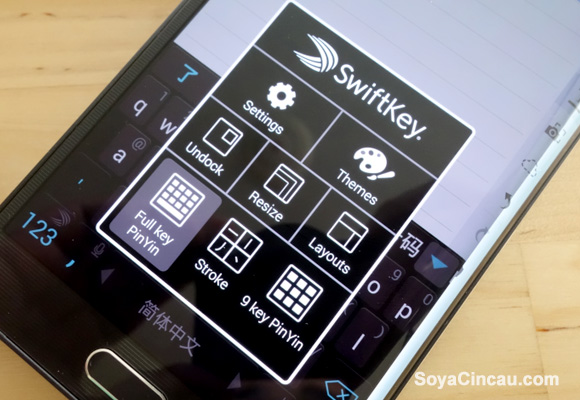
SwiftKey’s Chinese Input is finally out of Beta and it is now available for Android users. With the latest update, you are able to add Simplified Chinese or Traditional Chinese for either Taiwan and Hongkong. For quicker typing, the Chinese version also gets its famed predictive input where it studies your typing patterns and will try to predict the next word that you’re going to type next.

Pinyin (romanised spelling) is only available for simplified Chinese. To type even faster, you can just tap on the first romanised character of each word. So if you want to type 你好吗 (how are you?), you can just type “nhm” instead of “nihaoma”. If you’re a sloppy typist, it recognises typos and will autocorrect them for you. This also works with names and it gets smarter each time you use it.

To download, head over to the Google Play Store.

[ SOURCE, VIA ]

Tags: AndroidAndroid KeyboardChinese InputSwiftKeySwiftKey AndroidSwiftKey Chinese KeyboardSwiftKey Chinese Language
soyacincau

soyacincau

POPULAR

SwiftKey finally supports Chinese Input on Android

January 30, 2015

Malaysia to review EV policy amid concerns over strict rules affecting BYD CKD operations in Tanjung Malim

April 17, 2026
TQ Wuling Bingo EV Malaysia

TQ Wuling Bingo is now available for rental in Malaysia via GoEV

April 14, 2026

Malaysia’s EV charging network is still broken? Raya trip almost turns into a disaster | Let’s Talk About #139

April 15, 2026

Honor 600 series makes its debut in Malaysia on 22 April, featuring 200MP camera with AI Image to Video 2.0

April 13, 2026

Malaysia’s EV policy and the BYD debate: Are affordable EVs at risk? | Let’s Talk About #140

April 19, 2026

Copyright © 2025 · SoyaCincau.com
Mind Blow Sdn Bhd (1076827-P)

  • ADVERTISE
  • DISCLAIMER

Copyright © 2026 · SoyaCincau.com – Mind Blow Sdn Bhd (1076827-P)

  • ADVERTISE
  • DISCLAIMER