• 中文版
  • BM
  • News
  • Deals
  • Reviews
    • First Impressions
    • Hands-on
    • Comparisons
  • Tech
    • Mobile
    • Computers
    • Cameras
    • Wearables
    • Audio
    • Drones
  • Telco
    • Celcom
    • Digi
    • Maxis
    • Time
    • Tune Talk
    • U Mobile
    • Unifi
    • Yes
  • Cars
  • Contribute
  • Jobs
Menu
  • 中文版
  • BM
  • News
  • Deals
  • Reviews
    • First Impressions
    • Hands-on
    • Comparisons
  • Tech
    • Mobile
    • Computers
    • Cameras
    • Wearables
    • Audio
    • Drones
  • Telco
    • Celcom
    • Digi
    • Maxis
    • Time
    • Tune Talk
    • U Mobile
    • Unifi
    • Yes
  • Cars
  • Contribute
  • Jobs
Search
  • Tech
    • News
    • Mobile
    • Computers
    • Cameras
    • Wearables
    • Audio
    • Drones
  • Telco
    • Celcom
    • Digi
    • Maxis
    • Time
    • U Mobile
    • Unifi
    • Yes
  • Reviews
    • First Impressions
    • Hands-on
    • Comparisons
  • Buyer’s Guide
  • Opinions
  • Digital Life
  • Video
  • Deals
  • How-To
  • Cars
  • Bahasa Melayu
  • EV
  • Contribute
  • Advertise
Menu
  • Tech
    • News
    • Mobile
    • Computers
    • Cameras
    • Wearables
    • Audio
    • Drones
  • Telco
    • Celcom
    • Digi
    • Maxis
    • Time
    • U Mobile
    • Unifi
    • Yes
  • Reviews
    • First Impressions
    • Hands-on
    • Comparisons
  • Buyer’s Guide
  • Opinions
  • Digital Life
  • Video
  • Deals
  • How-To
  • Cars
  • Bahasa Melayu
  • EV
  • Contribute
  • Advertise
Search
Close
Home Digital Life

Instagram lets you create Hyperlapse videos easily on iOS

  • BY soyacincau
  • 27 August 2014
  • 10:08 am
  • Comment
Share on FacebookShare on Twitter

140827-instagram-hyperlapse-download

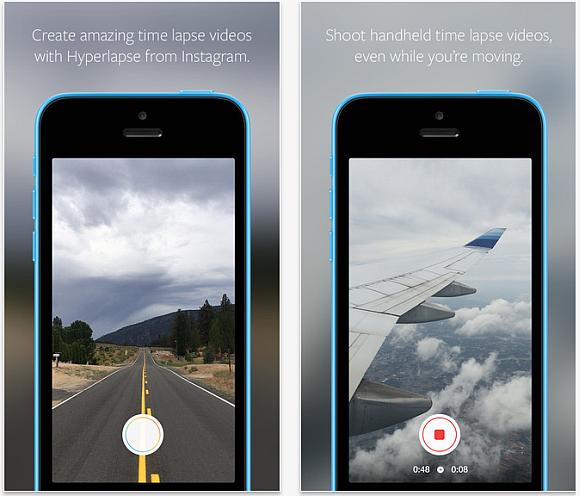
Instagram is taking social video creation to the next level with the introduction of its hyperlapse feature. It lets you create high quality time lapse video that’s stabilised, as if it was taken with a secured mount. So anyone can create awesome videos without the need of specialised equipment.

To make things easy, the Hyperlapse app does not require any account sign in and you can start recording right away. Just record several video snippets by tapping to start and tap again to stop. Once you’re done, just select the playback speed ranging from 1x to 12x.

It is available now for iOS devices and you can download Hyperlapse from Instagram over here. To give you a better idea on how it looks like, check out the official sample video after the break.

Introducing Hyperlapse from Instagram from Instagram on Vimeo.
140827-instagram-hyperlapse-download-2

140827-instagram-hyperlapse-download-3

[ SOURCE, VIA ]

Tags: hyperlapseHyperlapse from InstagramInstagramInstagram HyperlapseSocialTimelapse
soyacincau

soyacincau

POPULAR

Instagram lets you create Hyperlapse videos easily on iOS

August 27, 2014

Is This 509g Device the Lightest AI Productivity Tablet for Work and Study?

August 18, 2026

Poco F9 Pro and F9 Ultra launching in Malaysia on 1 September, here’s what to expect

August 25, 2026

Vivo V80 Lite 5G with 10,000mAh battery is launching in Malaysia on 3 Sept

August 23, 2026

We just found out Grab has a Women Only Ride option: Here’s what you girls need to know

August 25, 2026

Mac Mini 2026 Malaysia: M6 and M5 Pro, priced from RM3,799

August 26, 2026

Copyright © 2026 · SoyaCincau.com
Mind Blow Sdn Bhd (1076827-P)

  • ADVERTISE
  • DISCLAIMER

Copyright © 2026 · SoyaCincau.com – Mind Blow Sdn Bhd (1076827-P)

  • ADVERTISE
  • DISCLAIMER