• 中文版
  • BM
  • News
  • Deals
  • Reviews
    • First Impressions
    • Hands-on
    • Comparisons
  • Tech
    • Mobile
    • Computers
    • Cameras
    • Wearables
    • Audio
    • Drones
  • Telco
    • Celcom
    • Digi
    • Maxis
    • Time
    • Tune Talk
    • U Mobile
    • Unifi
    • Yes
  • Cars
  • Contribute
  • Jobs
Menu
  • 中文版
  • BM
  • News
  • Deals
  • Reviews
    • First Impressions
    • Hands-on
    • Comparisons
  • Tech
    • Mobile
    • Computers
    • Cameras
    • Wearables
    • Audio
    • Drones
  • Telco
    • Celcom
    • Digi
    • Maxis
    • Time
    • Tune Talk
    • U Mobile
    • Unifi
    • Yes
  • Cars
  • Contribute
  • Jobs
Search
  • Tech
    • News
    • Mobile
    • Computers
    • Cameras
    • Wearables
    • Audio
    • Drones
  • Telco
    • Celcom
    • Digi
    • Maxis
    • Time
    • U Mobile
    • Unifi
    • Yes
  • Reviews
    • First Impressions
    • Hands-on
    • Comparisons
  • Buyer’s Guide
  • Opinions
  • Digital Life
  • Video
  • Deals
  • How-To
  • Cars
  • Bahasa Melayu
  • EV
  • Contribute
  • Advertise
Menu
  • Tech
    • News
    • Mobile
    • Computers
    • Cameras
    • Wearables
    • Audio
    • Drones
  • Telco
    • Celcom
    • Digi
    • Maxis
    • Time
    • U Mobile
    • Unifi
    • Yes
  • Reviews
    • First Impressions
    • Hands-on
    • Comparisons
  • Buyer’s Guide
  • Opinions
  • Digital Life
  • Video
  • Deals
  • How-To
  • Cars
  • Bahasa Melayu
  • EV
  • Contribute
  • Advertise
Search
Close
Home Digital Life

Chrome Remote Desktop now lets you access desktop remotely from your mobile

  • BY soyacincau
  • 17 April 2014
  • 2:09 pm
  • Comment
Share on FacebookShare on Twitter

140417-chrome-remote-desktop-mobile-app

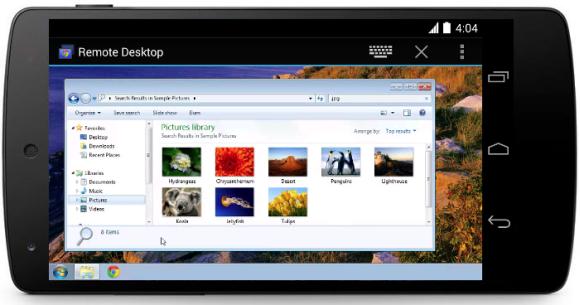
Cloud storage allows ease of sharing of files across desktop and mobile devices. But what if you left something behind on your desktop computer and you need to retrieve it? Now Google has released a Free Chrome Remote Desktop app for Android which lets you access your desktop anywhere from your smart phone or tablet.

To get started, you would need to install the Google Remote Desktop app on your computer. Then on your Android smart phone or tablet, you would then need to install the Remote Desktop Mobile app.

Setting up is pretty easy and you can secure your remote access with a pin number. This would work great if you have a high resolution tablet like the Galaxy NotePro 12.2. At the moment, the mobile app is only available on Android, while the iOS version is said to be on the way later this year.


[ SOURCE, VIA ]

Tags: AndroidChrome BrowserChrome Remote DesktopGoogle ChromeRDPRemote AccessRemote Desktop
soyacincau

soyacincau

POPULAR

Chrome Remote Desktop now lets you access desktop remotely from your mobile

April 17, 2014
Source: Photo by kovop58 / Adobe Stock

6 Places You Can Watch the FIFA World Cup 2026 Finals Live in Malaysia

July 17, 2026

U Mobile suffers nationwide network outage in the early hours of the morning

July 22, 2026

KTM Komuter and ETS disrupted today: Here is what’s causing the train delays

July 23, 2026

Touch ‘n Go rolls out Enhanced RFID lane at AKLEH, targets 10 lanes by year-end

July 21, 2026
Source: EVLeaks

Samsung Galaxy Z Fold 8, Fold 8 Ultra and Z Flip 8 Malaysian pricing leaked

July 21, 2026

Copyright © 2025 · SoyaCincau.com
Mind Blow Sdn Bhd (1076827-P)

  • ADVERTISE
  • DISCLAIMER

Copyright © 2026 · SoyaCincau.com – Mind Blow Sdn Bhd (1076827-P)

  • ADVERTISE
  • DISCLAIMER