• 中文版
  • BM
  • News
  • Deals
  • Reviews
    • First Impressions
    • Hands-on
    • Comparisons
  • Tech
    • Mobile
    • Computers
    • Cameras
    • Wearables
    • Audio
    • Drones
  • Telco
    • Celcom
    • Digi
    • Maxis
    • Time
    • Tune Talk
    • U Mobile
    • Unifi
    • Yes
  • Cars
  • Contribute
  • Jobs
Menu
  • 中文版
  • BM
  • News
  • Deals
  • Reviews
    • First Impressions
    • Hands-on
    • Comparisons
  • Tech
    • Mobile
    • Computers
    • Cameras
    • Wearables
    • Audio
    • Drones
  • Telco
    • Celcom
    • Digi
    • Maxis
    • Time
    • Tune Talk
    • U Mobile
    • Unifi
    • Yes
  • Cars
  • Contribute
  • Jobs
Search
  • Tech
    • News
    • Mobile
    • Computers
    • Cameras
    • Wearables
    • Audio
    • Drones
  • Telco
    • Celcom
    • Digi
    • Maxis
    • Time
    • U Mobile
    • Unifi
    • Yes
  • Reviews
    • First Impressions
    • Hands-on
    • Comparisons
  • Buyer’s Guide
  • Opinions
  • Digital Life
  • Video
  • Deals
  • How-To
  • Cars
  • Bahasa Melayu
  • EV
  • Contribute
  • Advertise
Menu
  • Tech
    • News
    • Mobile
    • Computers
    • Cameras
    • Wearables
    • Audio
    • Drones
  • Telco
    • Celcom
    • Digi
    • Maxis
    • Time
    • U Mobile
    • Unifi
    • Yes
  • Reviews
    • First Impressions
    • Hands-on
    • Comparisons
  • Buyer’s Guide
  • Opinions
  • Digital Life
  • Video
  • Deals
  • How-To
  • Cars
  • Bahasa Melayu
  • EV
  • Contribute
  • Advertise
Search
Close
Home News

Samsung Gear Fit is able to display vertically for both left and right handed users

  • BY soyacincau
  • 11 April 2014
  • 11:37 am
  • Comment
Share on FacebookShare on Twitter

140411-samsung-gear-fit-vertical-rotation-setting

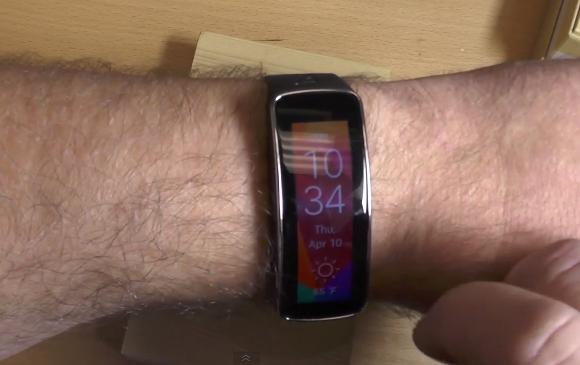
Yesterday, the Gear Fit was spotted displaying text in vertical orientation in Korea. This solves its usability issue when displaying information in landscape mode, making it awkward to read from your wrist.

Now it has been confirmed that the Gear Fit will be getting an update internationally and the folks at Android Central has managed to test this out. To change the orientation, you can do so under settings. You’ll also get the option to choose whether it is for left or right hand use so that it is usable in landscape mode.

Find out how this is done with a hands-on video after the break.

[ SOURCE ]

Tags: displayGear Fit Vertical DisplayOrientationSamsungSamsung Gear FitSamsung Gear Fit DisplaySamsung Gear Fit MalaysiaSports BandUpdate
soyacincau

soyacincau

POPULAR

Samsung Gear Fit is able to display vertically for both left and right handed users

April 11, 2014

HUAWEI Pura 90s Series: Elevating How You See, Create, and Stay Connected

July 23, 2026

The OPPO Reno16 Pro 5G Lands in Malaysia: A Look at the New 200MP All-in-One Content Studio

July 13, 2026

How fast is ULTRA5G inside KL Malls? Here’s What Dedicated Indoor ULTRA5G Infrastructure Can Actually Do

July 16, 2026

ChargEV and Maybank partner up: Get up to 16% rebate on EV charging

July 28, 2026

GSC Malaysia confirms Infinity Vision certification ahead of Avengers: Doomsday release

July 28, 2026

Copyright © 2026 · SoyaCincau.com
Mind Blow Sdn Bhd (1076827-P)

  • ADVERTISE
  • DISCLAIMER

Copyright © 2026 · SoyaCincau.com – Mind Blow Sdn Bhd (1076827-P)

  • ADVERTISE
  • DISCLAIMER