
• 中文版
  • BM
  • News
  • Deals
  • Reviews
    • First Impressions
    • Hands-on
    • Comparisons
  • Tech
    • Mobile
    • Computers
    • Cameras
    • Wearables
    • Audio
    • Drones
  • Telco
    • Celcom
    • Digi
    • Maxis
    • Time
    • Tune Talk
    • U Mobile
    • Unifi
    • Yes
  • Cars
  • Contribute
  • Jobs
Menu
  • 中文版
  • BM
  • News
  • Deals
  • Reviews
    • First Impressions
    • Hands-on
    • Comparisons
  • Tech
    • Mobile
    • Computers
    • Cameras
    • Wearables
    • Audio
    • Drones
  • Telco
    • Celcom
    • Digi
    • Maxis
    • Time
    • Tune Talk
    • U Mobile
    • Unifi
    • Yes
  • Cars
  • Contribute
  • Jobs
Search
  • Tech
    • News
    • Mobile
    • Computers
    • Cameras
    • Wearables
    • Audio
    • Drones
  • Telco
    • Celcom
    • Digi
    • Maxis
    • Time
    • U Mobile
    • Unifi
    • Yes
  • Reviews
    • First Impressions
    • Hands-on
    • Comparisons
  • Buyer’s Guide
  • Opinions
  • Digital Life
  • Video
  • Deals
  • How-To
  • Cars
  • Bahasa Melayu
  • EV
  • Contribute
  • Advertise
Menu
  • Tech
    • News
    • Mobile
    • Computers
    • Cameras
    • Wearables
    • Audio
    • Drones
  • Telco
    • Celcom
    • Digi
    • Maxis
    • Time
    • U Mobile
    • Unifi
    • Yes
  • Reviews
    • First Impressions
    • Hands-on
    • Comparisons
  • Buyer’s Guide
  • Opinions
  • Digital Life
  • Video
  • Deals
  • How-To
  • Cars
  • Bahasa Melayu
  • EV
  • Contribute
  • Advertise
Search
Close
Home News

HTC One’s logo as the 3rd capacitive button made possible with custom kernel

  • BY soyacincau
  • 24 April 2013
  • 10:00 am
  • Comment
Share on FacebookShare on Twitter

130424-htc-one-button

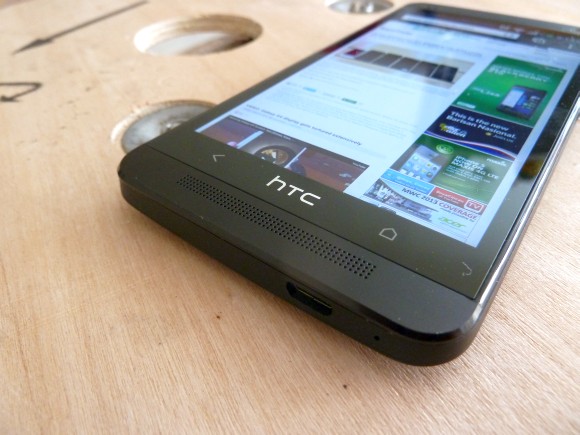
The HTC One comes with a simplified design where there’s only 2 buttons at the front – Home and Back. The other additional functions such as viewing current running apps is accessed by double tapping on the home button, while Google Now is triggered by pressing and holding the home button.

From the looks of it, looks like there’s nothing much can be done. However discovering that there’s a digitiser behind the logo, the folks at XDA Developer started cracking to make this hidden button functional. They had come out with 2 kernals – Home button to wake & Logo to Sleep and Home button to wake & Logo for Menu.

For those having the HTC One and feeling a bit adventurous, you can find out more about these custom kernels here. Note that these are unofficial mods, so do it at your own risk.

Watch the video of the HTC One’s functional logo button demo after the break.

[ SOURCE ]

Tags: HTCHTC OneHTC One 3rd ButtonHTC One Custom KernelHTC One HackHTC One LogoHTC One Logo ButtonHTC One MalaysiaHTC One Menu button
soyacincau

soyacincau

POPULAR

HTC One’s logo as the 3rd capacitive button made possible with custom kernel

April 24, 2013

TNG eWallet to disable auto-reload for debit cards from 13 May 2026

April 30, 2026

YouTube Premium Lite now in Malaysia: Ad-free viewing from RM12.90/month

May 4, 2026
Proton Saga Cross AMA02 by Theottle

Proton Saga Cross AMA02 to begin production in October?

May 4, 2026

MITI increases minimum CBU EV price to RM300K? Imported EVs with 240hp and below not allowed?

May 6, 2026

Volvo offers Selekt certified used EVs from as little as RM153,000

April 30, 2026

Copyright © 2025 · SoyaCincau.com
Mind Blow Sdn Bhd (1076827-P)

  • ADVERTISE
  • DISCLAIMER

Copyright © 2026 · SoyaCincau.com – Mind Blow Sdn Bhd (1076827-P)

  • ADVERTISE
  • DISCLAIMER





