• 中文版
  • BM
  • News
  • Deals
  • Reviews
    • First Impressions
    • Hands-on
    • Comparisons
  • Tech
    • Mobile
    • Computers
    • Cameras
    • Wearables
    • Audio
    • Drones
  • Telco
    • Celcom
    • Digi
    • Maxis
    • Time
    • Tune Talk
    • U Mobile
    • Unifi
    • Yes
  • Cars
  • Contribute
  • Jobs
Menu
  • 中文版
  • BM
  • News
  • Deals
  • Reviews
    • First Impressions
    • Hands-on
    • Comparisons
  • Tech
    • Mobile
    • Computers
    • Cameras
    • Wearables
    • Audio
    • Drones
  • Telco
    • Celcom
    • Digi
    • Maxis
    • Time
    • Tune Talk
    • U Mobile
    • Unifi
    • Yes
  • Cars
  • Contribute
  • Jobs
Search
  • Tech
    • News
    • Mobile
    • Computers
    • Cameras
    • Wearables
    • Audio
    • Drones
  • Telco
    • Celcom
    • Digi
    • Maxis
    • Time
    • U Mobile
    • Unifi
    • Yes
  • Reviews
    • First Impressions
    • Hands-on
    • Comparisons
  • Buyer’s Guide
  • Opinions
  • Digital Life
  • Video
  • Deals
  • How-To
  • Cars
  • Bahasa Melayu
  • EV
  • Contribute
  • Advertise
Menu
  • Tech
    • News
    • Mobile
    • Computers
    • Cameras
    • Wearables
    • Audio
    • Drones
  • Telco
    • Celcom
    • Digi
    • Maxis
    • Time
    • U Mobile
    • Unifi
    • Yes
  • Reviews
    • First Impressions
    • Hands-on
    • Comparisons
  • Buyer’s Guide
  • Opinions
  • Digital Life
  • Video
  • Deals
  • How-To
  • Cars
  • Bahasa Melayu
  • EV
  • Contribute
  • Advertise
Search
Close
Home News

Android Jelly Bean improves Face Unlock with Liveness Check

  • BY soyacincau
  • 2 July 2012
  • 6:51 pm
  • Comment
Share on FacebookShare on Twitter

Liveness Check Face Unlock

The Android Face Unlock which was introduced with Android 4.0 Ice Cream Sandwich was a pretty neat trick. However it isn’t really a secured option as it can be easily fooled by a static picture of the owner. Now on Android 4.1 Jelly Bean release, the Face Unlock is further enhanced, taking a leaf out of Samsung’s own face unlock enhancement.
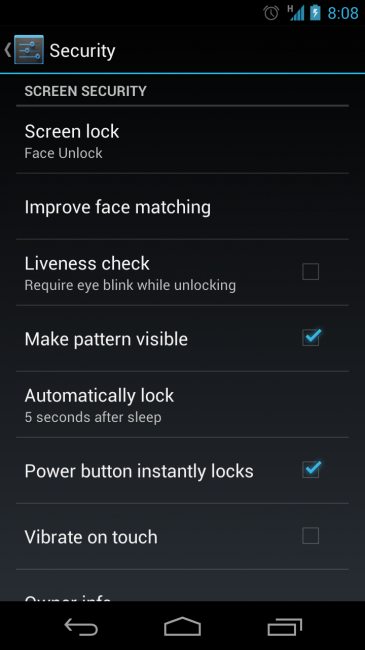
Jelly Bean Face Unlock Android

On the set up menu, there’s now a new “Liveness Check” where it requires you to blink while unlocking the screen. The moment you wake the phone, there will be an indicator at the bottom which signals you to blink before allowing you access to your phone.

Pretty simple solution to enhance Face Unlock’s security.

[ SOURCE, VIA ]

Tags: AndroidAndroid 4.1Android Face UnlockAndroid Jelly BeanFace UnlockIce Cream Sandwich Face unlockJelly Beanlock screensecurity
soyacincau

soyacincau

POPULAR

Android Jelly Bean improves Face Unlock with Liveness Check

July 2, 2012
BYD Tech Discovery KL

MITI’s CBU EV ruling will wipe out current EV lineup from BYD, iCaur, Mini, Smart, Toyota, and more

May 7, 2026
Proton Saga Cross AMA02 by Theottle

Proton Saga Cross AMA02 to begin production in October?

May 4, 2026

TNG eWallet to disable auto-reload for debit cards from 13 May 2026

April 30, 2026

YouTube Premium Lite now in Malaysia: Ad-free viewing from RM12.90/month

May 4, 2026

MITI increases minimum CBU EV price to RM300K? Imported EVs with 240hp and below not allowed?

May 6, 2026

Copyright © 2025 · SoyaCincau.com
Mind Blow Sdn Bhd (1076827-P)

  • ADVERTISE
  • DISCLAIMER

Copyright © 2026 · SoyaCincau.com – Mind Blow Sdn Bhd (1076827-P)

  • ADVERTISE
  • DISCLAIMER