• 中文版
  • BM
  • News
  • Deals
  • Reviews
    • First Impressions
    • Hands-on
    • Comparisons
  • Tech
    • Mobile
    • Computers
    • Cameras
    • Wearables
    • Audio
    • Drones
  • Telco
    • Celcom
    • Digi
    • Maxis
    • Time
    • Tune Talk
    • U Mobile
    • Unifi
    • Yes
  • Cars
  • Contribute
  • Jobs
Menu
  • 中文版
  • BM
  • News
  • Deals
  • Reviews
    • First Impressions
    • Hands-on
    • Comparisons
  • Tech
    • Mobile
    • Computers
    • Cameras
    • Wearables
    • Audio
    • Drones
  • Telco
    • Celcom
    • Digi
    • Maxis
    • Time
    • Tune Talk
    • U Mobile
    • Unifi
    • Yes
  • Cars
  • Contribute
  • Jobs
Search
  • Tech
    • News
    • Mobile
    • Computers
    • Cameras
    • Wearables
    • Audio
    • Drones
  • Telco
    • Celcom
    • Digi
    • Maxis
    • Time
    • U Mobile
    • Unifi
    • Yes
  • Reviews
    • First Impressions
    • Hands-on
    • Comparisons
  • Buyer’s Guide
  • Opinions
  • Digital Life
  • Video
  • Deals
  • How-To
  • Cars
  • Bahasa Melayu
  • EV
  • Contribute
  • Advertise
Menu
  • Tech
    • News
    • Mobile
    • Computers
    • Cameras
    • Wearables
    • Audio
    • Drones
  • Telco
    • Celcom
    • Digi
    • Maxis
    • Time
    • U Mobile
    • Unifi
    • Yes
  • Reviews
    • First Impressions
    • Hands-on
    • Comparisons
  • Buyer’s Guide
  • Opinions
  • Digital Life
  • Video
  • Deals
  • How-To
  • Cars
  • Bahasa Melayu
  • EV
  • Contribute
  • Advertise
Search
Close
Home Digital Life

Microsoft Edge: What does that weird new button do?

  • BY Alexander Wong
  • 8 March 2021
  • 2:42 pm
  • Comment
Share on FacebookShare on Twitter

If you’re using Microsoft Edge as your default desktop web browser, you would probably noticed a new feature that sits on the top left corner of the screen. If you prefer to cycle through your active tabs vertically instead of horizontally, you can enable the new feature on the latest Edge browser version.
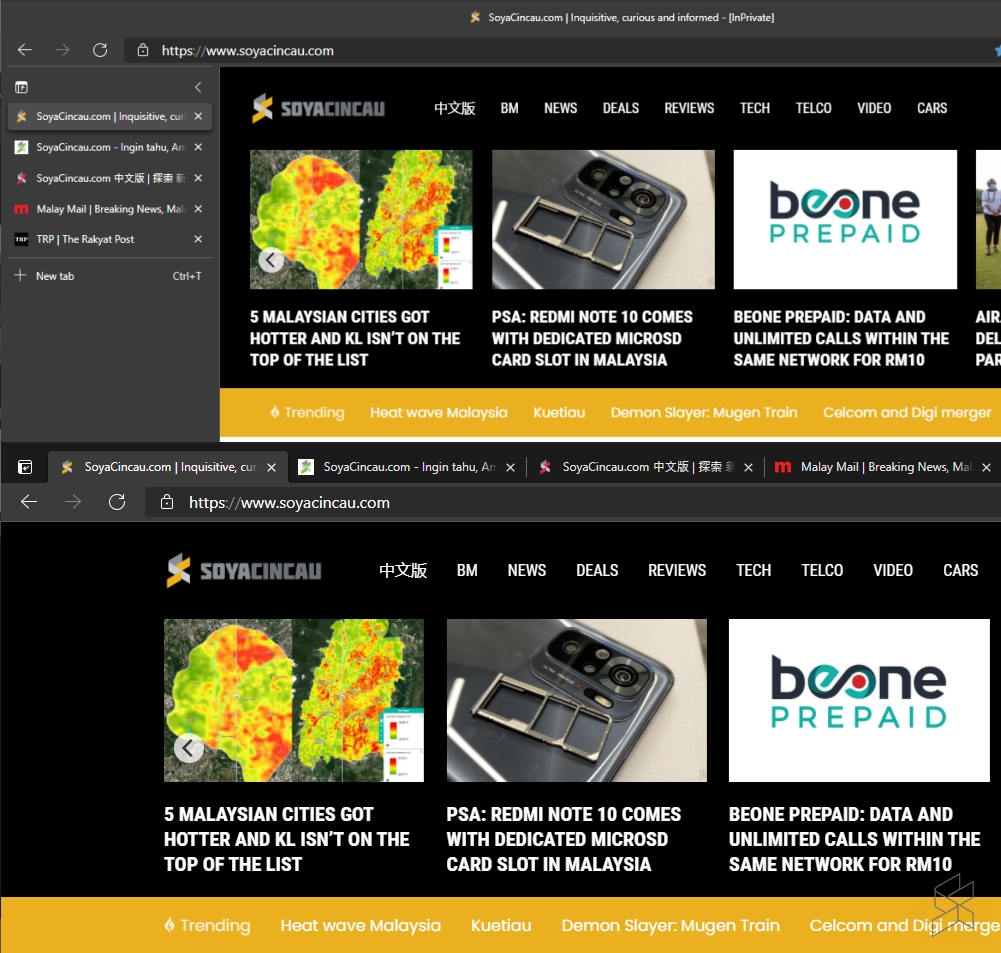
By clicking on the top-left icon, you can enable vertical-tabs in a single click. By default, the vertical tabs are expanded but you can shrink it to an icon only view. When you mouse over, it will expand briefly to give you a glimpse of the title for all individual tabs.

From our experience, this feature doesn’t actually increase your vertical display real-estate. The space that was previously occupied by the tabs is now used to display the title of the page. If anything, it actually sacrifices the width of the displayable area but this shouldn’t be an issue for users with ultra-wide monitors.

Apparently, the Chrome browser did feature vertical tabs before. However, Google later decided to remove the side-tabs as they found that it “ended up not compelling enough to make the cut”. Some fans of the feature were not happy about the move so this new addition to Edge might serve as a good alternative.

Apart from vertical tabs, Microsoft has also introduced “startup boost” which automatically launches the browser in the background when you start your device. The feature is said to cut down startup time by 29% to 41%. They are also revising its browser history interface which will appear as a drop-down menu, instead of occupying the entire page.

To optimise your computer’s resources, Microsoft had recently rolled out sleeping tabs which uses less RAM and CPU usage for inactive tabs. As a result, laptop users should see improved battery life.

[ SOURCE ]

Related reading

Microsoft Edge gets themes, password manager and a feature that cuts down on RAM use
Microsoft Edge update messes up the way you copy and paste URLs. Here’s how to turn it off
Mario Kart, Pac-Man illegally published in Microsoft Edge browser add-ons
Tags: microsoftMicrosoft Edge
Alexander Wong

Alexander Wong

POPULAR

Microsoft Edge: What does that weird new button do?

March 8, 2021
BYD Tech Discovery KL

MITI’s CBU EV ruling will wipe out current EV lineup from BYD, iCaur, Mini, Smart, Toyota, and more

May 7, 2026
Proton Saga Cross AMA02 by Theottle

Proton Saga Cross AMA02 to begin production in October?

May 4, 2026

MITI increases minimum CBU EV price to RM300K? Imported EVs with 240hp and below not allowed?

May 6, 2026

YouTube Premium Lite now in Malaysia: Ad-free viewing from RM12.90/month

May 4, 2026
Proton EV Plant, Tanjung Malim

MITI says EVs won’t become more expensive, but can Malaysia’s CKD industry fill the gap?

May 10, 2026

Copyright © 2025 · SoyaCincau.com
Mind Blow Sdn Bhd (1076827-P)

  • ADVERTISE
  • DISCLAIMER

Copyright © 2026 · SoyaCincau.com – Mind Blow Sdn Bhd (1076827-P)

  • ADVERTISE
  • DISCLAIMER