• 中文版
  • BM
  • News
  • Deals
  • Reviews
    • First Impressions
    • Hands-on
    • Comparisons
  • Tech
    • Mobile
    • Computers
    • Cameras
    • Wearables
    • Audio
    • Drones
  • Telco
    • Celcom
    • Digi
    • Maxis
    • Time
    • Tune Talk
    • U Mobile
    • Unifi
    • Yes
  • Cars
  • Contribute
  • Jobs
Menu
  • 中文版
  • BM
  • News
  • Deals
  • Reviews
    • First Impressions
    • Hands-on
    • Comparisons
  • Tech
    • Mobile
    • Computers
    • Cameras
    • Wearables
    • Audio
    • Drones
  • Telco
    • Celcom
    • Digi
    • Maxis
    • Time
    • Tune Talk
    • U Mobile
    • Unifi
    • Yes
  • Cars
  • Contribute
  • Jobs
Search
  • Tech
    • News
    • Mobile
    • Computers
    • Cameras
    • Wearables
    • Audio
    • Drones
  • Telco
    • Celcom
    • Digi
    • Maxis
    • Time
    • U Mobile
    • Unifi
    • Yes
  • Reviews
    • First Impressions
    • Hands-on
    • Comparisons
  • Buyer’s Guide
  • Opinions
  • Digital Life
  • Video
  • Deals
  • How-To
  • Cars
  • Bahasa Melayu
  • EV
  • Contribute
  • Advertise
Menu
  • Tech
    • News
    • Mobile
    • Computers
    • Cameras
    • Wearables
    • Audio
    • Drones
  • Telco
    • Celcom
    • Digi
    • Maxis
    • Time
    • U Mobile
    • Unifi
    • Yes
  • Reviews
    • First Impressions
    • Hands-on
    • Comparisons
  • Buyer’s Guide
  • Opinions
  • Digital Life
  • Video
  • Deals
  • How-To
  • Cars
  • Bahasa Melayu
  • EV
  • Contribute
  • Advertise
Search
Close
Home News

Adobe updates Acrobat Web with new URL shortcuts to sign PDFs via your browser

  • BY Nic Ker
  • 3 February 2021
  • 7:10 pm
  • Comment
Share on FacebookShare on Twitter

If you’re one of the millions of users who regularly sign electronic documents everyday, Adobe has upgraded Acrobat Web with a couple of nifty features that users have been requesting for awhile now. Acrobat, of course, is Adobe’s desktop app that is has been used to view and edit PDF files over the years, and Acrobat Web is essentially a lighter, browser-based version.

This lightweight nature also meant that a couple of features were missing on the browser-based version of Acrobat—including editing text and images in PDFs. Instead, users had to turn to the desktop version of Acrobat for these tasks. However, Adobe is now including a number of these features in the latest update for Acrobat Web, along with easy access to these features via the address bar in your browser.

According to Adobe:

“Last July (which feels like a lifetime ago!), we teamed up with Google to launch a handful of simple Acrobat shortcuts for Google’s .new domain. We tested the waters and everyone dove right in. In fact, we’ve seen more than 10 million clicks in just a few short months. And, for the thousands of people who search phrases like, how to convert Word to PDF or how to sign a PDF in their browsers every day, now there is a simple to use, secure, and free set of Acrobat web tools at the ready.”

Now, you’ll be able to use Acrobat Web to handle tasks via your browser including protecting a PDF, splitting a PDF into two, or merging multiple PDFs together. As mentioned above, you’ll be able to access these tools easily by simply entering in one of the following URLs into your address bar:
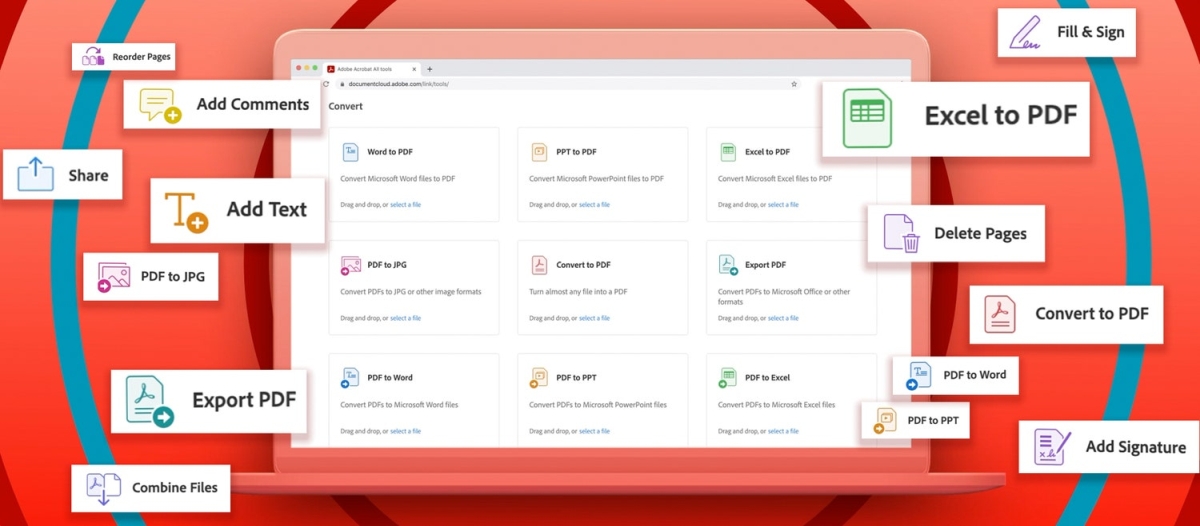
  • PDF.new
  • Sign.new
  • JPGtoPDF.new
  • CompressPDF.new
  • Create.new
  • ConvertPDF.new
  • WordtoPDF.new

So, why haven’t some of these features been available on Acrobat Web in the past? Why has it taken Adobe so long to introduce features that were obviously in demand by a wide range of users? According to Tech Crunch, a lot of it was down to technical challenges, including the use of different fonts in text and images being edited. Plus, of course, Adobe says that they wanted to ensure that the web-based version of Acrobat reached the company’s standards in terms of quality.

Regardless, it’s great news for those of you who want to make simple edits to your PDFs within your browser. If you’re keen to find out more about the update, click here for Adobe’s full statement.


[ SOURCE , VIA ]

Tags: adobeAdobe AcrobatAdobe Acrobat WebMobile
Nic Ker

Nic Ker

POPULAR

JPJePlate: Is the Malaysian flag printed wrongly on EV plates?

December 12, 2025

sooka’s Gilerrr Streaming Challenge Draws 273 Participants, Clinches Malaysia Book of Records Title

December 5, 2025

Adobe updates Acrobat Web with new URL shortcuts to sign PDFs via your browser

February 3, 2021

U Mobile Unbeatable Phone Sale: Travel with FREE Global Roaming Across 60+ Destinations

December 10, 2025

Perodua Traz: B-segment SUV with 1.5L engine and 471L boot, priced from RM76,100

December 17, 2025

Why have Malaysia’s 5G download speeds declined?

December 16, 2025

Copyright © 2025 · SoyaCincau.com
Mind Blow Sdn Bhd (1076827-P)

  • ADVERTISE
  • DISCLAIMER

Copyright © 2025 · SoyaCincau.com – Mind Blow Sdn Bhd (1076827-P)

  • ADVERTISE
  • DISCLAIMER