• 中文版
  • BM
  • News
  • Deals
  • Reviews
    • First Impressions
    • Hands-on
    • Comparisons
  • Tech
    • Mobile
    • Computers
    • Cameras
    • Wearables
    • Audio
    • Drones
  • Telco
    • Celcom
    • Digi
    • Maxis
    • Time
    • Tune Talk
    • U Mobile
    • Unifi
    • Yes
  • Cars
  • Contribute
  • Jobs
Menu
  • 中文版
  • BM
  • News
  • Deals
  • Reviews
    • First Impressions
    • Hands-on
    • Comparisons
  • Tech
    • Mobile
    • Computers
    • Cameras
    • Wearables
    • Audio
    • Drones
  • Telco
    • Celcom
    • Digi
    • Maxis
    • Time
    • Tune Talk
    • U Mobile
    • Unifi
    • Yes
  • Cars
  • Contribute
  • Jobs
Search
  • Tech
    • News
    • Mobile
    • Computers
    • Cameras
    • Wearables
    • Audio
    • Drones
  • Telco
    • Celcom
    • Digi
    • Maxis
    • Time
    • U Mobile
    • Unifi
    • Yes
  • Reviews
    • First Impressions
    • Hands-on
    • Comparisons
  • Buyer’s Guide
  • Opinions
  • Digital Life
  • Video
  • Deals
  • How-To
  • Cars
  • Bahasa Melayu
  • EV
  • Contribute
  • Advertise
Menu
  • Tech
    • News
    • Mobile
    • Computers
    • Cameras
    • Wearables
    • Audio
    • Drones
  • Telco
    • Celcom
    • Digi
    • Maxis
    • Time
    • U Mobile
    • Unifi
    • Yes
  • Reviews
    • First Impressions
    • Hands-on
    • Comparisons
  • Buyer’s Guide
  • Opinions
  • Digital Life
  • Video
  • Deals
  • How-To
  • Cars
  • Bahasa Melayu
  • EV
  • Contribute
  • Advertise
Search
Close
Home Digital Life

Microsoft Edge update messes up the way you copy and paste URLs. Here’s how to turn it off

  • BY Alexander Wong
  • 23 November 2020
  • 11:09 am
  • Comment
Share on FacebookShare on Twitter

If you’re struggling to copy and paste web addresses on the latest Microsoft Edge browser, you’re not alone. Microsoft Edge has rolled out a new feature called “Friendly URLs” which can be annoying for those that just want to copy raw URLs, especially to WordPress.

With the new feature, Microsoft wants to make URL sharing more pleasant as users will see a hyperlinked title of the page instead of a ugly URL which can get really long. This is great for sharing links on Emails, Microsoft Word or other rich media based editors.
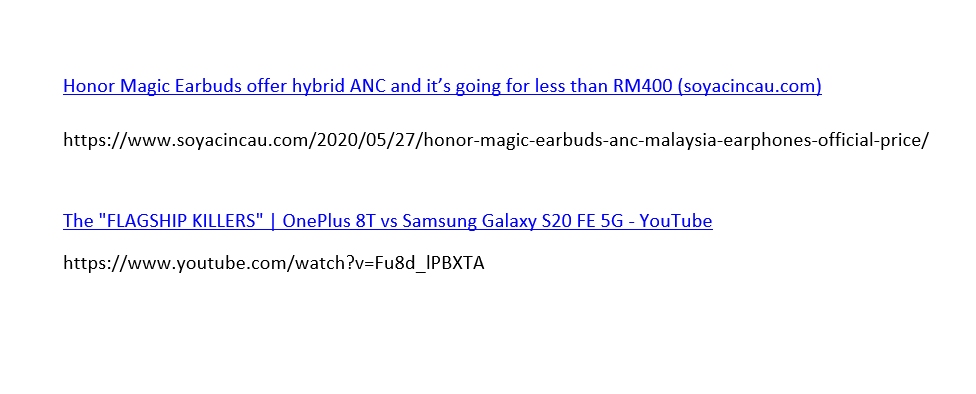
Micrrosoft Edge Friendly URL Copy and paste
With and without “Friendly URL”

As shown above, it does look more pleasant but this can be a problem if you just want to paste the actual URL. The feature will interfere the shortcut method of adding links or embeds by pasting URLs on web editors such as WordPress.

Turn off Friendly URL pasting
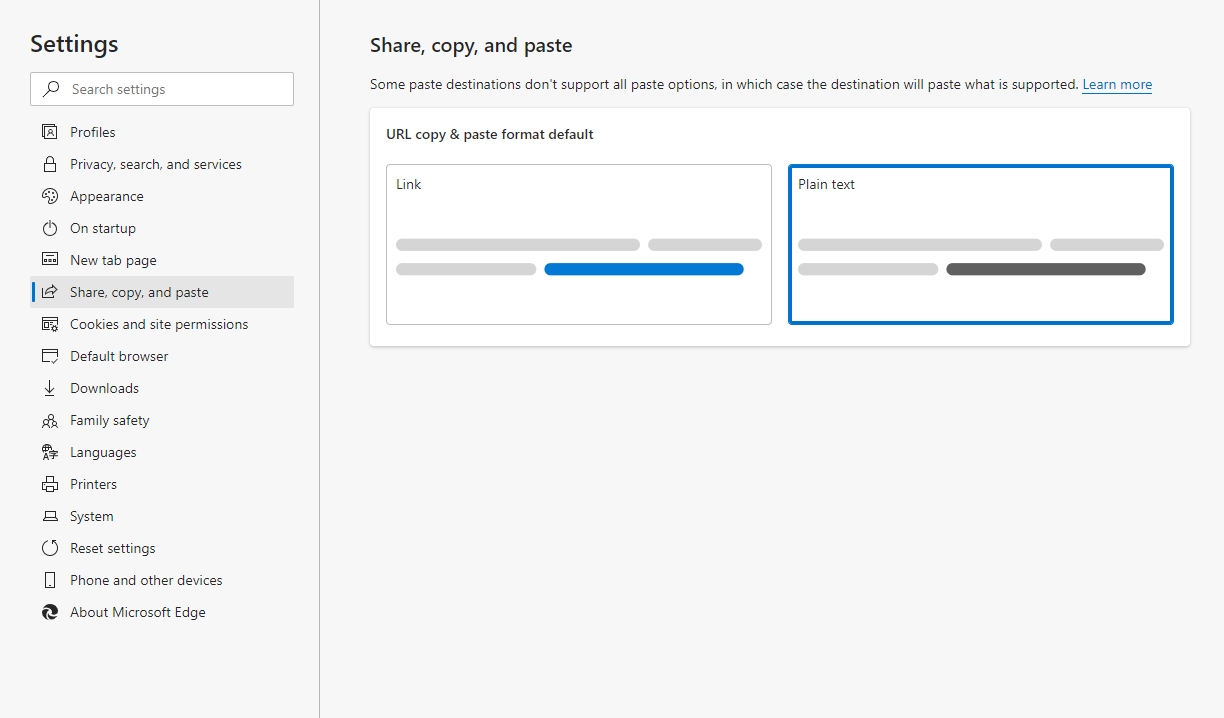
Change Copy and Paste URL format Microsoft Edge
Change Share, Copy and Paste settings on Edge browser

If you want to go back to the old fashion way of copy and pasting URLs, fortunately, there’s a way to turn it off. Under the Edge browser settings, go to “Share, copy and paste“. You should find the option to change the format from Link to Plain text.
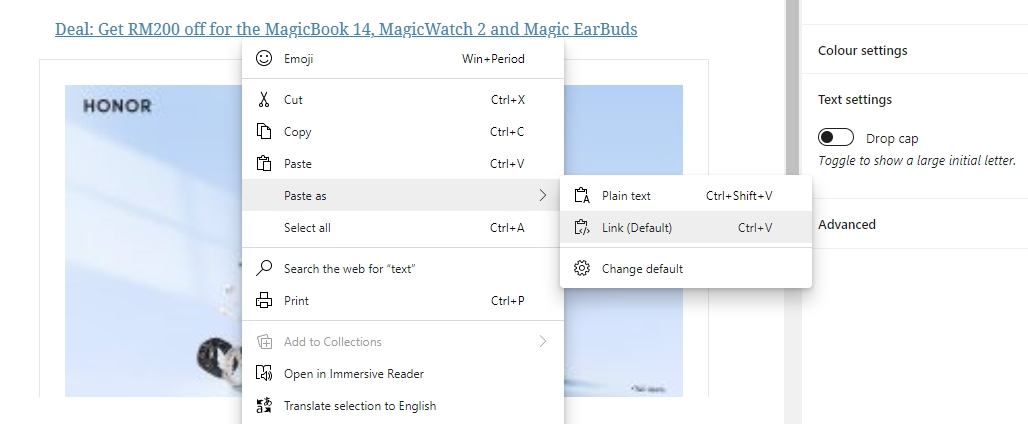
If you actually prefer the new friendly URL format as your default setting, you can still paste URLs in plaintext format by right clicking and select Paste as > Plain text. Alternatively, you can use the shortcut Ctrl + Shift + V instead of the usual Ctrl + V.

If you’re having trouble dealing with links on WordPress, hope this solves your problem. Let us know in the comments if you prefer the new linked format or the good old plaintext version?

[ SOURCE ]

Tags: microsoftMicrosoft Edgewordpress
Alexander Wong

Alexander Wong

POPULAR

Microsoft Edge update messes up the way you copy and paste URLs. Here’s how to turn it off

November 23, 2020

Malaysia now spending over RM4 billion monthly on fuel subsidies. It’s time to accelerate EV shift

March 29, 2026

The Xiaomi 17 Proves You Don’t Need a Giant Phone for Pro-Level Photos

February 28, 2026

Is Your Current Phone Generations Behind? Here’s a Simpler Way to Close the Gap

March 13, 2026
Tesla Model Y L Malaysia

Tesla Model Y L 3-row electric SUV to launch in Malaysia on 1 April: 681km range, supports V2L

March 30, 2026
Image source: Jakub Zerdzicki on Pexels

AEON Bank’s Personal Financing-i (PF-i): Flexible Funds to Help Ease Budget Constraints

December 24, 2025

Copyright © 2025 · SoyaCincau.com
Mind Blow Sdn Bhd (1076827-P)

  • ADVERTISE
  • DISCLAIMER

Copyright © 2026 · SoyaCincau.com – Mind Blow Sdn Bhd (1076827-P)

  • ADVERTISE
  • DISCLAIMER