• 中文版
  • BM
  • News
  • Deals
  • Reviews
    • First Impressions
    • Hands-on
    • Comparisons
  • Tech
    • Mobile
    • Computers
    • Cameras
    • Wearables
    • Audio
    • Drones
  • Telco
    • Celcom
    • Digi
    • Maxis
    • Time
    • Tune Talk
    • U Mobile
    • Unifi
    • Yes
  • Cars
  • Contribute
  • Jobs
Menu
  • 中文版
  • BM
  • News
  • Deals
  • Reviews
    • First Impressions
    • Hands-on
    • Comparisons
  • Tech
    • Mobile
    • Computers
    • Cameras
    • Wearables
    • Audio
    • Drones
  • Telco
    • Celcom
    • Digi
    • Maxis
    • Time
    • Tune Talk
    • U Mobile
    • Unifi
    • Yes
  • Cars
  • Contribute
  • Jobs
Search
  • Tech
    • News
    • Mobile
    • Computers
    • Cameras
    • Wearables
    • Audio
    • Drones
  • Telco
    • Celcom
    • Digi
    • Maxis
    • Time
    • U Mobile
    • Unifi
    • Yes
  • Reviews
    • First Impressions
    • Hands-on
    • Comparisons
  • Buyer’s Guide
  • Opinions
  • Digital Life
  • Video
  • Deals
  • How-To
  • Cars
  • Bahasa Melayu
  • EV
  • Contribute
  • Advertise
Menu
  • Tech
    • News
    • Mobile
    • Computers
    • Cameras
    • Wearables
    • Audio
    • Drones
  • Telco
    • Celcom
    • Digi
    • Maxis
    • Time
    • U Mobile
    • Unifi
    • Yes
  • Reviews
    • First Impressions
    • Hands-on
    • Comparisons
  • Buyer’s Guide
  • Opinions
  • Digital Life
  • Video
  • Deals
  • How-To
  • Cars
  • Bahasa Melayu
  • EV
  • Contribute
  • Advertise
Search
Close
Home Digital Life

AirAsia Virtual Allstar is now available on WhatsApp

  • BY Alexander Wong
  • 28 July 2020
  • 2:38 pm
  • Comment
Share on FacebookShare on Twitter

Here’s a new way to contact AirAsia on your smartphone. The low-cost carrier has launched its WhatsApp hotline number which you can use to get flight updates, make changes or to follow up on refunds.

The WhatsApp hotline works like the current AirAsia Virtual Allstar (AVA) bot that’s available on Facebook, AirAsia.com and the mobile app. To get started, just add +60 11-3516 5078 on your phone or click on this link. You can start the conversation by saying “Hi” and you’ll be greeted by a menu option which you can navigate by entering the respective numbers.
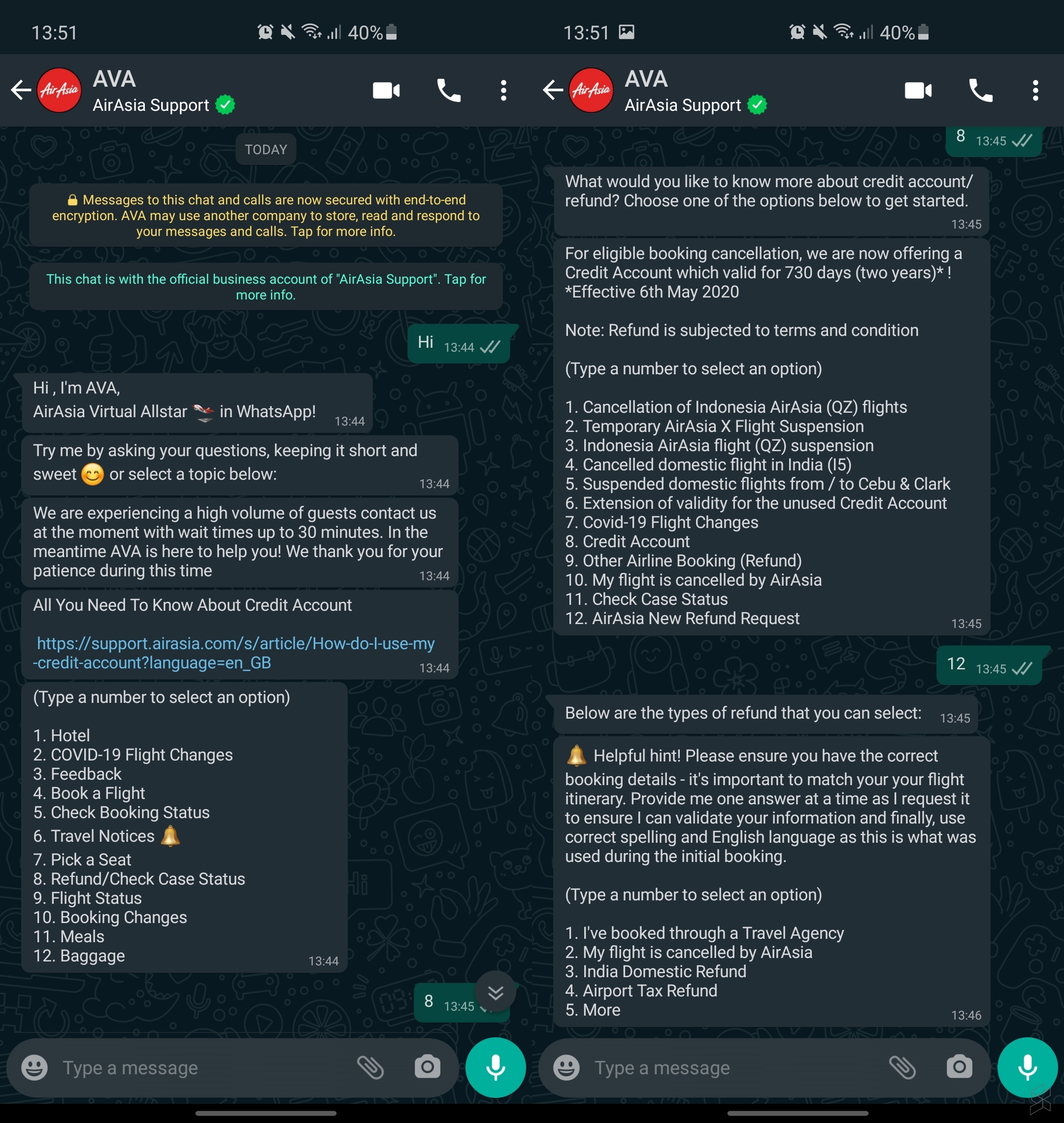
With AVA, you can use it to submit feedback, check on your booking status, view travel notices and to follow up on existing refund and case status. If you’re making changes to an existing booking, you’ll need to standby your flight’s booking number or PNR.

The AVA bot is able to answer queries in 11 languages which include English, Bahasa Malaysia, Thai, Bahasa Indonesia, Vietnamese, Korean, Tagalog, Hindi, Japanese, Simplified Chinese and Traditional Chinese. You can view the AVA guide here.


Tags: AirAsiaAirlinesAVAWhatsapp
Alexander Wong

Alexander Wong

POPULAR

sooka’s Gilerrr Streaming Challenge Draws 273 Participants, Clinches Malaysia Book of Records Title

December 5, 2025

BOMBA investigating fire involving two EVs parked at home

December 19, 2025

AirAsia Virtual Allstar is now available on WhatsApp

July 28, 2020

U Mobile Unbeatable Phone Sale: Travel with FREE Global Roaming Across 60+ Destinations

December 10, 2025

Perodua Traz: B-segment SUV with 1.5L engine and 471L boot, priced from RM76,100

December 17, 2025

JPJePlate: Is the Malaysian flag printed wrongly on EV plates?

December 12, 2025

Copyright © 2025 · SoyaCincau.com
Mind Blow Sdn Bhd (1076827-P)

  • ADVERTISE
  • DISCLAIMER

Copyright © 2025 · SoyaCincau.com – Mind Blow Sdn Bhd (1076827-P)

  • ADVERTISE
  • DISCLAIMER