• 中文版
  • BM
  • News
  • Deals
  • Reviews
    • First Impressions
    • Hands-on
    • Comparisons
  • Tech
    • Mobile
    • Computers
    • Cameras
    • Wearables
    • Audio
    • Drones
  • Telco
    • Celcom
    • Digi
    • Maxis
    • Time
    • Tune Talk
    • U Mobile
    • Unifi
    • Yes
  • Cars
  • Contribute
  • Jobs
Menu
  • 中文版
  • BM
  • News
  • Deals
  • Reviews
    • First Impressions
    • Hands-on
    • Comparisons
  • Tech
    • Mobile
    • Computers
    • Cameras
    • Wearables
    • Audio
    • Drones
  • Telco
    • Celcom
    • Digi
    • Maxis
    • Time
    • Tune Talk
    • U Mobile
    • Unifi
    • Yes
  • Cars
  • Contribute
  • Jobs
Search
  • Tech
    • News
    • Mobile
    • Computers
    • Cameras
    • Wearables
    • Audio
    • Drones
  • Telco
    • Celcom
    • Digi
    • Maxis
    • Time
    • U Mobile
    • Unifi
    • Yes
  • Reviews
    • First Impressions
    • Hands-on
    • Comparisons
  • Buyer’s Guide
  • Opinions
  • Digital Life
  • Video
  • Deals
  • How-To
  • Cars
  • Bahasa Melayu
  • EV
  • Contribute
  • Advertise
Menu
  • Tech
    • News
    • Mobile
    • Computers
    • Cameras
    • Wearables
    • Audio
    • Drones
  • Telco
    • Celcom
    • Digi
    • Maxis
    • Time
    • U Mobile
    • Unifi
    • Yes
  • Reviews
    • First Impressions
    • Hands-on
    • Comparisons
  • Buyer’s Guide
  • Opinions
  • Digital Life
  • Video
  • Deals
  • How-To
  • Cars
  • Bahasa Melayu
  • EV
  • Contribute
  • Advertise
Search
Close
Home News

Make use of the GoPro during the pandemic by turning it into a webcam

  • BY Dzamira Dzafri
  • 10 July 2020
  • 2:34 pm
  • Comment
Share on FacebookShare on Twitter

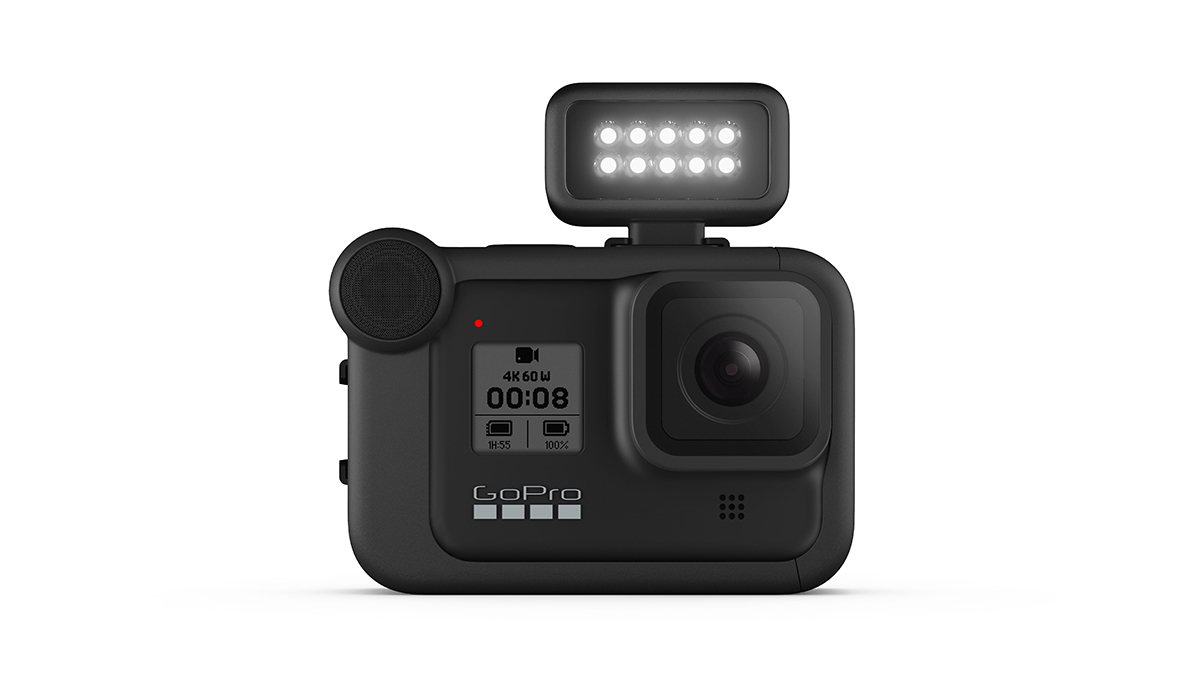
So, you’re not able to get out there as often to use your GoPro as intended during the COVID-19 pandemic. Here’s how to turn it into something a little more useful in our current situation—a wide-angle webcam. However, it is only available for MacOS users for now.

GoPro suggests a Hero 8 Black “as a durable, mountable, ultra-high-quality webcam”, along with a beta camera firmware update and a USB-C cord. However, after looking through the official instructions, GoPros that precede Hero 8 Black can also be used as webcams—including Hero 7 Black, Hero 6 Black, Hero 5 Black or Hero 4 Black.

How to your GoPro into a webcam

Here’s how to turn your Hero 8 into a webcam:

  • Download GoPro Webcam Beta Firmware on your Mac desktop. This contains the “UPDATE” folder to update your Hero 8 Black to support the new Webcam feature.
  • Follow Steps 2-4 from these instructions to manually update your camera.
  • Power on your camera and connect it to your computer via USB cable.
  • In the status bar, the GoPro icon will display a blue dot to indicate a successful connection.
  • Open your webcam application and select GoPro Camera as your preferred camera.
  • You can click here for a more detailed list of instructions.

As for GoPro Hero 7 Black, Hero 6 Black, Hero 5 Black or Hero 4 Black, you can click here for detailed instructions. They also note that the most important thing for turning these GoPro cameras into a webcam is that they require at least one third party accessory.

Once you have the GoPro set up, you can then use it for all of your favourite video chat services, including Microsoft Teams, Google Meet, Discord, and Zoom. It also works with Webex, Skype, Facebook Rooms, Messenger, and Slack, but you have to access them through Google Chrome.

The fact that this feature is available might help quite a number of you, as webcams are reportedly getting harder to find these days. Besides GoPro, many other camera manufacturers, including Fujifilm and Canon, have opted people to retool their cameras into webcams.

[ SOURCE, 2 ]

Tags: GoProGoPro Hero 8
Dzamira Dzafri

Dzamira Dzafri

POPULAR

Upgraded To a New Phone? Cool. But When Was the Last Time you Upgraded your Shaver?

November 10, 2025

5 Reasons Every Home Should Have a Smart Security System

November 11, 2025

Solar ATAP: The new solar programme for consumers will only start in 2026

December 2, 2025

Make use of the GoPro during the pandemic by turning it into a webcam

July 10, 2020
Perodua QV-E EV

Perodua QV-E is now official: Electric sportback with 201hp, 445km NEDC range, priced at RM80k not inclusive of battery subscription

December 1, 2025

GrabRewards is now GrabCoins: Now with even more ways to earn and save

November 17, 2025

Copyright © 2025 · SoyaCincau.com
Mind Blow Sdn Bhd (1076827-P)

  • ADVERTISE
  • DISCLAIMER

Copyright © 2025 · SoyaCincau.com – Mind Blow Sdn Bhd (1076827-P)

  • ADVERTISE
  • DISCLAIMER