• 中文版
  • BM
  • News
  • Deals
  • Reviews
    • First Impressions
    • Hands-on
    • Comparisons
  • Tech
    • Mobile
    • Computers
    • Cameras
    • Wearables
    • Audio
    • Drones
  • Telco
    • Celcom
    • Digi
    • Maxis
    • Time
    • Tune Talk
    • U Mobile
    • Unifi
    • Yes
  • Cars
  • Contribute
  • Jobs
Menu
  • 中文版
  • BM
  • News
  • Deals
  • Reviews
    • First Impressions
    • Hands-on
    • Comparisons
  • Tech
    • Mobile
    • Computers
    • Cameras
    • Wearables
    • Audio
    • Drones
  • Telco
    • Celcom
    • Digi
    • Maxis
    • Time
    • Tune Talk
    • U Mobile
    • Unifi
    • Yes
  • Cars
  • Contribute
  • Jobs
Search
  • Tech
    • News
    • Mobile
    • Computers
    • Cameras
    • Wearables
    • Audio
    • Drones
  • Telco
    • Celcom
    • Digi
    • Maxis
    • Time
    • U Mobile
    • Unifi
    • Yes
  • Reviews
    • First Impressions
    • Hands-on
    • Comparisons
  • Buyer’s Guide
  • Opinions
  • Digital Life
  • Video
  • Deals
  • How-To
  • Cars
  • Bahasa Melayu
  • EV
  • Contribute
  • Advertise
Menu
  • Tech
    • News
    • Mobile
    • Computers
    • Cameras
    • Wearables
    • Audio
    • Drones
  • Telco
    • Celcom
    • Digi
    • Maxis
    • Time
    • U Mobile
    • Unifi
    • Yes
  • Reviews
    • First Impressions
    • Hands-on
    • Comparisons
  • Buyer’s Guide
  • Opinions
  • Digital Life
  • Video
  • Deals
  • How-To
  • Cars
  • Bahasa Melayu
  • EV
  • Contribute
  • Advertise
Search
Close
Home Digital Life

Here’s how to add Boost eWallet to Samsung Pay

  • BY Alexander Wong
  • 16 March 2020
  • 3:20 pm
  • Comment
Share on FacebookShare on Twitter

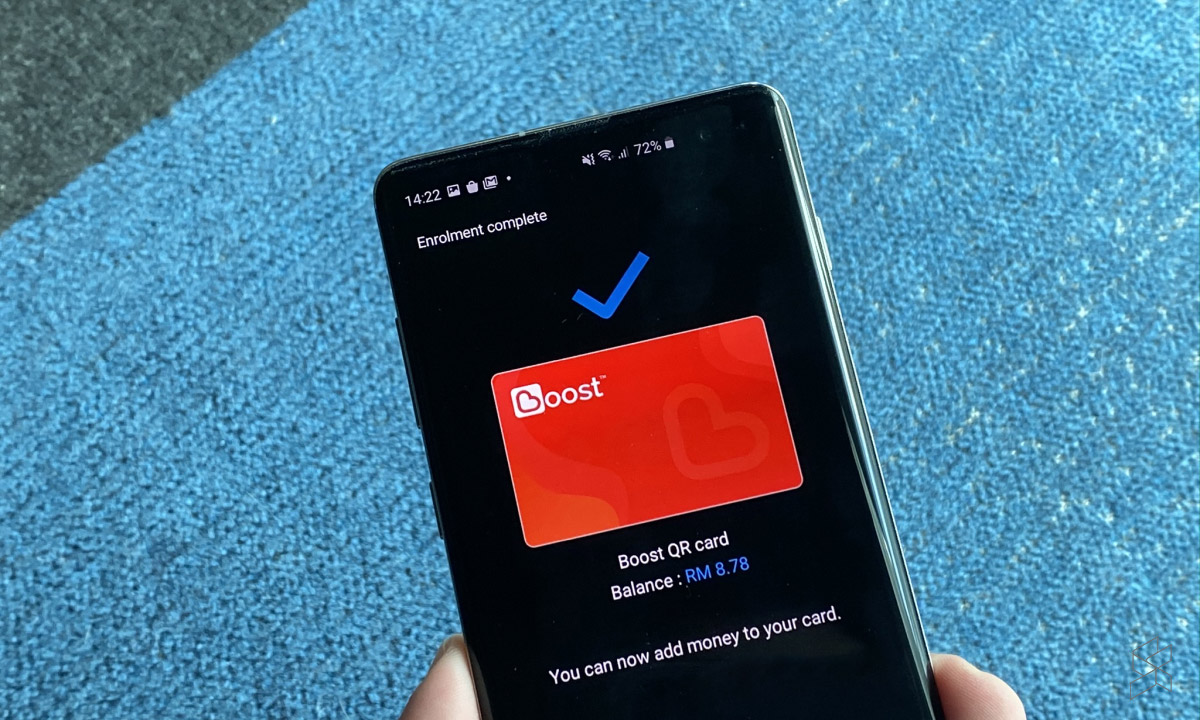
If you’re using a Samsung Galaxy smartphone with Samsung Pay, you can now add Boost eWallet as one of your payment options. It’s available now for users in Malaysia and you will need to update Samsung Pay to the latest version. Here’s how to get started.

After updating Samsung Pay to the latest version, you will see a new Boost QR card option in the “Pay” tab. To proceed, just tap on “Get it Now” and login to your eWallet.
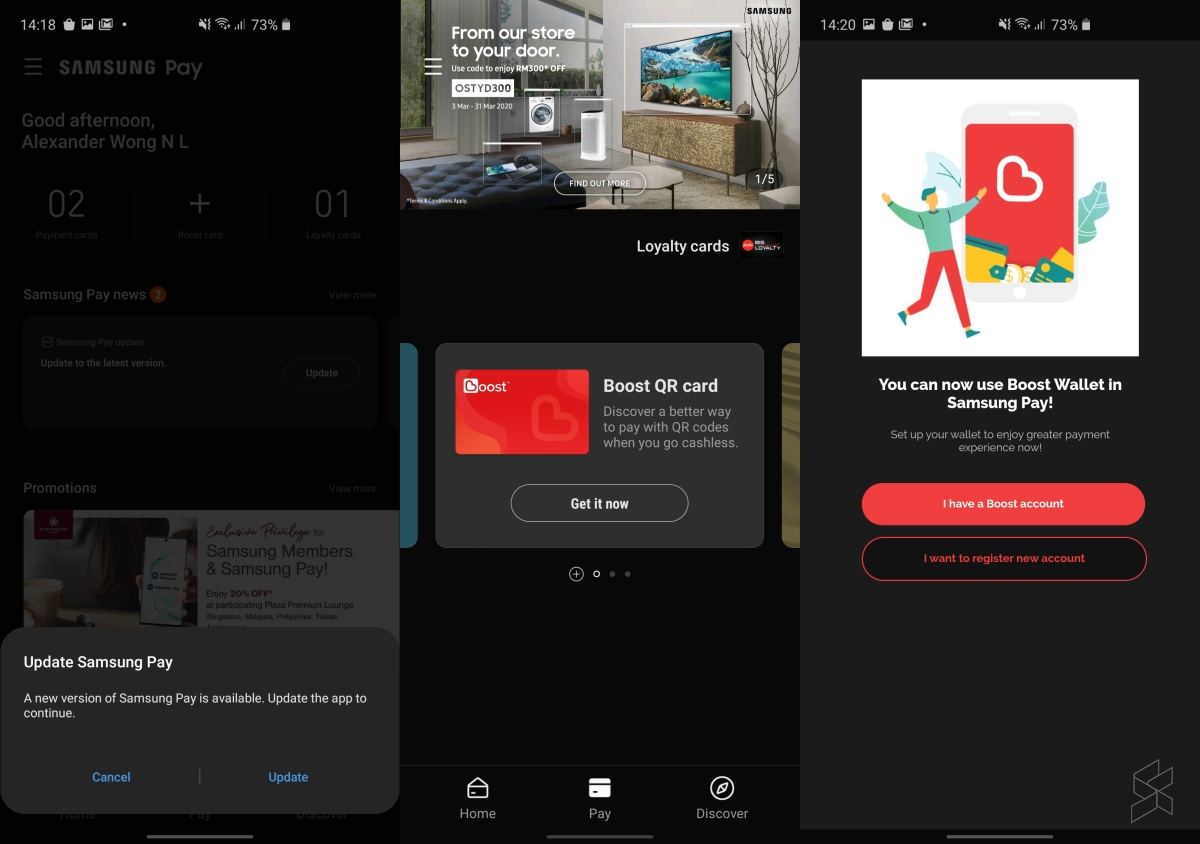
To login, you’ll need to enter your registered mobile number and your 6 digit pin. A One-Time-Password verification is required and the 6 digit Boost code will be sent via SMS. Once it has verified your account, Boost will be added as a card and it will show your current eWallet balance.
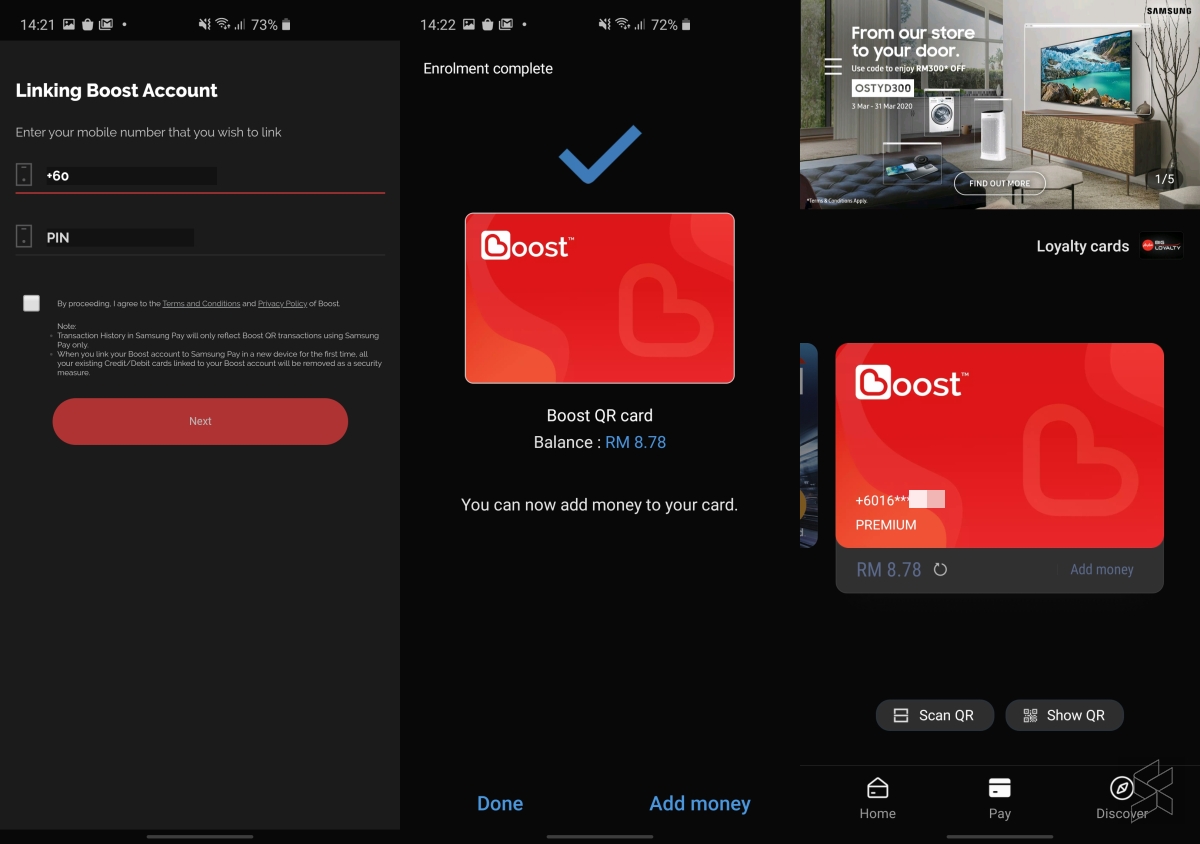
On the Samsung Pay interface, it looks like a regular card, however, it doesn’t work like PayWave or Mastercard Paypass. Instead, the Boost eWallet card will only allow you to Scan or Display QR code. This means you can only use it at merchants that accept Boost eWallet payments.
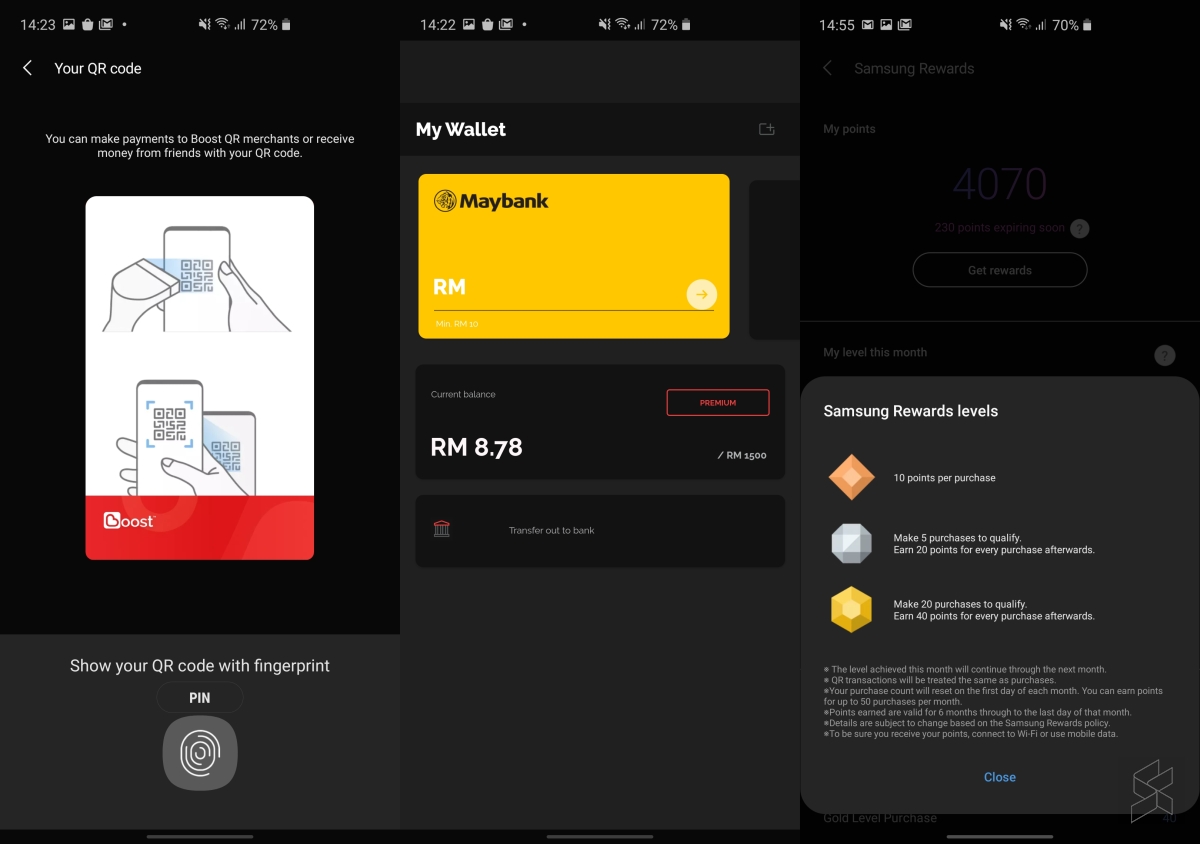
In addition, you can also reload your Boost eWallet via the Samsung Pay interface, however, do note that all of your previously saved credit cards and debit cards will be removed for security purposes. You can add them again via the Samsung Pay interface.

Although there’s a “Transfer out to bank” button, you could only do so via the standalone eWallet app. Interestingly, Samsung Pay allows you to collect rewards for Boost eWallet payments and they do state that QR transactions will be treated the same as purchases.

Using Boost via Samsung Pay is much quicker to access compared to the standalone app. You can make payments with a simple swipe up from the bottom edge of the screen even in sleep mode, and all you’ll need is your fingerprint to allow the QR code to be displayed.

Boost is currently the first eWallet to be supported on Samsung Pay in Malaysia. However, we do hope that Boost could issue a virtual prepaid card so that you can use it to pay at card terminals via NFC or MST.

Thanks to Joshua Low for leaving a tip at the RKMD Group.

Tags: boostewalletMobileSamsungSamsung Pay
Alexander Wong

Alexander Wong

POPULAR

Upgraded To a New Phone? Cool. But When Was the Last Time you Upgraded your Shaver?

November 10, 2025

5 Reasons Every Home Should Have a Smart Security System

November 11, 2025

Solar ATAP: The new solar programme for consumers will only start in 2026

December 2, 2025

Here’s how to add Boost eWallet to Samsung Pay

March 16, 2020
Perodua QV-E EV

Perodua QV-E is now official: Electric sportback with 201hp, 445km NEDC range, priced at RM80k not inclusive of battery subscription

December 1, 2025

GrabRewards is now GrabCoins: Now with even more ways to earn and save

November 17, 2025

Copyright © 2025 · SoyaCincau.com
Mind Blow Sdn Bhd (1076827-P)

  • ADVERTISE
  • DISCLAIMER

Copyright © 2025 · SoyaCincau.com – Mind Blow Sdn Bhd (1076827-P)

  • ADVERTISE
  • DISCLAIMER