• 中文版
  • BM
  • News
  • Deals
  • Reviews
    • First Impressions
    • Hands-on
    • Comparisons
  • Tech
    • Mobile
    • Computers
    • Cameras
    • Wearables
    • Audio
    • Drones
  • Telco
    • Celcom
    • Digi
    • Maxis
    • Time
    • Tune Talk
    • U Mobile
    • Unifi
    • Yes
  • Cars
  • Contribute
  • Jobs
Menu
  • 中文版
  • BM
  • News
  • Deals
  • Reviews
    • First Impressions
    • Hands-on
    • Comparisons
  • Tech
    • Mobile
    • Computers
    • Cameras
    • Wearables
    • Audio
    • Drones
  • Telco
    • Celcom
    • Digi
    • Maxis
    • Time
    • Tune Talk
    • U Mobile
    • Unifi
    • Yes
  • Cars
  • Contribute
  • Jobs
Search
  • Tech
    • News
    • Mobile
    • Computers
    • Cameras
    • Wearables
    • Audio
    • Drones
  • Telco
    • Celcom
    • Digi
    • Maxis
    • Time
    • U Mobile
    • Unifi
    • Yes
  • Reviews
    • First Impressions
    • Hands-on
    • Comparisons
  • Buyer’s Guide
  • Opinions
  • Digital Life
  • Video
  • Deals
  • How-To
  • Cars
  • Bahasa Melayu
  • EV
  • Contribute
  • Advertise
Menu
  • Tech
    • News
    • Mobile
    • Computers
    • Cameras
    • Wearables
    • Audio
    • Drones
  • Telco
    • Celcom
    • Digi
    • Maxis
    • Time
    • U Mobile
    • Unifi
    • Yes
  • Reviews
    • First Impressions
    • Hands-on
    • Comparisons
  • Buyer’s Guide
  • Opinions
  • Digital Life
  • Video
  • Deals
  • How-To
  • Cars
  • Bahasa Melayu
  • EV
  • Contribute
  • Advertise
Search
Close
Home Digital Life

Gmail now lets you add other emails as attachments

  • BY Alexander Wong
  • 10 December 2019
  • 9:05 am
  • Comment
Share on FacebookShare on Twitter

If you’ve used traditional email clients such as Outlook, attaching an email to another email is as easy as drag and drop. However, this hasn’t been possible natively on Gmail. But now Google is pushing a new Gmail update that will finally allow you to attach other emails easily.

The new email attachment feature is rolling out starting with G Suite users. Those on Rapid release domains will get it starting from 9th December while others on scheduled release domains will receive it later starting from 6th January 2020. It may take up to 15 days for the changes to be visible.

Gmail drag and drop attach email

Gmail offers two ways to attach an email. The easiest option is to create a new email in a floating pop-up window and then drag your email from the email list into the new email window. You can even attach more than one email by selected multiple emails before you drag and drop.

If you want to attach the email as a reply to an existing thread in Gmail, there will be a pop-out compose window option that allows you to perform the same drag and drop action.
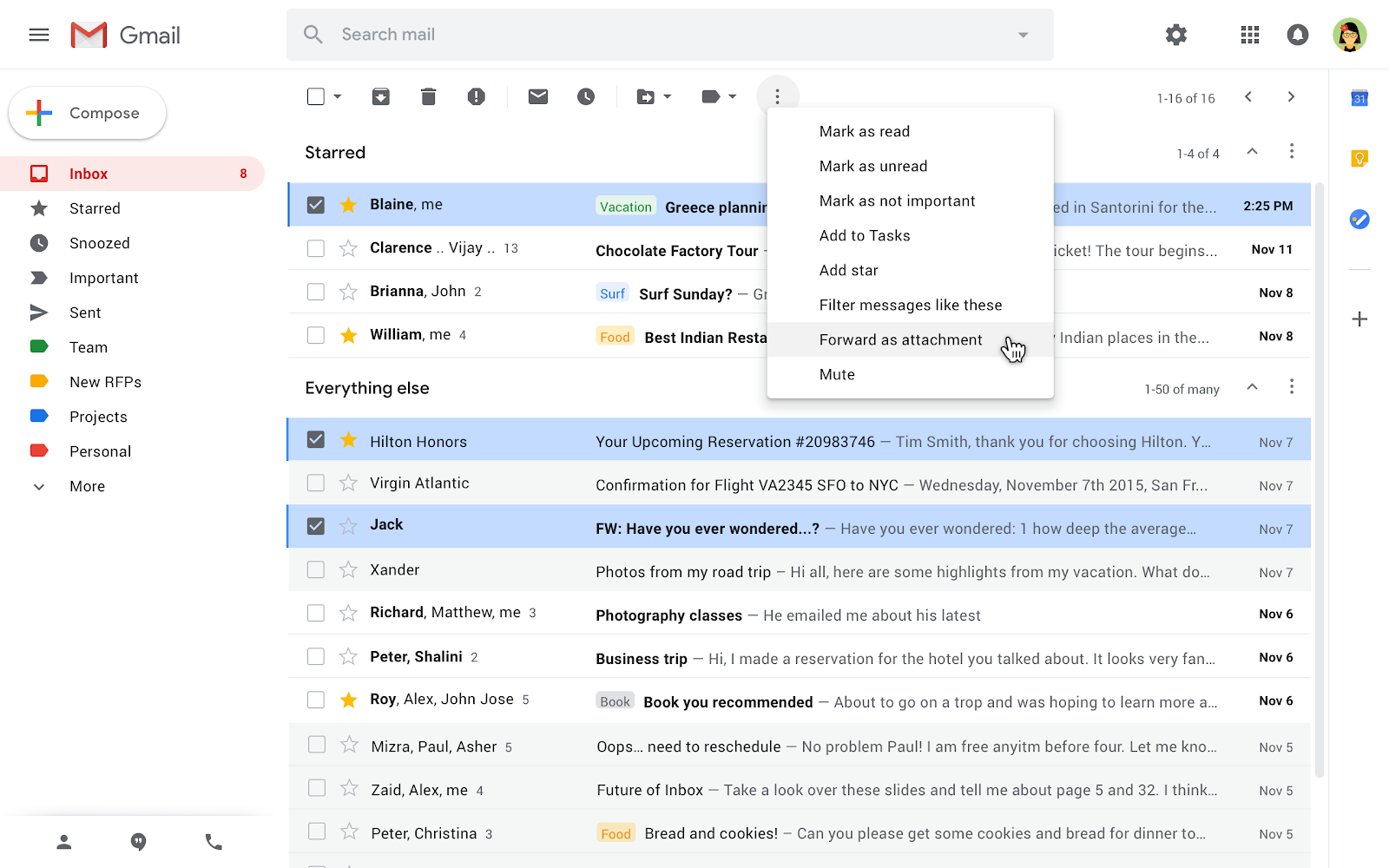
Gmail forward as attachment

Alternatively, you can select the emails manually and then click on the three-dot menu and select “Forward as attachment”.

The feature is a long-awaited for power users and it can be very useful especially when you want to forward multiple email attachments at one go. We are currently using Google G Suite and it isn’t available in Malaysia just yet. We would probably get it by the end of this month.


[ SOURCE, VIA ]

Tags: Gmailgoogle
Alexander Wong

Alexander Wong

POPULAR

Gmail now lets you add other emails as attachments

December 10, 2019

Genting Highlands Road Charges begin 28 May, here are the official rates

May 26, 2026

Ryt Bank introduces Ryt Invest with RM1 entry and 0% sales charge

May 28, 2026

Xiaomi 17T and 17T Pro launched in Malaysia: Leica 5x telephoto camera and up to 7,000mAh battery

May 28, 2026

Small Steps, Daily Rewards: Exploring the Maybank Tabung Daily Bonus Campaign

May 28, 2026

U Mobile ULTRA5G: Fast 5G That Actually Works Indoors

May 29, 2026

Copyright © 2025 · SoyaCincau.com
Mind Blow Sdn Bhd (1076827-P)

  • ADVERTISE
  • DISCLAIMER

Copyright © 2026 · SoyaCincau.com – Mind Blow Sdn Bhd (1076827-P)

  • ADVERTISE
  • DISCLAIMER