• 中文版
  • BM
  • News
  • Deals
  • Reviews
    • First Impressions
    • Hands-on
    • Comparisons
  • Tech
    • Mobile
    • Computers
    • Cameras
    • Wearables
    • Audio
    • Drones
  • Telco
    • Celcom
    • Digi
    • Maxis
    • Time
    • Tune Talk
    • U Mobile
    • Unifi
    • Yes
  • Cars
  • Contribute
  • Jobs
Menu
  • 中文版
  • BM
  • News
  • Deals
  • Reviews
    • First Impressions
    • Hands-on
    • Comparisons
  • Tech
    • Mobile
    • Computers
    • Cameras
    • Wearables
    • Audio
    • Drones
  • Telco
    • Celcom
    • Digi
    • Maxis
    • Time
    • Tune Talk
    • U Mobile
    • Unifi
    • Yes
  • Cars
  • Contribute
  • Jobs
Search
  • Tech
    • News
    • Mobile
    • Computers
    • Cameras
    • Wearables
    • Audio
    • Drones
  • Telco
    • Celcom
    • Digi
    • Maxis
    • Time
    • U Mobile
    • Unifi
    • Yes
  • Reviews
    • First Impressions
    • Hands-on
    • Comparisons
  • Buyer’s Guide
  • Opinions
  • Digital Life
  • Video
  • Deals
  • How-To
  • Cars
  • Bahasa Melayu
  • EV
  • Contribute
  • Advertise
Menu
  • Tech
    • News
    • Mobile
    • Computers
    • Cameras
    • Wearables
    • Audio
    • Drones
  • Telco
    • Celcom
    • Digi
    • Maxis
    • Time
    • U Mobile
    • Unifi
    • Yes
  • Reviews
    • First Impressions
    • Hands-on
    • Comparisons
  • Buyer’s Guide
  • Opinions
  • Digital Life
  • Video
  • Deals
  • How-To
  • Cars
  • Bahasa Melayu
  • EV
  • Contribute
  • Advertise
Search
Close
Home News

Dark mode for Instagram is finally here for Android and iOS—but how do you turn it off?

  • BY Nic Ker
  • 11 October 2019
  • 12:17 pm
  • Comment
Share on FacebookShare on Twitter

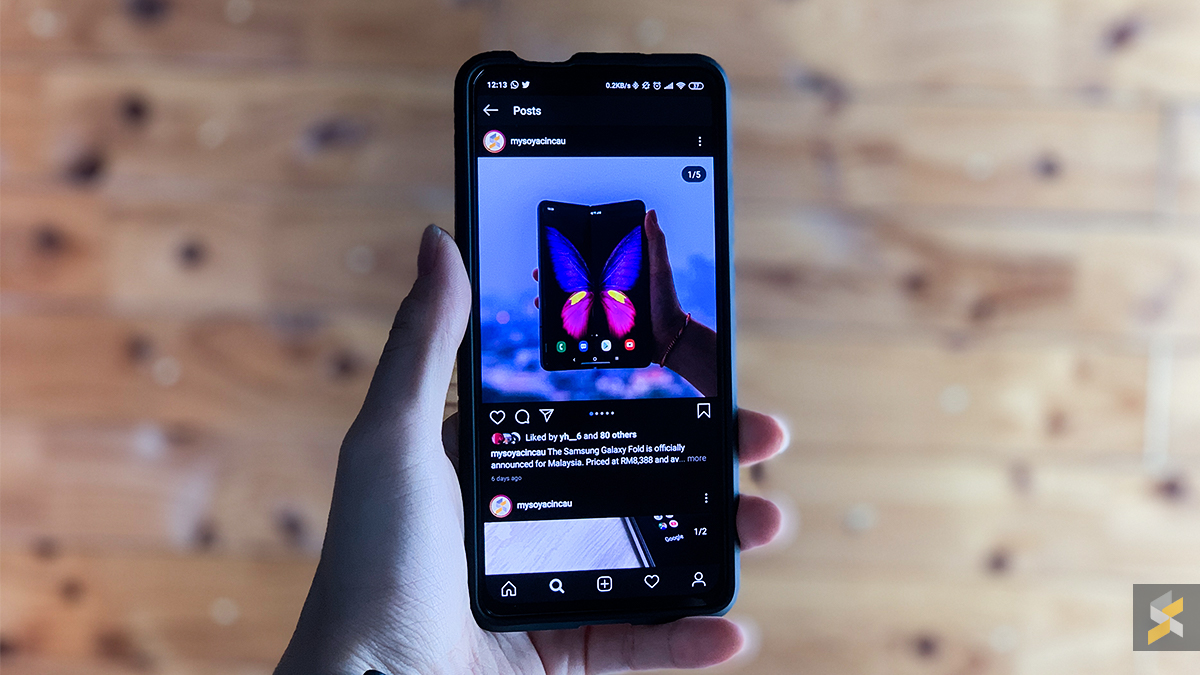
Fans of dark mode, such as myself, were thrilled to discover that the latest update for Instagram has introduced dark mode for Android 10 and iOS 13 users. Once the app is updated, Instagram will automatically go into dark mode if your system settings are set to dark mode.

https://twitter.com/mosseri/status/1181361666992115719

Instagram Head, Adam Mosseri, recently tweeted that the update is available on the latest OS versions of iPhones and Android devices, but the update appears to be available to certain Android 9 devices as well—those that have system-wide dark mode built in.

Dark mode is a feature that is included with Android 10, but for phones such those that run on Xiaomi’s MIUI or Samsung’s One UI, system-wide dark mode will still trigger the Instagram app to run in dark mode with the latest updates.

Unfortunately, there doesn’t appear to be an option to toggle dark mode within the app itself, and the only way to revert back to the more conventional coloured interface is to turn off system-wide dark mode.

[ SOURCE ]

Tags: AndroidInstagraminstagram dark modeiOSMobile
Nic Ker

Nic Ker

POPULAR

Dark mode for Instagram is finally here for Android and iOS—but how do you turn it off?

October 11, 2019
BYD Tech Discovery KL

MITI’s CBU EV ruling will wipe out current EV lineup from BYD, iCaur, Mini, Smart, Toyota, and more

May 7, 2026
Proton EV Plant, Tanjung Malim

MITI says EVs won’t become more expensive, but can Malaysia’s CKD industry fill the gap?

May 10, 2026

The Best Camera is the One You Have with You; The OPPO Find X9 Ultra Wants to be Your Only One

May 6, 2026

RM32 Per Line with 1TB Shared Data? Inside U Mobile’s New ULTRA Family Suite

May 7, 2026

Maxis Home Solar now offers outright purchase option, with up to 80% electricity bill savings

May 11, 2026

Copyright © 2025 · SoyaCincau.com
Mind Blow Sdn Bhd (1076827-P)

  • ADVERTISE
  • DISCLAIMER

Copyright © 2026 · SoyaCincau.com – Mind Blow Sdn Bhd (1076827-P)

  • ADVERTISE
  • DISCLAIMER