• 中文版
  • BM
  • News
  • Deals
  • Reviews
    • First Impressions
    • Hands-on
    • Comparisons
  • Tech
    • Mobile
    • Computers
    • Cameras
    • Wearables
    • Audio
    • Drones
  • Telco
    • Celcom
    • Digi
    • Maxis
    • Time
    • Tune Talk
    • U Mobile
    • Unifi
    • Yes
  • Cars
  • Contribute
  • Jobs
Menu
  • 中文版
  • BM
  • News
  • Deals
  • Reviews
    • First Impressions
    • Hands-on
    • Comparisons
  • Tech
    • Mobile
    • Computers
    • Cameras
    • Wearables
    • Audio
    • Drones
  • Telco
    • Celcom
    • Digi
    • Maxis
    • Time
    • Tune Talk
    • U Mobile
    • Unifi
    • Yes
  • Cars
  • Contribute
  • Jobs
Search
  • Tech
    • News
    • Mobile
    • Computers
    • Cameras
    • Wearables
    • Audio
    • Drones
  • Telco
    • Celcom
    • Digi
    • Maxis
    • Time
    • U Mobile
    • Unifi
    • Yes
  • Reviews
    • First Impressions
    • Hands-on
    • Comparisons
  • Buyer’s Guide
  • Opinions
  • Digital Life
  • Video
  • Deals
  • How-To
  • Cars
  • Bahasa Melayu
  • EV
  • Contribute
  • Advertise
Menu
  • Tech
    • News
    • Mobile
    • Computers
    • Cameras
    • Wearables
    • Audio
    • Drones
  • Telco
    • Celcom
    • Digi
    • Maxis
    • Time
    • U Mobile
    • Unifi
    • Yes
  • Reviews
    • First Impressions
    • Hands-on
    • Comparisons
  • Buyer’s Guide
  • Opinions
  • Digital Life
  • Video
  • Deals
  • How-To
  • Cars
  • Bahasa Melayu
  • EV
  • Contribute
  • Advertise
Search
Close
Home News

Here’s how to enable Dark Mode for Facebook Messenger

  • BY Raywen Ong
  • 4 March 2019
  • 3:41 pm
  • Comment
Share on FacebookShare on Twitter

Facebook has made tons of changes to their Messenger app recently. The company has been overhauling the Messenger app in an effort to ease user’s experience by eliminating unnecessary elements and putting emphasis on more important features.

Interestingly, Facebook has also promised that it would eventually roll out a dark mode for its users, and that mode has finally arrived as a fun Easter egg.

The feature was first announced back in October 2018, but it was only made available to a couple of users in certain country as part of its early testing phase. And now, it is available to everyone who has the latest version of the Messenger app installed on their devices.

To activate dark mode in Messenger, all you have to do is go to a chat thread, and send the person (or even yourself) the crescent moon emoji. If you are confused, the emoji looks something like this:


And once that’s done, it will start raining moon on your screen, indicating that the feature has been unlocked.
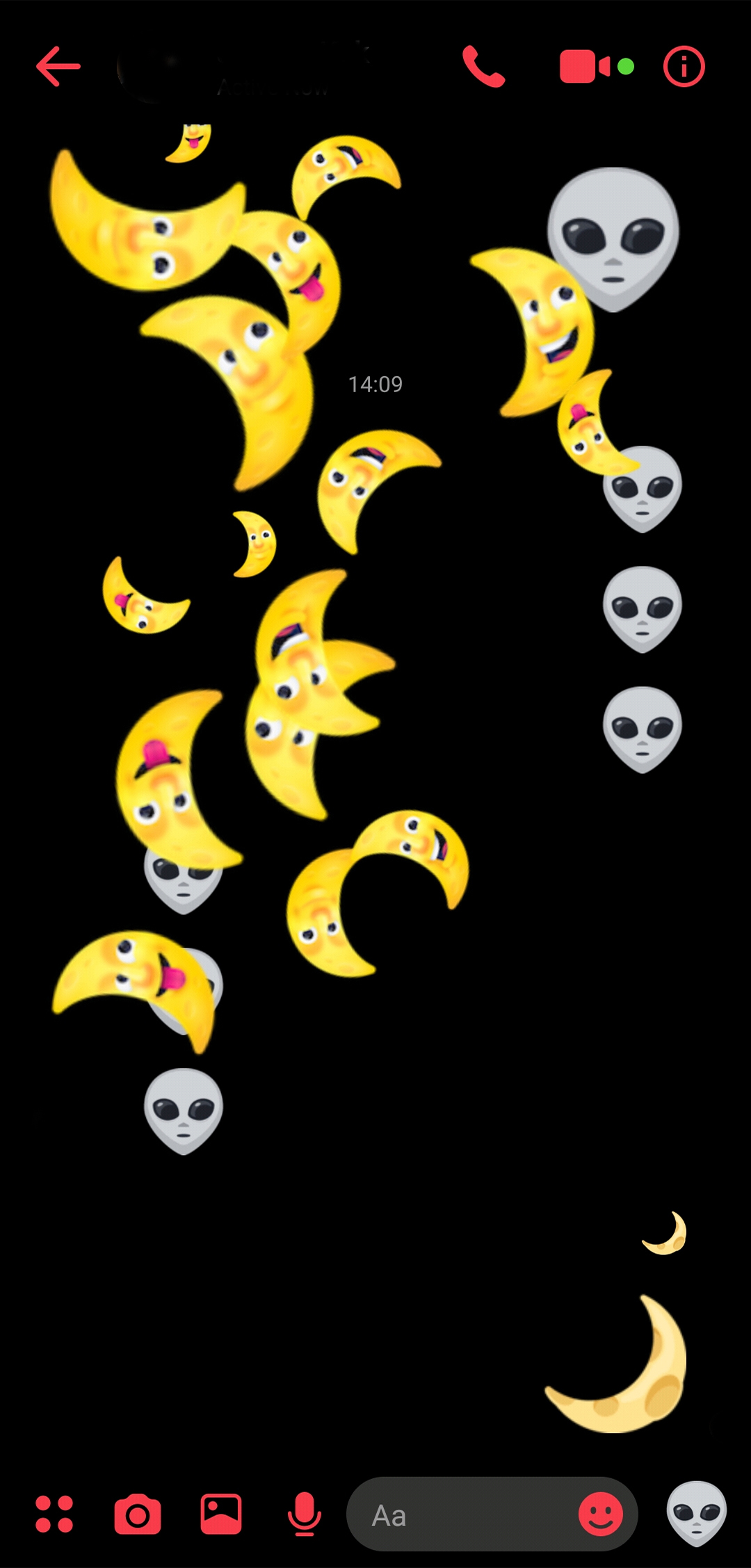
All that’s left to do is to go to your profile page in the app, and you will be greeted with an option to turn the Dark Mode on. Simple as that!

But if this mode is not available on your Messenger app yet, don’t worry. Because according to Android Police, the mode has not rolled out to everyone just yet. Some of the users also received a message indicating that it is still a work in progress.

[SOURCE]

Raywen Ong

Raywen Ong

POPULAR

Malaysia’s first 5g advanced Broadband: What You Get for RM68/month

January 14, 2026

Can a mid-range phone really stay fast for 6 years? A closer look at the OPPO Reno15 series

January 26, 2026

Here’s how to enable Dark Mode for Facebook Messenger

March 4, 2019
Perodua QV-E at Perodua Glenmarie

Less than 40 registered in 2025: What’s next for Perodua’s first EV? | Let’s Talk About #136

February 9, 2026

Zeekr 7X 2026 gets a price hike in Malaysia: Still cheaper than Tesla Model Y

February 6, 2026

Tesla Model 3 and Model Y now listed with up to 55km more range

February 6, 2026

Copyright © 2025 · SoyaCincau.com
Mind Blow Sdn Bhd (1076827-P)

  • ADVERTISE
  • DISCLAIMER

Copyright © 2026 · SoyaCincau.com – Mind Blow Sdn Bhd (1076827-P)

  • ADVERTISE
  • DISCLAIMER