• 中文版
  • BM
  • News
  • Deals
  • Reviews
    • First Impressions
    • Hands-on
    • Comparisons
  • Tech
    • Mobile
    • Computers
    • Cameras
    • Wearables
    • Audio
    • Drones
  • Telco
    • Celcom
    • Digi
    • Maxis
    • Time
    • Tune Talk
    • U Mobile
    • Unifi
    • Yes
  • Cars
  • Contribute
  • Jobs
Menu
  • 中文版
  • BM
  • News
  • Deals
  • Reviews
    • First Impressions
    • Hands-on
    • Comparisons
  • Tech
    • Mobile
    • Computers
    • Cameras
    • Wearables
    • Audio
    • Drones
  • Telco
    • Celcom
    • Digi
    • Maxis
    • Time
    • Tune Talk
    • U Mobile
    • Unifi
    • Yes
  • Cars
  • Contribute
  • Jobs
Search
  • Tech
    • News
    • Mobile
    • Computers
    • Cameras
    • Wearables
    • Audio
    • Drones
  • Telco
    • Celcom
    • Digi
    • Maxis
    • Time
    • U Mobile
    • Unifi
    • Yes
  • Reviews
    • First Impressions
    • Hands-on
    • Comparisons
  • Buyer’s Guide
  • Opinions
  • Digital Life
  • Video
  • Deals
  • How-To
  • Cars
  • Bahasa Melayu
  • EV
  • Contribute
  • Advertise
Menu
  • Tech
    • News
    • Mobile
    • Computers
    • Cameras
    • Wearables
    • Audio
    • Drones
  • Telco
    • Celcom
    • Digi
    • Maxis
    • Time
    • U Mobile
    • Unifi
    • Yes
  • Reviews
    • First Impressions
    • Hands-on
    • Comparisons
  • Buyer’s Guide
  • Opinions
  • Digital Life
  • Video
  • Deals
  • How-To
  • Cars
  • Bahasa Melayu
  • EV
  • Contribute
  • Advertise
Search
Close
Home News

Here’s how to get iOS 12 Public Beta on your iPhone and iPad

  • BY Alexander Wong
  • 26 June 2018
  • 10:10 am
  • Comment
Share on FacebookShare on Twitter

iOS 12 Public Beta Malaysia

Earlier this month, Apple had announced iOS 12. While it will be released officially later this year, you can give it a try with its iOS 12 public beta release. It’s available today and you can download it on your spare iPhone, iPad or iPod Touch.

Take note that this is still beta so it won’t be as stable as the official release. If you know what to expect and if you don’t mind trying it out on a secondary device, you can proceed by enrolling your device for the iOS beta program.
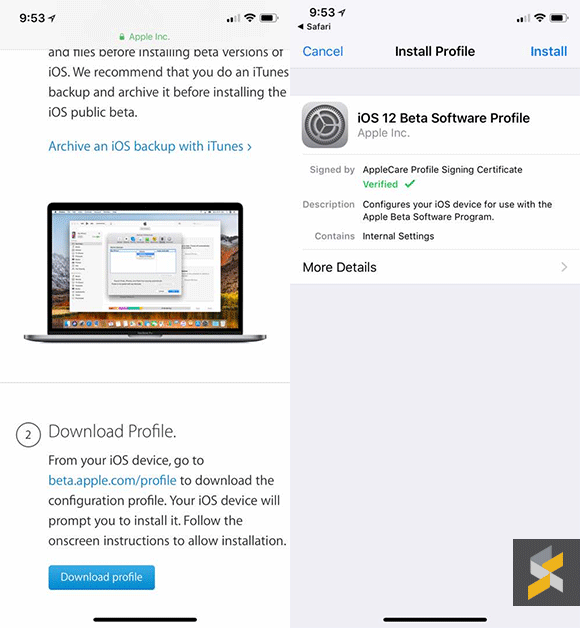
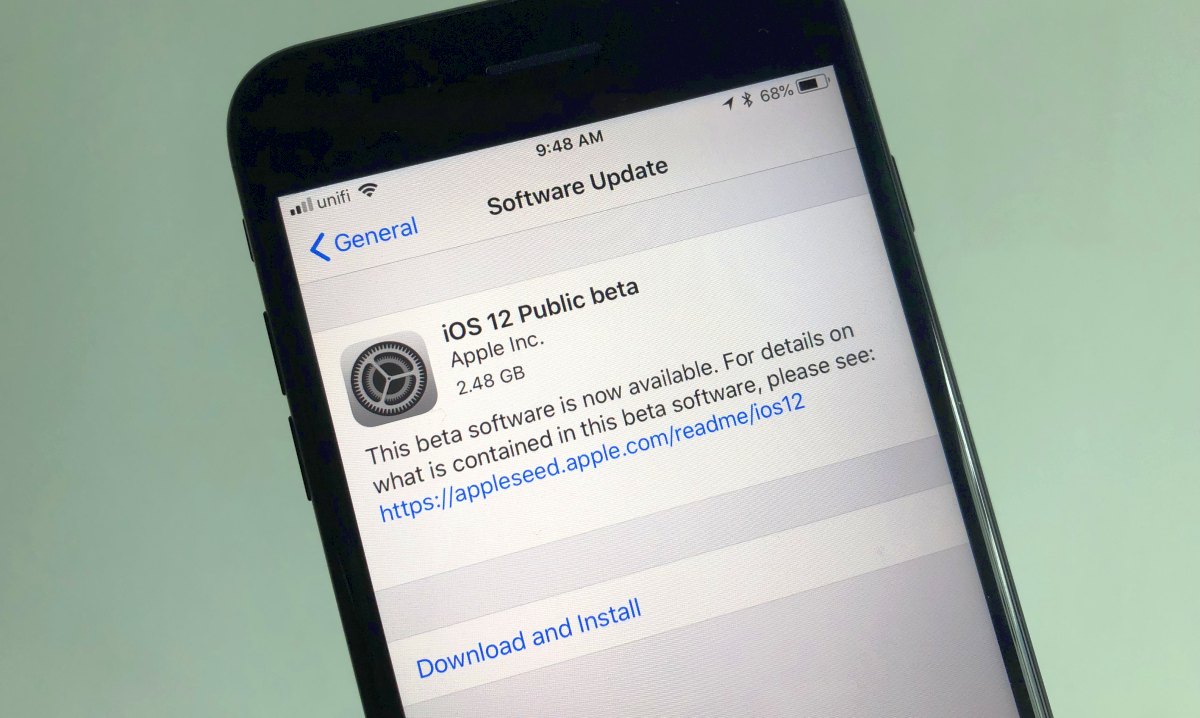
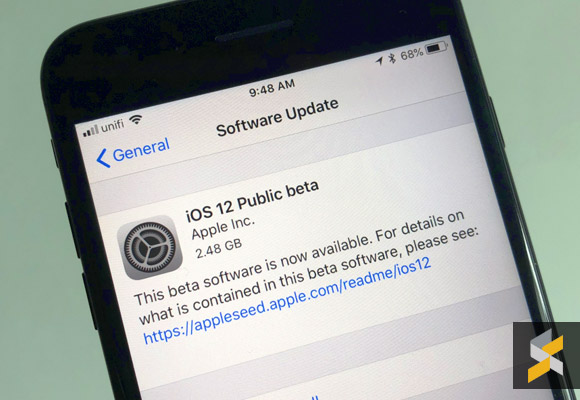
To do so, just sign in with your Apple ID, download the profile using Safari on your iPhone or iPad and proceed to install. Once that’s done, just go to Settings > General > Software Update, and you should be able to start downloading iOS 12 Public Beta.

When we tried downloading it on our iPhone 7 Plus, the update is about 2.5GB in size. It is also recommended that you perform a full device backup via iTunes so that you can downgrade back to iOS 11.4 with your existing data. For more details, you can check out the FAQ for the beta program.

With iOS 12, you can expect faster and responsive performance, better notification management, screen time tracking, support for up to 32 people on FaceTime and better privacy features on Safari. You can learn more about the iOS 12 on the preview page.

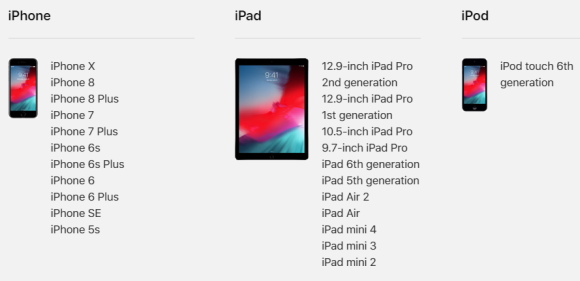
iOS 12 is supported on the following iOS devices:
Tags: AppleDownload iOS 12 MalaysiaiOSiOS 12iOS 12 BetaiOS 12 Beta MalaysiaiOS 12 MalaysiaiOS 12 Public BetaiPadiPhone
Alexander Wong

Alexander Wong

POPULAR

Can a mid-range phone really stay fast for 6 years? A closer look at the OPPO Reno15 series

January 26, 2026
Perodua QV-E at Perodua Glenmarie

Less than 40 registered in 2025: What’s next for Perodua’s first EV? | Let’s Talk About #136

February 9, 2026

Here’s how to get iOS 12 Public Beta on your iPhone and iPad

June 26, 2018

Zeekr 7X 2026 gets a price hike in Malaysia: Still cheaper than Tesla Model Y

February 6, 2026

SARA: One-off RM100 credit available today, applicable for frozen food

February 9, 2026

Tesla Model 3 and Model Y now listed with up to 55km more range

February 6, 2026

Copyright © 2025 · SoyaCincau.com
Mind Blow Sdn Bhd (1076827-P)

  • ADVERTISE
  • DISCLAIMER

Copyright © 2026 · SoyaCincau.com – Mind Blow Sdn Bhd (1076827-P)

  • ADVERTISE
  • DISCLAIMER