• 中文版
  • BM
  • News
  • Deals
  • Reviews
    • First Impressions
    • Hands-on
    • Comparisons
  • Tech
    • Mobile
    • Computers
    • Cameras
    • Wearables
    • Audio
    • Drones
  • Telco
    • Celcom
    • Digi
    • Maxis
    • Time
    • Tune Talk
    • U Mobile
    • Unifi
    • Yes
  • Cars
  • Contribute
  • Jobs
Menu
  • 中文版
  • BM
  • News
  • Deals
  • Reviews
    • First Impressions
    • Hands-on
    • Comparisons
  • Tech
    • Mobile
    • Computers
    • Cameras
    • Wearables
    • Audio
    • Drones
  • Telco
    • Celcom
    • Digi
    • Maxis
    • Time
    • Tune Talk
    • U Mobile
    • Unifi
    • Yes
  • Cars
  • Contribute
  • Jobs
Search
  • Tech
    • News
    • Mobile
    • Computers
    • Cameras
    • Wearables
    • Audio
    • Drones
  • Telco
    • Celcom
    • Digi
    • Maxis
    • Time
    • U Mobile
    • Unifi
    • Yes
  • Reviews
    • First Impressions
    • Hands-on
    • Comparisons
  • Buyer’s Guide
  • Opinions
  • Digital Life
  • Video
  • Deals
  • How-To
  • Cars
  • Bahasa Melayu
  • EV
  • Contribute
  • Advertise
Menu
  • Tech
    • News
    • Mobile
    • Computers
    • Cameras
    • Wearables
    • Audio
    • Drones
  • Telco
    • Celcom
    • Digi
    • Maxis
    • Time
    • U Mobile
    • Unifi
    • Yes
  • Reviews
    • First Impressions
    • Hands-on
    • Comparisons
  • Buyer’s Guide
  • Opinions
  • Digital Life
  • Video
  • Deals
  • How-To
  • Cars
  • Bahasa Melayu
  • EV
  • Contribute
  • Advertise
Search
Close
Home News

This is how you disable throttling on your slow iPhone with iOS 11.3

  • BY Alexander Wong
  • 7 February 2018
  • 1:44 pm
  • Comment
Share on FacebookShare on Twitter

Apple will be adding a new feature on iOS 11.3 which will provide iPhone users with some form of visibility of their battery’s health. On top of that, users with iPhone slowdowns will be given the choice to disable throttling so that they can run their iPhone at maximum performance. This comes after Apple had admitted to managing the performance of its older iPhones to prevent sudden shutdowns.

If you’re wondering how all this would look like, Apple has released a couple of screenshots and details of its new Battery Health feature for the next iOS release.
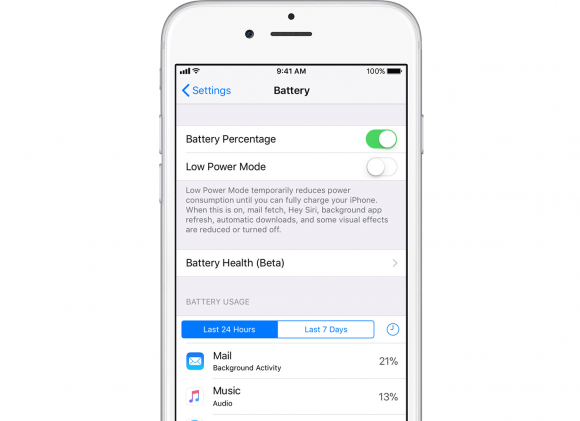
If you’re using an iPhone 6 or newer, and running on iOS 11.3, you’ll see a new “Battery Health (Beta)” menu item under Settings > Battery. This will give you a status of battery’s maximum capacity and whether or not your device is running at peak performance.
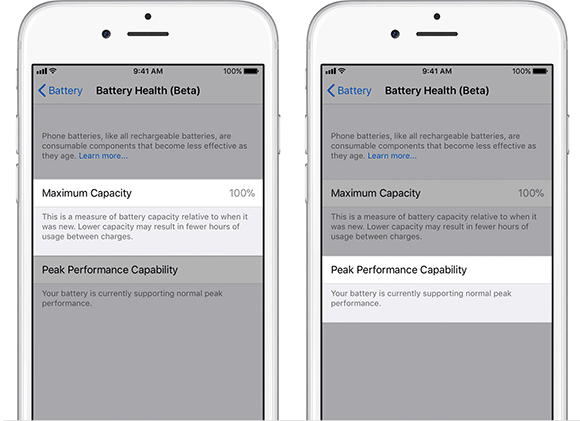
If everything is all good, the Battery Health status will show 100% for Maximum capacity while being able to support normal peak performance. This means there’s no throttling and there won’t be performance caps on your iPhone.
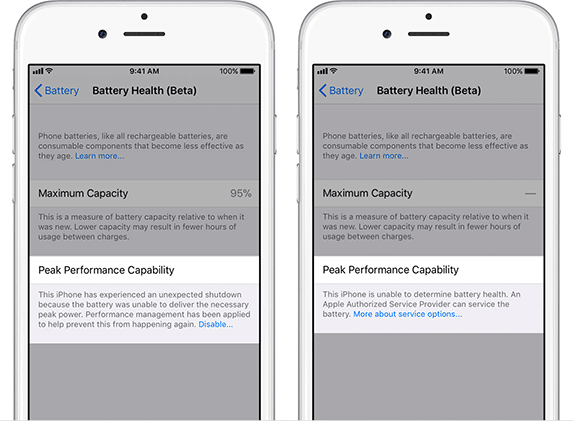
For those with a problematic battery, you would see a message indicating that there was an unexpected shutdown and performance management has been applied for better stability. As a result, your iPhone will be slower than normal but you can disable this by tapping on the “Disable” link.

Obviously, Apple doesn’t recommend that you disable this management feature and the best solution is to replace the battery which is now offered at a discount. If it can’t detect your battery status, it will also warn you to replace your battery at an authorised service provider.
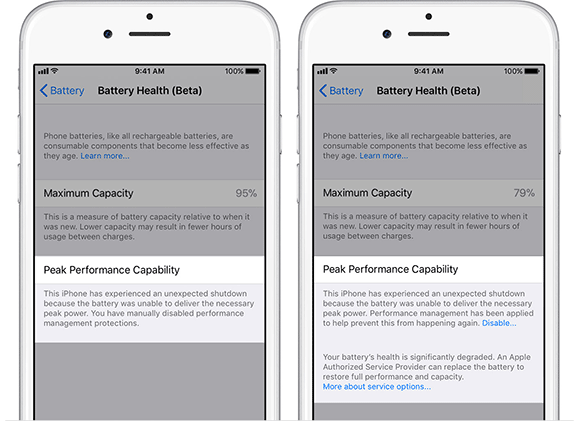
Once you’ve turned off performance management, you won’t be able to enable it back unless there’s another unexpected shutdown. So, if it was a false alarm, you should be able to continue using your iPhone at maximum performance all the time.

If the battery’s health is severely degraded, iOS 11.3 will add another message below which recommends that you replace your battery in order to restore full performance. When this happens, you can keep on disabling the “performance management” feature but you could be getting more frequent shutdowns or restarts, which isn’t great in terms of experience.

At least, Apple is being more transparent and users can get to decide what’s best for them whether it is for performance or stability. What do you guys think? Is this the best solution so far from Apple? Let us know in the comments below.

[ SOURCE, VIA ]

Tags: ApplebatteryBattery HealthiOSiOS 11.3iOS 11.3 BetaiPhoneiPhone 6iPhone 6SiPhone 7iPhone Slow downiPhone SlowdownSlow iPhoneThrottling
Alexander Wong

Alexander Wong

POPULAR

JPJePlate: Is the Malaysian flag printed wrongly on EV plates?

December 12, 2025

sooka’s Gilerrr Streaming Challenge Draws 273 Participants, Clinches Malaysia Book of Records Title

December 5, 2025

This is how you disable throttling on your slow iPhone with iOS 11.3

February 7, 2018

U Mobile Unbeatable Phone Sale: Travel with FREE Global Roaming Across 60+ Destinations

December 10, 2025

Perodua Traz: B-segment SUV with 1.5L engine and 471L boot, priced from RM76,100

December 17, 2025

Why have Malaysia’s 5G download speeds declined?

December 16, 2025

Copyright © 2025 · SoyaCincau.com
Mind Blow Sdn Bhd (1076827-P)

  • ADVERTISE
  • DISCLAIMER

Copyright © 2025 · SoyaCincau.com – Mind Blow Sdn Bhd (1076827-P)

  • ADVERTISE
  • DISCLAIMER