• 中文版
  • BM
  • News
  • Deals
  • Reviews
    • First Impressions
    • Hands-on
    • Comparisons
  • Tech
    • Mobile
    • Computers
    • Cameras
    • Wearables
    • Audio
    • Drones
  • Telco
    • Celcom
    • Digi
    • Maxis
    • Time
    • Tune Talk
    • U Mobile
    • Unifi
    • Yes
  • Cars
  • Contribute
  • Jobs
Menu
  • 中文版
  • BM
  • News
  • Deals
  • Reviews
    • First Impressions
    • Hands-on
    • Comparisons
  • Tech
    • Mobile
    • Computers
    • Cameras
    • Wearables
    • Audio
    • Drones
  • Telco
    • Celcom
    • Digi
    • Maxis
    • Time
    • Tune Talk
    • U Mobile
    • Unifi
    • Yes
  • Cars
  • Contribute
  • Jobs
Search
  • Tech
    • News
    • Mobile
    • Computers
    • Cameras
    • Wearables
    • Audio
    • Drones
  • Telco
    • Celcom
    • Digi
    • Maxis
    • Time
    • U Mobile
    • Unifi
    • Yes
  • Reviews
    • First Impressions
    • Hands-on
    • Comparisons
  • Buyer’s Guide
  • Opinions
  • Digital Life
  • Video
  • Deals
  • How-To
  • Cars
  • Bahasa Melayu
  • EV
  • Contribute
  • Advertise
Menu
  • Tech
    • News
    • Mobile
    • Computers
    • Cameras
    • Wearables
    • Audio
    • Drones
  • Telco
    • Celcom
    • Digi
    • Maxis
    • Time
    • U Mobile
    • Unifi
    • Yes
  • Reviews
    • First Impressions
    • Hands-on
    • Comparisons
  • Buyer’s Guide
  • Opinions
  • Digital Life
  • Video
  • Deals
  • How-To
  • Cars
  • Bahasa Melayu
  • EV
  • Contribute
  • Advertise
Search
Close
Home Digital Life

You won’t need Chromecast to watch iflix on your TV now

  • BY Rory Lee
  • 16 May 2017
  • 5:15 pm
  • Comment
Share on FacebookShare on Twitter


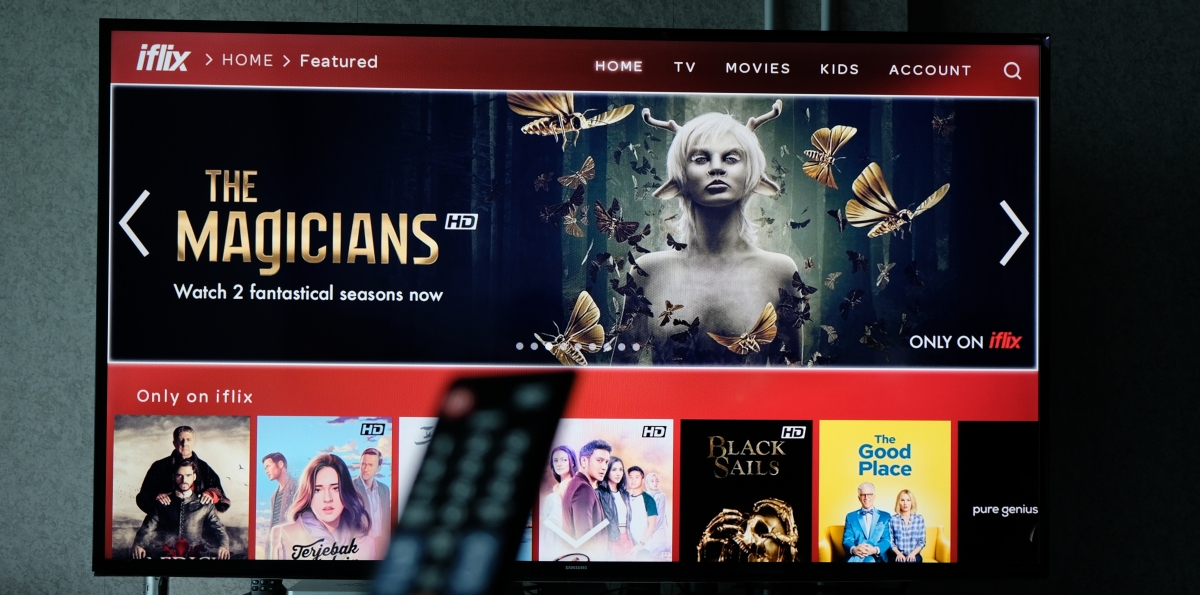
Huzzah! iflix finally has its own standalone TV app so you have access to all of iflix’s content without the need to plug in a Chromecast anymore. There is a catch, though.

In conjunction with Samsung’s launch of their brand new QLED flagship TVs, iflix also announced that they will be debuting their proprietary native television application on Samsung’s Smart Hub. That means all Samsung Smart TVs with the Samsung Smart Hub can install the iflix app — yes that means old (2012 onwards) and new TVs too — directly into their televisions.

However, this also means that the native TV iflix app — at least for now — is available exclusively on Samsung’s Smart TVs. For the most part, the application looks pretty much identical on the TV as it does on the desktop so it should be very familiar to iflix users.

Users who want to download the iflix app can do so by accessing “Apps” in Samsung’s Smart Hub. Then just search for iflix, select the app, and download it.

Customers who purchase designated Samsung Smart TV models from 16th May to the 30th June 2017 will also receive a 12-month iflix subscription for free. Unfortunately, there is no information on when iflix plans to launch native TV apps for non-Samsung TVs but in a past statement, the streaming service has said that it will come in the “near future”.

Tags: iflixSamsungSamsung TV
Rory Lee

Rory Lee

POPULAR

sooka’s Gilerrr Streaming Challenge Draws 273 Participants, Clinches Malaysia Book of Records Title

December 5, 2025

JPJePlate: Is the Malaysian flag printed wrongly on EV plates?

December 12, 2025

BOMBA investigating fire involving two EVs parked at home

December 19, 2025

You won’t need Chromecast to watch iflix on your TV now

May 16, 2017

U Mobile Unbeatable Phone Sale: Travel with FREE Global Roaming Across 60+ Destinations

December 10, 2025

Perodua Traz: B-segment SUV with 1.5L engine and 471L boot, priced from RM76,100

December 17, 2025

Copyright © 2025 · SoyaCincau.com
Mind Blow Sdn Bhd (1076827-P)

  • ADVERTISE
  • DISCLAIMER

Copyright © 2025 · SoyaCincau.com – Mind Blow Sdn Bhd (1076827-P)

  • ADVERTISE
  • DISCLAIMER