• 中文版
  • BM
  • News
  • Deals
  • Reviews
    • First Impressions
    • Hands-on
    • Comparisons
  • Tech
    • Mobile
    • Computers
    • Cameras
    • Wearables
    • Audio
    • Drones
  • Telco
    • Celcom
    • Digi
    • Maxis
    • Time
    • Tune Talk
    • U Mobile
    • Unifi
    • Yes
  • Cars
  • Contribute
  • Jobs
Menu
  • 中文版
  • BM
  • News
  • Deals
  • Reviews
    • First Impressions
    • Hands-on
    • Comparisons
  • Tech
    • Mobile
    • Computers
    • Cameras
    • Wearables
    • Audio
    • Drones
  • Telco
    • Celcom
    • Digi
    • Maxis
    • Time
    • Tune Talk
    • U Mobile
    • Unifi
    • Yes
  • Cars
  • Contribute
  • Jobs
Search
  • Tech
    • News
    • Mobile
    • Computers
    • Cameras
    • Wearables
    • Audio
    • Drones
  • Telco
    • Celcom
    • Digi
    • Maxis
    • Time
    • U Mobile
    • Unifi
    • Yes
  • Reviews
    • First Impressions
    • Hands-on
    • Comparisons
  • Buyer’s Guide
  • Opinions
  • Digital Life
  • Video
  • Deals
  • How-To
  • Cars
  • Bahasa Melayu
  • EV
  • Contribute
  • Advertise
Menu
  • Tech
    • News
    • Mobile
    • Computers
    • Cameras
    • Wearables
    • Audio
    • Drones
  • Telco
    • Celcom
    • Digi
    • Maxis
    • Time
    • U Mobile
    • Unifi
    • Yes
  • Reviews
    • First Impressions
    • Hands-on
    • Comparisons
  • Buyer’s Guide
  • Opinions
  • Digital Life
  • Video
  • Deals
  • How-To
  • Cars
  • Bahasa Melayu
  • EV
  • Contribute
  • Advertise
Search
Close
Home Digital Life

Secure your WhatsApp now with Two-Step verification

  • BY Alexander Wong
  • 11 February 2017
  • 9:27 pm
  • Comment
Share on FacebookShare on Twitter

170211-secure-whatsapp-two-step-authentication

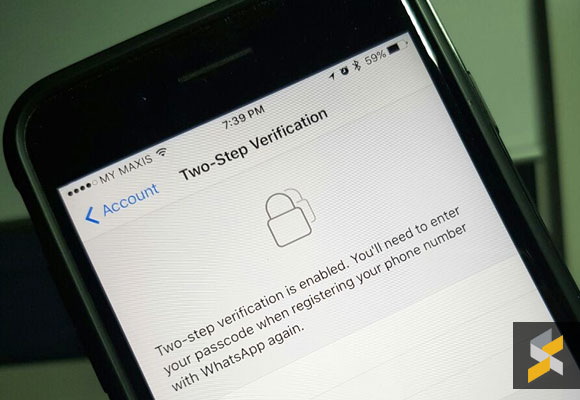
WhatsApp has just introduced a new way of securing your account. If the standard SMS verification isn’t enough, you can now add another layer with its new two-step verification. So even if someone grabs hold of your SIM or hijacks your mobile number, this will prevent unwanted access to your WhatsApp account.
170210-whatsapp-2-step-verification-01

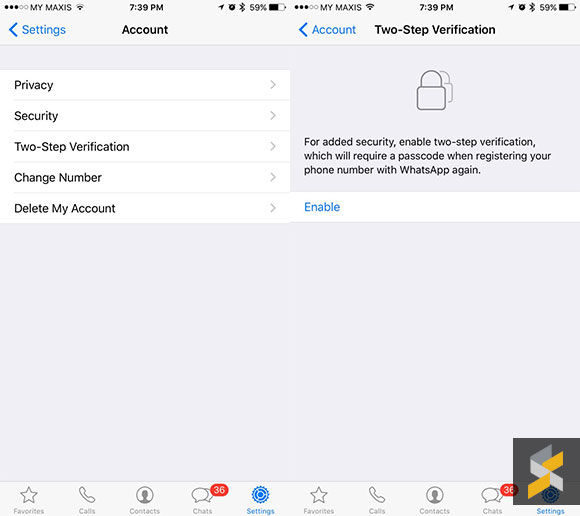
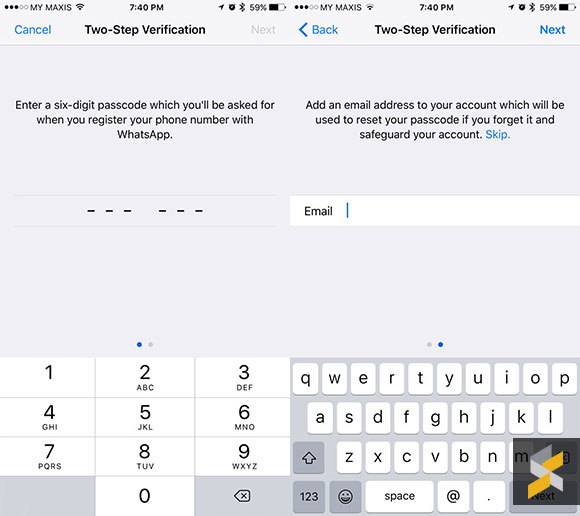
The Two-Step verification process isn’t as dynamic as it seems. You’ll need to enter a 6 digit passcode of your choice and you also get the option to enter an email address in case you’ve forgotten your pin number. To set it up, just go into Settings > Account > Two Step verification. Do ensure that you’ve entered the correct email address as WhatsApp doesn’t perform any validation from their end.
170210-whatsapp-2-step-verification-02

After enabling Two Step verification, WhatsApp may periodically ask you to enter the 6 digit pin to ensure that you still remember your passcode. If you lose your passcode, you’ll be locked out from your account for 7 days. After that, you can verify without a passcode but you’ll lose all pending conversations.

The Two Step verification feature was released for beta users late last year and it is now available to all users on iOS and Android. If you’re paranoid about being hijacked, you probably should enable this now.


[ SOURCE, VIA ]

Tags: Instant MessagingWhatsappWhatsApp passwordWhatsApp securityWhatsApp Two Step Verification
Alexander Wong

Alexander Wong

POPULAR

Xiaomi’s new Mijia Air Conditioner Eco 4-star now in Malaysia, available from under RM900

March 25, 2026

Secure your WhatsApp now with Two-Step verification

February 11, 2017

Malaysia now spending over RM4 billion monthly on fuel subsidies. It’s time to accelerate EV shift

March 29, 2026

Is Your Current Phone Generations Behind? Here’s a Simpler Way to Close the Gap

March 13, 2026

Oppo Find N6 Malaysia: The Flattest Foldable Ever is Now Available for Purchase at RM8,699

March 27, 2026

Oppo Find X9 Ultra with Hasselblad 10x optical telephoto camera launching in April

March 24, 2026

Copyright © 2025 · SoyaCincau.com
Mind Blow Sdn Bhd (1076827-P)

  • ADVERTISE
  • DISCLAIMER

Copyright © 2026 · SoyaCincau.com – Mind Blow Sdn Bhd (1076827-P)

  • ADVERTISE
  • DISCLAIMER