• 中文版
  • BM
  • News
  • Deals
  • Reviews
    • First Impressions
    • Hands-on
    • Comparisons
  • Tech
    • Mobile
    • Computers
    • Cameras
    • Wearables
    • Audio
    • Drones
  • Telco
    • Celcom
    • Digi
    • Maxis
    • Time
    • Tune Talk
    • U Mobile
    • Unifi
    • Yes
  • Cars
  • Contribute
  • Jobs
Menu
  • 中文版
  • BM
  • News
  • Deals
  • Reviews
    • First Impressions
    • Hands-on
    • Comparisons
  • Tech
    • Mobile
    • Computers
    • Cameras
    • Wearables
    • Audio
    • Drones
  • Telco
    • Celcom
    • Digi
    • Maxis
    • Time
    • Tune Talk
    • U Mobile
    • Unifi
    • Yes
  • Cars
  • Contribute
  • Jobs
Search
  • Tech
    • News
    • Mobile
    • Computers
    • Cameras
    • Wearables
    • Audio
    • Drones
  • Telco
    • Celcom
    • Digi
    • Maxis
    • Time
    • U Mobile
    • Unifi
    • Yes
  • Reviews
    • First Impressions
    • Hands-on
    • Comparisons
  • Buyer’s Guide
  • Opinions
  • Digital Life
  • Video
  • Deals
  • How-To
  • Cars
  • Bahasa Melayu
  • EV
  • Contribute
  • Advertise
Menu
  • Tech
    • News
    • Mobile
    • Computers
    • Cameras
    • Wearables
    • Audio
    • Drones
  • Telco
    • Celcom
    • Digi
    • Maxis
    • Time
    • U Mobile
    • Unifi
    • Yes
  • Reviews
    • First Impressions
    • Hands-on
    • Comparisons
  • Buyer’s Guide
  • Opinions
  • Digital Life
  • Video
  • Deals
  • How-To
  • Cars
  • Bahasa Melayu
  • EV
  • Contribute
  • Advertise
Search
Close
Home Digital Life

Netflix goes offline

  • BY Alexander Wong
  • 1 December 2016
  • 12:32 am
  • Comment
Share on FacebookShare on Twitter

161201-netflix-offline-download

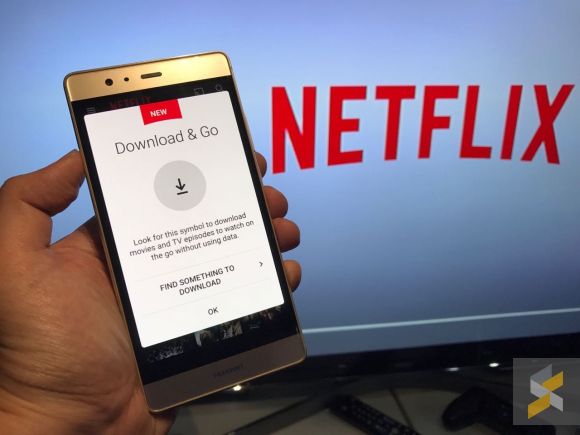
Catching a flight or heading somewhere with poor internet connectivity? Now you can watch Netflix offline with its new download feature.

Airplane mode. Road trip mode. Stuck-in-the-subway-for-20-minutes mode. Your favorite stories are now available for download any time. pic.twitter.com/g7QZA3TyE8

— Netflix US (@netflix) November 30, 2016

Not all content are supported but most popular original titles like Stranger Things, The Crown, Narcos and Black Mirror are available for offline viewing. It is applicable for both Android and iOS, and you can start saving your shows if it has a download button on them. Just make sure you’ve updated the app to the latest version.

Depending on your preference and available storage, you can choose to download your offline content in either standard or high quality. Just hit the menu button and select App settings. You should see the Video Quality option under Downloads. A typical TV series episode takes up about 200-300MB of space and it doubles if you choose high quality.

You can find all your downloaded shows under My Downloads when you tap the menu icon. Similar to iflix, there’s an expiry after 7 days. The moment you hit play, you have 48 hours to complete your show and you can see how much time is remaining under the My Downloads section.


[ SOURCE 2 ]

Tags: DownloadDownload Netflix ShowsNetflixNetflix OfflineNetflix offline mode
Alexander Wong

Alexander Wong

POPULAR

Tune Talk introduces #TheRealTuney campaign, highlights focus on all-day Ultra Fast 5G Connectivity for 2026

January 23, 2026

Netflix goes offline

December 1, 2016

Is your TNG eWallet suspended? Here’s what you should do

January 27, 2026

Xiaomi TV Stick 4K Second Gen: Google TV on a stick, priced at RM219

February 19, 2026

Astro drops HBO channels after nearly 30 years, introduces 4 new channels under Astro One Epic Pack

February 16, 2026

GWM Wey G9 PHEV: The latest Alphard fighter in Malaysia, locally assembled in Melaka

February 19, 2026

Copyright © 2025 · SoyaCincau.com
Mind Blow Sdn Bhd (1076827-P)

  • ADVERTISE
  • DISCLAIMER

Copyright © 2026 · SoyaCincau.com – Mind Blow Sdn Bhd (1076827-P)

  • ADVERTISE
  • DISCLAIMER