
• 中文版
  • BM
  • News
  • Deals
  • Reviews
    • First Impressions
    • Hands-on
    • Comparisons
  • Tech
    • Mobile
    • Computers
    • Cameras
    • Wearables
    • Audio
    • Drones
  • Telco
    • Celcom
    • Digi
    • Maxis
    • Time
    • Tune Talk
    • U Mobile
    • Unifi
    • Yes
  • Cars
  • Contribute
  • Jobs
Menu
  • 中文版
  • BM
  • News
  • Deals
  • Reviews
    • First Impressions
    • Hands-on
    • Comparisons
  • Tech
    • Mobile
    • Computers
    • Cameras
    • Wearables
    • Audio
    • Drones
  • Telco
    • Celcom
    • Digi
    • Maxis
    • Time
    • Tune Talk
    • U Mobile
    • Unifi
    • Yes
  • Cars
  • Contribute
  • Jobs
Search
  • Tech
    • News
    • Mobile
    • Computers
    • Cameras
    • Wearables
    • Audio
    • Drones
  • Telco
    • Celcom
    • Digi
    • Maxis
    • Time
    • U Mobile
    • Unifi
    • Yes
  • Reviews
    • First Impressions
    • Hands-on
    • Comparisons
  • Buyer’s Guide
  • Opinions
  • Digital Life
  • Video
  • Deals
  • How-To
  • Cars
  • Bahasa Melayu
  • EV
  • Contribute
  • Advertise
Menu
  • Tech
    • News
    • Mobile
    • Computers
    • Cameras
    • Wearables
    • Audio
    • Drones
  • Telco
    • Celcom
    • Digi
    • Maxis
    • Time
    • U Mobile
    • Unifi
    • Yes
  • Reviews
    • First Impressions
    • Hands-on
    • Comparisons
  • Buyer’s Guide
  • Opinions
  • Digital Life
  • Video
  • Deals
  • How-To
  • Cars
  • Bahasa Melayu
  • EV
  • Contribute
  • Advertise
Search
Close
Home Digital Life

Google Keyboard’s new update brings awesome new features

  • BY Rory Lee
  • 3 May 2016
  • 6:08 pm
  • Comment
Share on FacebookShare on Twitter

160503-google-keyboard-v5.0-update

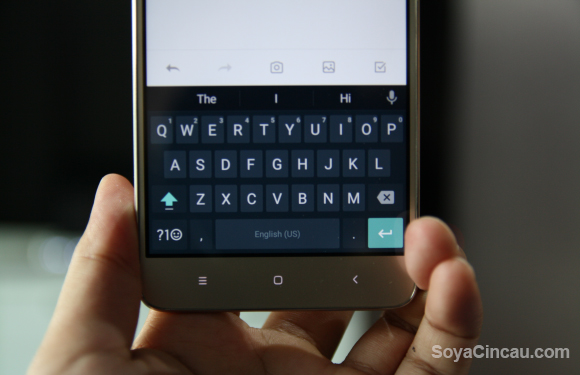
Google Keyboard is by far my favourite keyboard app. It’s clean, minimalist and unobtrusive but perhaps the thing I like most about it is that it’s familiar. The keys are where I need them to be.

The only thing is that the Google Keyboard is a little behind its competitors if we’re looking at functionality. Well, Google is looking to rectify that with a massive update to their Keyboard app.

Version 5.0 is Google’s latest update to the Keyboard app and it comes with a whole host of new features. Stuff like one-handed mode, adjustable keyboard height in settings, and even improved gesture typing.
160503-google-keyboard-v5.0-update-1

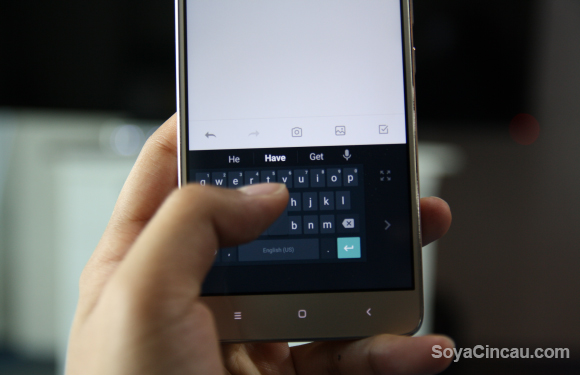
One-handed mode will undoubtedly be welcomed by those who have large smartphones but want to use them with one hand. With this new update, simply hold the comma key and swipe your hand right to activate one-handed mode. Once there, you can switch which side you want the keyboard to be as well as hit a button to bring it back to full size.
160503-google-keyboard-v5.0-update-3

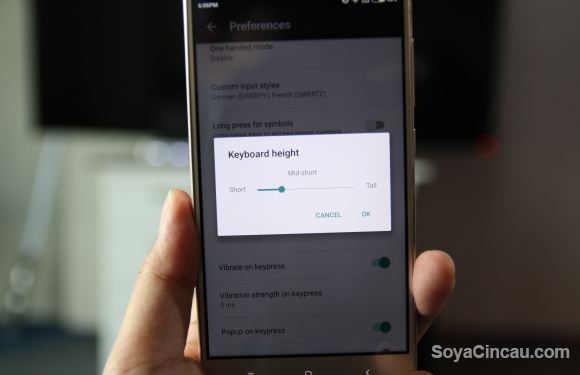
You can also now adjust the keyboard height in the settings menu. I don’t know about you but I prefer a shorter keyboard so that there’s more space for me to look at what I’m typing, plus I don’t have to reach too far to hit the top row of keys.
 

160503-google-keyboard-v5.0-update-2

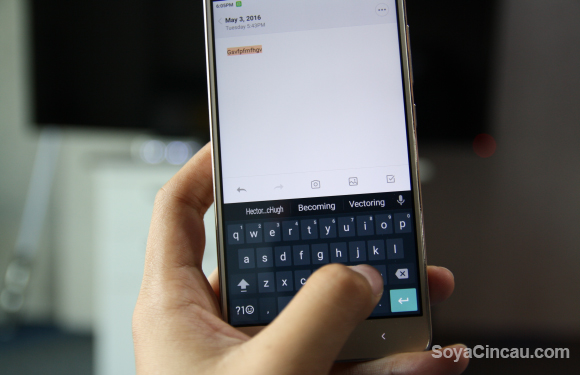
Among my favourite quality of life improvements that came with the keyboard is the fact that you can now slide your finger on the spacebar to move the text cursor which does wonders for precise text selection. You can also swipe your finger on the backspace button to delete multiple words at a time.

I liked the Google Keyboard for how barebones and minimalistic it was, but I have to admit, being able to slide your finger on the spacebar to move the cursor for individual text selection is something I definitely wanted to have.

Maybe more features is a good thing, just as long as they keep the feel the same. I’d hate to have to start searching for a new keyboard app again.

Keep in mind that these updates will roll out in stages so if you haven’t received it yet be patient. If you’d like to have a more detailed look at all the changes, check out Android Police’s article on it.

If you’ve gotten the update already, what do you think about the new features?

[SOURCE]

Tags: AndroidgoogleGoogle AppsGoogle Keyboardsmartphone
Rory Lee

Rory Lee

POPULAR

Upgraded To a New Phone? Cool. But When Was the Last Time you Upgraded your Shaver?

November 10, 2025

5 Reasons Every Home Should Have a Smart Security System

November 11, 2025

Solar ATAP: The new solar programme for consumers will only start in 2026

December 2, 2025

Google Keyboard’s new update brings awesome new features

May 3, 2016
Perodua QV-E EV

Perodua QV-E is now official: Electric sportback with 201hp, 445km NEDC range, priced at RM80k not inclusive of battery subscription

December 1, 2025

GrabRewards is now GrabCoins: Now with even more ways to earn and save

November 17, 2025

Copyright © 2025 · SoyaCincau.com
Mind Blow Sdn Bhd (1076827-P)

  • ADVERTISE
  • DISCLAIMER

Copyright © 2025 · SoyaCincau.com – Mind Blow Sdn Bhd (1076827-P)

  • ADVERTISE
  • DISCLAIMER





