• 中文版
  • BM
  • News
  • Deals
  • Reviews
    • First Impressions
    • Hands-on
    • Comparisons
  • Tech
    • Mobile
    • Computers
    • Cameras
    • Wearables
    • Audio
    • Drones
  • Telco
    • Celcom
    • Digi
    • Maxis
    • Time
    • Tune Talk
    • U Mobile
    • Unifi
    • Yes
  • Cars
  • Contribute
  • Jobs
Menu
  • 中文版
  • BM
  • News
  • Deals
  • Reviews
    • First Impressions
    • Hands-on
    • Comparisons
  • Tech
    • Mobile
    • Computers
    • Cameras
    • Wearables
    • Audio
    • Drones
  • Telco
    • Celcom
    • Digi
    • Maxis
    • Time
    • Tune Talk
    • U Mobile
    • Unifi
    • Yes
  • Cars
  • Contribute
  • Jobs
Search
  • Tech
    • News
    • Mobile
    • Computers
    • Cameras
    • Wearables
    • Audio
    • Drones
  • Telco
    • Celcom
    • Digi
    • Maxis
    • Time
    • U Mobile
    • Unifi
    • Yes
  • Reviews
    • First Impressions
    • Hands-on
    • Comparisons
  • Buyer’s Guide
  • Opinions
  • Digital Life
  • Video
  • Deals
  • How-To
  • Cars
  • Bahasa Melayu
  • EV
  • Contribute
  • Advertise
Menu
  • Tech
    • News
    • Mobile
    • Computers
    • Cameras
    • Wearables
    • Audio
    • Drones
  • Telco
    • Celcom
    • Digi
    • Maxis
    • Time
    • U Mobile
    • Unifi
    • Yes
  • Reviews
    • First Impressions
    • Hands-on
    • Comparisons
  • Buyer’s Guide
  • Opinions
  • Digital Life
  • Video
  • Deals
  • How-To
  • Cars
  • Bahasa Melayu
  • EV
  • Contribute
  • Advertise
Search
Close
Home Digital Life

Google Chrome now tells you when you’re clicking fake ads & links

  • BY Arif Lee
  • 4 February 2016
  • 11:21 am
  • Comment
Share on FacebookShare on Twitter

160204-Google-Chrome-Safe-Browsing-01

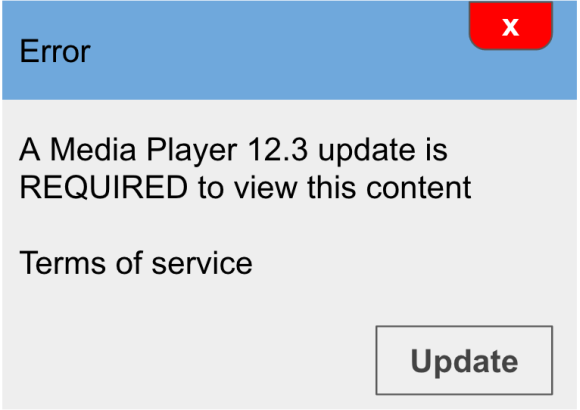
You know when you’re looking to download something and there are too many “download” buttons? Yeah, those times. Google has your back and they’ll let you know when you encounter those pesky links on their browser through its Safe Browsing update.

These malicious ads usually trick you and once you’ve clicked, it’ll likely install malware and steal your data. They refer to this as “social engineering attacks”.

Adding to their social engineering policy that was announced four months back, embedded ads on pages will be considered as social engineering if they fall under the two listed below:

Pretend to act, or look and feel, like a trusted entity – like your own device or browser, or the website itself.

Try to trick you into doing something you’d only do for a trusted entity – like sharing a password or calling tech support.

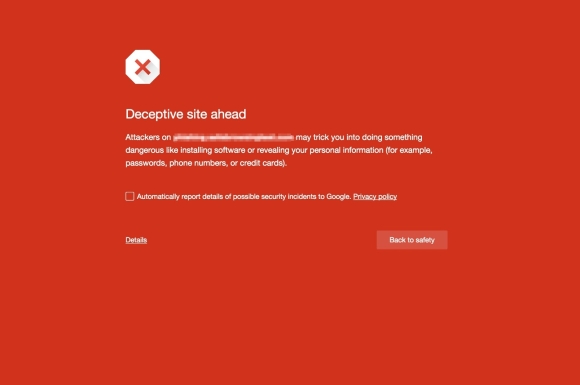
In the case that the two occur, a warning page will let you know that you might be duped.

Here are some examples:

160204-Google-Chrome-Safe-Browsing-02

160204-Google-Chrome-Safe-Browsing-03

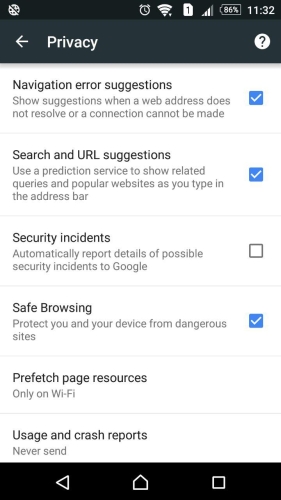
For those who are worrying about “Safe Browsing”, you’ll be happy to know that by default, the option is turned ON. If you need to be assured of the settings, head to Chrome and follow the steps below:
160204-Google-Chrome-Safe-Browsing-04

Mobile

Click the three vertical dots on the top right > Settings > Privacy > make sure “Safe Browsing” is ticked.


PCs

When using Chrome on your computers, the algorithm will automatically remove them.

[ SOURCE, VIA ]

Tags: best browserChromeChrome BrowserChrome Safe Browsingfake adsfake linksgoogleGoogle browserGoogle ChromeGoogle Chrome Safe BrowsingGoogle Safe BrowsingSafe Browsing
Arif Lee

Arif Lee

POPULAR

Upgraded To a New Phone? Cool. But When Was the Last Time you Upgraded your Shaver?

November 10, 2025

5 Reasons Every Home Should Have a Smart Security System

November 11, 2025

Solar ATAP: The new solar programme for consumers will only start in 2026

December 2, 2025

Google Chrome now tells you when you’re clicking fake ads & links

February 4, 2016
Perodua QV-E EV

Perodua QV-E is now official: Electric sportback with 201hp, 445km NEDC range, priced at RM80k not inclusive of battery subscription

December 1, 2025

GrabRewards is now GrabCoins: Now with even more ways to earn and save

November 17, 2025

Copyright © 2025 · SoyaCincau.com
Mind Blow Sdn Bhd (1076827-P)

  • ADVERTISE
  • DISCLAIMER

Copyright © 2025 · SoyaCincau.com – Mind Blow Sdn Bhd (1076827-P)

  • ADVERTISE
  • DISCLAIMER