
• 中文版
  • BM
  • News
  • Deals
  • Reviews
    • First Impressions
    • Hands-on
    • Comparisons
  • Tech
    • Mobile
    • Computers
    • Cameras
    • Wearables
    • Audio
    • Drones
  • Telco
    • Celcom
    • Digi
    • Maxis
    • Time
    • Tune Talk
    • U Mobile
    • Unifi
    • Yes
  • Cars
  • Contribute
  • Jobs
Menu
  • 中文版
  • BM
  • News
  • Deals
  • Reviews
    • First Impressions
    • Hands-on
    • Comparisons
  • Tech
    • Mobile
    • Computers
    • Cameras
    • Wearables
    • Audio
    • Drones
  • Telco
    • Celcom
    • Digi
    • Maxis
    • Time
    • Tune Talk
    • U Mobile
    • Unifi
    • Yes
  • Cars
  • Contribute
  • Jobs
Search
  • Tech
    • News
    • Mobile
    • Computers
    • Cameras
    • Wearables
    • Audio
    • Drones
  • Telco
    • Celcom
    • Digi
    • Maxis
    • Time
    • U Mobile
    • Unifi
    • Yes
  • Reviews
    • First Impressions
    • Hands-on
    • Comparisons
  • Buyer’s Guide
  • Opinions
  • Digital Life
  • Video
  • Deals
  • How-To
  • Cars
  • Bahasa Melayu
  • EV
  • Contribute
  • Advertise
Menu
  • Tech
    • News
    • Mobile
    • Computers
    • Cameras
    • Wearables
    • Audio
    • Drones
  • Telco
    • Celcom
    • Digi
    • Maxis
    • Time
    • U Mobile
    • Unifi
    • Yes
  • Reviews
    • First Impressions
    • Hands-on
    • Comparisons
  • Buyer’s Guide
  • Opinions
  • Digital Life
  • Video
  • Deals
  • How-To
  • Cars
  • Bahasa Melayu
  • EV
  • Contribute
  • Advertise
Search
Close
Home News

You can do more on the Galaxy S6 edge screen with Marshmallow update

  • BY Alexander Wong
  • 29 December 2015
  • 11:39 am
  • Comment
Share on FacebookShare on Twitter

151229-samsung-galaxy-s6-edge-marshmallow-features-1

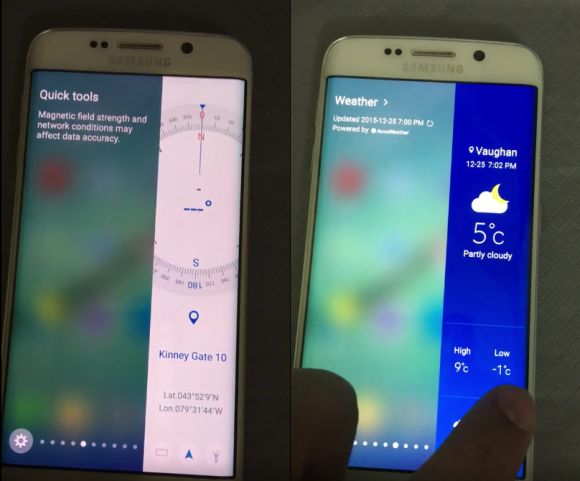
As Samsung prepares to roll out its latest Android Marshmallow update, the Galaxy S6 edge and its bigger S6 edge+ are getting a couple of new tricks up their sleeves. When the Galaxy Note Edge came out last year, the extra curve screen offers a couple of standalone features which are more extensive when compared to the latest “edge” models for 2016.

Soon, owners of the Galaxy S6 edge/edge+ will be able to do more than just accessing contacts and shortcuts in the months to come.
151229-samsung-galaxy-s6-edge-marshmallow-features-2

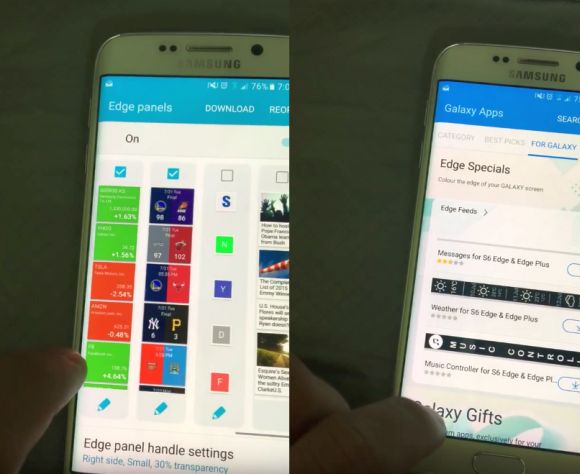
According to a leaked video, a purported S6 edge is shown running on a newer Android 6.0.1 software with TouchWiz. Under the Edge screen settings, the device is seen with more customisable panels covering tools and shortcuts, plus larger content widgets thrown in the mix. This is definitely a significant improvement over its current S6 edge features.

So far there’s no timeline when this will be rolled out and we are guessing it should be within the next few months to come. You can view the hands-on video below.

[ SOURCE ]

Tags: AndroidAndroid 6.0MarshmallowSamsungSamsung Galaxy S6 EdgeSamsung Galaxy S6 edge Marshmallow updateSamsung Galaxy S6 edge panelSamsung Galaxy S6 edge Plussoftware update
Alexander Wong

Alexander Wong

POPULAR

Upgraded To a New Phone? Cool. But When Was the Last Time you Upgraded your Shaver?

November 10, 2025

5 Reasons Every Home Should Have a Smart Security System

November 11, 2025

Solar ATAP: The new solar programme for consumers will only start in 2026

December 2, 2025

You can do more on the Galaxy S6 edge screen with Marshmallow update

December 29, 2015
Perodua QV-E EV

Perodua QV-E is now official: Electric sportback with 201hp, 445km NEDC range, priced at RM80k not inclusive of battery subscription

December 1, 2025

GrabRewards is now GrabCoins: Now with even more ways to earn and save

November 17, 2025

Copyright © 2025 · SoyaCincau.com
Mind Blow Sdn Bhd (1076827-P)

  • ADVERTISE
  • DISCLAIMER

Copyright © 2025 · SoyaCincau.com – Mind Blow Sdn Bhd (1076827-P)

  • ADVERTISE
  • DISCLAIMER




