• 中文版
  • BM
  • News
  • Deals
  • Reviews
    • First Impressions
    • Hands-on
    • Comparisons
  • Tech
    • Mobile
    • Computers
    • Cameras
    • Wearables
    • Audio
    • Drones
  • Telco
    • Celcom
    • Digi
    • Maxis
    • Time
    • Tune Talk
    • U Mobile
    • Unifi
    • Yes
  • Cars
  • Contribute
  • Jobs
Menu
  • 中文版
  • BM
  • News
  • Deals
  • Reviews
    • First Impressions
    • Hands-on
    • Comparisons
  • Tech
    • Mobile
    • Computers
    • Cameras
    • Wearables
    • Audio
    • Drones
  • Telco
    • Celcom
    • Digi
    • Maxis
    • Time
    • Tune Talk
    • U Mobile
    • Unifi
    • Yes
  • Cars
  • Contribute
  • Jobs
Search
  • Tech
    • News
    • Mobile
    • Computers
    • Cameras
    • Wearables
    • Audio
    • Drones
  • Telco
    • Celcom
    • Digi
    • Maxis
    • Time
    • U Mobile
    • Unifi
    • Yes
  • Reviews
    • First Impressions
    • Hands-on
    • Comparisons
  • Buyer’s Guide
  • Opinions
  • Digital Life
  • Video
  • Deals
  • How-To
  • Cars
  • Bahasa Melayu
  • EV
  • Contribute
  • Advertise
Menu
  • Tech
    • News
    • Mobile
    • Computers
    • Cameras
    • Wearables
    • Audio
    • Drones
  • Telco
    • Celcom
    • Digi
    • Maxis
    • Time
    • U Mobile
    • Unifi
    • Yes
  • Reviews
    • First Impressions
    • Hands-on
    • Comparisons
  • Buyer’s Guide
  • Opinions
  • Digital Life
  • Video
  • Deals
  • How-To
  • Cars
  • Bahasa Melayu
  • EV
  • Contribute
  • Advertise
Search
Close
Home Digital Life

Want the Google Drive back-up enabled WhatsApp for Android? Here’s how to get it

  • BY Arif Lee
  • 15 October 2015
  • 2:29 pm
  • Comment
Share on FacebookShare on Twitter

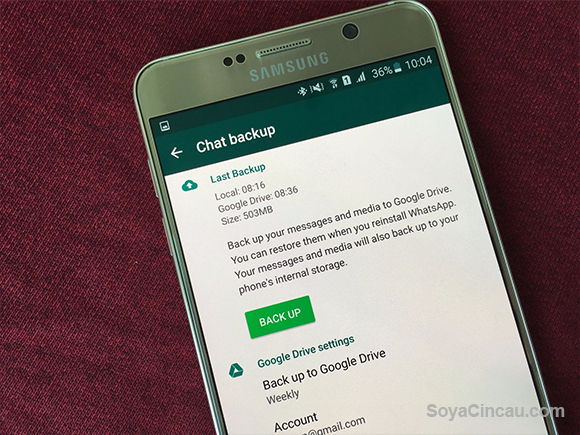
151015-Google-Drive-WhatsApp-01

A week has passed since Google announced support for Drive back up on WhatsApp and today the app developer has released an official APK on their website for download. Although, not officially on the Play Store yet, the APK is from WhatsApp devs themselves, so there shouldn’t be any issues with the update.

So what do you need to do to get it running? It’s not rocket science and anyone who wants to have this on their Android devices can just follow these steps.

Step 1
150420-whatsapp-android-backup-google-drive-05
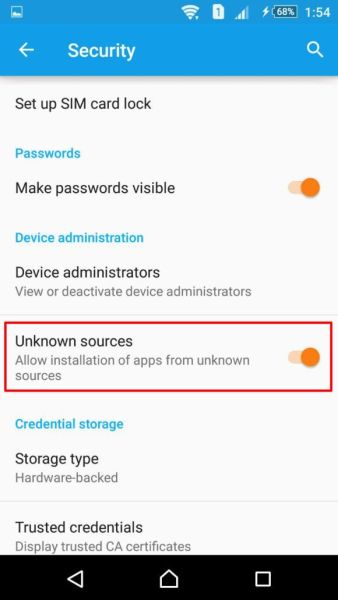
Ensure that your device is set to allow installations from “unknown sources”
Head on over to your Settings > Security > turn on “unknown sources”

Step 2
Head on to WhatsApp’s official website and download the APK file
Install the file

Step 3
150420-whatsapp-android-backup-google-drive-02
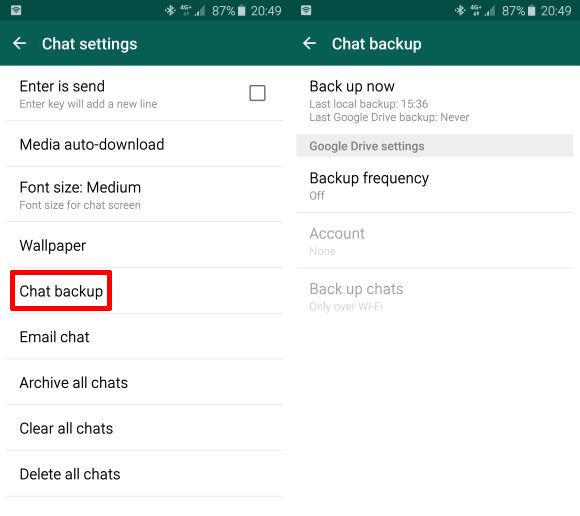
Now you have the feature available but you’ve got to enable it manually
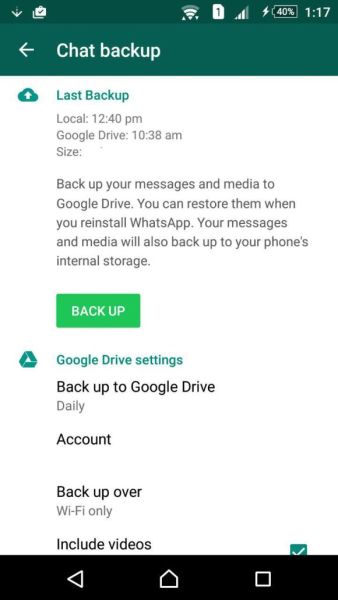
To do that, open your WhatsApp > the three vertical dots on your top right > Settings > Chat and calls > Chat backup > Back Up

Here you’ll be able to choose whether you want to include your videos with that backup and how often you’d like the backups to be done.
150420-whatsapp-android-backup-google-drive-03

A great feature for all Android users who have multiple smartphones, it gets the nod thanks to Google Drive’s APIs that gives permissions to developers, hence offering the ability to users for this backup option.

If you’re not too keen on getting the APK, you’ll have to wait until the official update comes to the Play Store, which quoting Google, will only roll out “soon”. It’s about time this came to the Android half of things, considering iOS has had their iCloud backup for quite some time.

[ SOURCE ]

Tags: AndroidAPK fileback upBackupDriveGoggle Play StoregoogleGoogle DriveGoogle Drive WhatsApp back upGoogle Drive WhatsApp backupPlay StoreWhatsappWhatsApp APKWhatsApp APK back upWhatsApp Google Drive back up APK
Arif Lee

Arif Lee

POPULAR

Upgraded To a New Phone? Cool. But When Was the Last Time you Upgraded your Shaver?

November 10, 2025

5 Reasons Every Home Should Have a Smart Security System

November 11, 2025

Solar ATAP: The new solar programme for consumers will only start in 2026

December 2, 2025

Want the Google Drive back-up enabled WhatsApp for Android? Here’s how to get it

October 15, 2015
Perodua QV-E EV

Perodua QV-E is now official: Electric sportback with 201hp, 445km NEDC range, priced at RM80k not inclusive of battery subscription

December 1, 2025

GrabRewards is now GrabCoins: Now with even more ways to earn and save

November 17, 2025

Copyright © 2025 · SoyaCincau.com
Mind Blow Sdn Bhd (1076827-P)

  • ADVERTISE
  • DISCLAIMER

Copyright © 2025 · SoyaCincau.com – Mind Blow Sdn Bhd (1076827-P)

  • ADVERTISE
  • DISCLAIMER