• 中文版
  • BM
  • News
  • Deals
  • Reviews
    • First Impressions
    • Hands-on
    • Comparisons
  • Tech
    • Mobile
    • Computers
    • Cameras
    • Wearables
    • Audio
    • Drones
  • Telco
    • Celcom
    • Digi
    • Maxis
    • Time
    • Tune Talk
    • U Mobile
    • Unifi
    • Yes
  • Cars
  • Contribute
  • Jobs
Menu
  • 中文版
  • BM
  • News
  • Deals
  • Reviews
    • First Impressions
    • Hands-on
    • Comparisons
  • Tech
    • Mobile
    • Computers
    • Cameras
    • Wearables
    • Audio
    • Drones
  • Telco
    • Celcom
    • Digi
    • Maxis
    • Time
    • Tune Talk
    • U Mobile
    • Unifi
    • Yes
  • Cars
  • Contribute
  • Jobs
Search
  • Tech
    • News
    • Mobile
    • Computers
    • Cameras
    • Wearables
    • Audio
    • Drones
  • Telco
    • Celcom
    • Digi
    • Maxis
    • Time
    • U Mobile
    • Unifi
    • Yes
  • Reviews
    • First Impressions
    • Hands-on
    • Comparisons
  • Buyer’s Guide
  • Opinions
  • Digital Life
  • Video
  • Deals
  • How-To
  • Cars
  • Bahasa Melayu
  • EV
  • Contribute
  • Advertise
Menu
  • Tech
    • News
    • Mobile
    • Computers
    • Cameras
    • Wearables
    • Audio
    • Drones
  • Telco
    • Celcom
    • Digi
    • Maxis
    • Time
    • U Mobile
    • Unifi
    • Yes
  • Reviews
    • First Impressions
    • Hands-on
    • Comparisons
  • Buyer’s Guide
  • Opinions
  • Digital Life
  • Video
  • Deals
  • How-To
  • Cars
  • Bahasa Melayu
  • EV
  • Contribute
  • Advertise
Search
Close
Home Digital Life

Microsoft brings Office Lens to iOS and Android

  • BY Sirap Bandung
  • 3 April 2015
  • 3:32 pm
  • Comment
Share on FacebookShare on Twitter

office lens

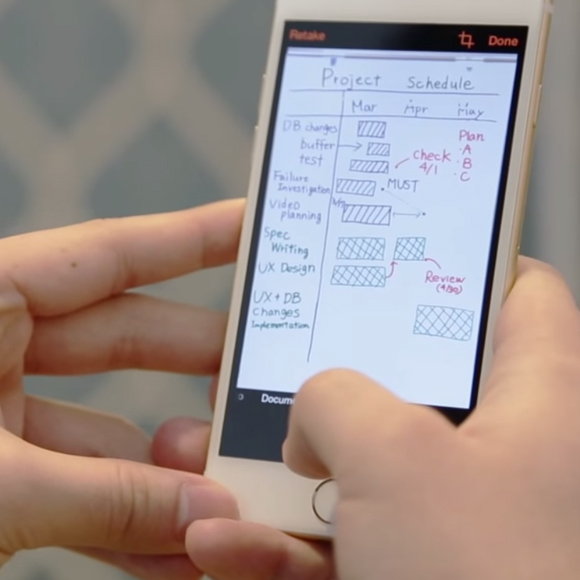
Microsoft is bringing some love for iOS and Android users by porting over one of it’s impressive Windows Phone apps to both platforms.

Office Lens is basically a pocket scanner you can lug around in your smartphone that lets you capture pictures of well, anything with writing on it to save and edit digitally. Of course there are similar apps like Scanner Pro, Scanbot and Evernote but the beauty behind Lens is Office integration. Captured images will be converted into Word, PDF documents and Powerpoint files, and if you take a picture of a document Word will preserve the layout of the document and use optical character recognition (OCR) to convert image into text.

Images also can be automatically rotated and cropped, with PowerPoint even converting hand-drawn whiteboard images into objects that can be fully edited. So if you want to file away your receipts, business cards or even sticky notes you can snap them, clean up the image and then export them as a JPEG, Word, PDF or Powerpoint to OneNote or OneDrive for storage. You can grab a copy for iOS and Android and they’re both free to download.

Check it out in action below.

.

[VIA][SOURCE]

Tags: AndroidiOSmicrosoftmicrosoft office 365microsoft office lensoffice lenswindows phone
Sirap Bandung

Sirap Bandung

[email protected]

POPULAR

sooka’s Gilerrr Streaming Challenge Draws 273 Participants, Clinches Malaysia Book of Records Title

December 5, 2025

JPJePlate: Is the Malaysian flag printed wrongly on EV plates?

December 12, 2025

BOMBA investigating fire involving two EVs parked at home

December 19, 2025

Microsoft brings Office Lens to iOS and Android

April 3, 2015

U Mobile Unbeatable Phone Sale: Travel with FREE Global Roaming Across 60+ Destinations

December 10, 2025

Perodua Traz: B-segment SUV with 1.5L engine and 471L boot, priced from RM76,100

December 17, 2025

Copyright © 2025 · SoyaCincau.com
Mind Blow Sdn Bhd (1076827-P)

  • ADVERTISE
  • DISCLAIMER

Copyright © 2025 · SoyaCincau.com – Mind Blow Sdn Bhd (1076827-P)

  • ADVERTISE
  • DISCLAIMER