• 中文版
  • BM
  • News
  • Deals
  • Reviews
    • First Impressions
    • Hands-on
    • Comparisons
  • Tech
    • Mobile
    • Computers
    • Cameras
    • Wearables
    • Audio
    • Drones
  • Telco
    • Celcom
    • Digi
    • Maxis
    • Time
    • Tune Talk
    • U Mobile
    • Unifi
    • Yes
  • Cars
  • Contribute
  • Jobs
Menu
  • 中文版
  • BM
  • News
  • Deals
  • Reviews
    • First Impressions
    • Hands-on
    • Comparisons
  • Tech
    • Mobile
    • Computers
    • Cameras
    • Wearables
    • Audio
    • Drones
  • Telco
    • Celcom
    • Digi
    • Maxis
    • Time
    • Tune Talk
    • U Mobile
    • Unifi
    • Yes
  • Cars
  • Contribute
  • Jobs
Search
  • Tech
    • News
    • Mobile
    • Computers
    • Cameras
    • Wearables
    • Audio
    • Drones
  • Telco
    • Celcom
    • Digi
    • Maxis
    • Time
    • U Mobile
    • Unifi
    • Yes
  • Reviews
    • First Impressions
    • Hands-on
    • Comparisons
  • Buyer’s Guide
  • Opinions
  • Digital Life
  • Video
  • Deals
  • How-To
  • Cars
  • Bahasa Melayu
  • EV
  • Contribute
  • Advertise
Menu
  • Tech
    • News
    • Mobile
    • Computers
    • Cameras
    • Wearables
    • Audio
    • Drones
  • Telco
    • Celcom
    • Digi
    • Maxis
    • Time
    • U Mobile
    • Unifi
    • Yes
  • Reviews
    • First Impressions
    • Hands-on
    • Comparisons
  • Buyer’s Guide
  • Opinions
  • Digital Life
  • Video
  • Deals
  • How-To
  • Cars
  • Bahasa Melayu
  • EV
  • Contribute
  • Advertise
Search
Close
Home News

Xiaomi updates Redmi Note allowing you to save Photos, Music and Videos to microSD Card

  • BY soyacincau
  • 21 August 2014
  • 9:06 am
  • Comment
Share on FacebookShare on Twitter

140821-xiaomi-redmi-note-MIUI-SDCard-Option

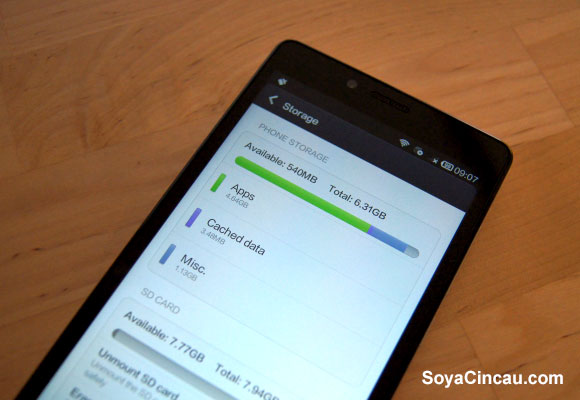
The added advantage of the Redmi series over its Mi 3 and Mi 4 is having a microSD slot which allows you to expand your storage beyond its current 8GB capacity. Unfortunately the expansion slot is quite pointless as the native camera app won’t save to SD and there’s no option to move apps to SD storage as well unless you are adventurous enough to root your device. So how would an average joe use the expansion storage then?

Now Xiaomi has released an update for the Redmi Note where it lets you select SD card storage for the Camera, Gallery, Video and Music apps. The only thing though, it isn’t pushed through an OTA (Over The Air) update and you would need to update your phone manually.

To update, just download the MIUI JHDMIBF30.0 ROM (523MB) from MIUI’s forum and then copy it to your phone’s microSD card in a “/downloaded_rom” folder. Once that’s done, just run the Updater (usually under Tools Folder), press the menu key and tap on “Select Update Package”. Select the file that you’ve copied and it will prompt you to install the latest ROM. Take note that this is for international units that are purchased officially outside of China. More details over here.

So far the update is only available for the Redmi Note and it is likely to be rolled out for its Redmi 1S sometime later.

Thanks @polarmanz and @AfiqHBS for the tip!

Tags: Redmi Note MalaysiaRedmi Note microSDRedmi Note ROMRedmi Note SD CardRedmi Note UpdateRedmi save to SDSave to SDXiaomiXiaomi RedmiXiaomi Redmi NoteXiaomi Redmi Note MalaysiaXiaomi Redmi Note SD CardXiaomi Save to SD
soyacincau

soyacincau

POPULAR

Xiaomi updates Redmi Note allowing you to save Photos, Music and Videos to microSD Card

August 21, 2014

Why are Malaysians still buying EVs in 2026? | Let’s Talk About #138

March 15, 2026

iPhone to support 5G SA for Yes 5G, U Mobile and Maxis via iOS 26.4

March 16, 2026

Is Your Current Phone Generations Behind? Here’s a Simpler Way to Close the Gap

March 13, 2026

BMW i3: Fully electric 3 Series, 800V EV with up to 900km range and 400kW DC charging

March 18, 2026

Poco X8 Pro: Flagship-class performance and up to 8,500mAh battery for under RM2,000

March 17, 2026

Copyright © 2025 · SoyaCincau.com
Mind Blow Sdn Bhd (1076827-P)

  • ADVERTISE
  • DISCLAIMER

Copyright © 2026 · SoyaCincau.com – Mind Blow Sdn Bhd (1076827-P)

  • ADVERTISE
  • DISCLAIMER