• 中文版
  • BM
  • News
  • Deals
  • Reviews
    • First Impressions
    • Hands-on
    • Comparisons
  • Tech
    • Mobile
    • Computers
    • Cameras
    • Wearables
    • Audio
    • Drones
  • Telco
    • Celcom
    • Digi
    • Maxis
    • Time
    • Tune Talk
    • U Mobile
    • Unifi
    • Yes
  • Cars
  • Contribute
  • Jobs
Menu
  • 中文版
  • BM
  • News
  • Deals
  • Reviews
    • First Impressions
    • Hands-on
    • Comparisons
  • Tech
    • Mobile
    • Computers
    • Cameras
    • Wearables
    • Audio
    • Drones
  • Telco
    • Celcom
    • Digi
    • Maxis
    • Time
    • Tune Talk
    • U Mobile
    • Unifi
    • Yes
  • Cars
  • Contribute
  • Jobs
Search
  • Tech
    • News
    • Mobile
    • Computers
    • Cameras
    • Wearables
    • Audio
    • Drones
  • Telco
    • Celcom
    • Digi
    • Maxis
    • Time
    • U Mobile
    • Unifi
    • Yes
  • Reviews
    • First Impressions
    • Hands-on
    • Comparisons
  • Buyer’s Guide
  • Opinions
  • Digital Life
  • Video
  • Deals
  • How-To
  • Cars
  • Bahasa Melayu
  • EV
  • Contribute
  • Advertise
Menu
  • Tech
    • News
    • Mobile
    • Computers
    • Cameras
    • Wearables
    • Audio
    • Drones
  • Telco
    • Celcom
    • Digi
    • Maxis
    • Time
    • U Mobile
    • Unifi
    • Yes
  • Reviews
    • First Impressions
    • Hands-on
    • Comparisons
  • Buyer’s Guide
  • Opinions
  • Digital Life
  • Video
  • Deals
  • How-To
  • Cars
  • Bahasa Melayu
  • EV
  • Contribute
  • Advertise
Search
Close
Home News

Hands-on: LG’s Knock Code unlock feature demonstrated

  • BY soyacincau
  • 26 February 2014
  • 2:26 am
  • Comment
Share on FacebookShare on Twitter

140226-lg-knockcode

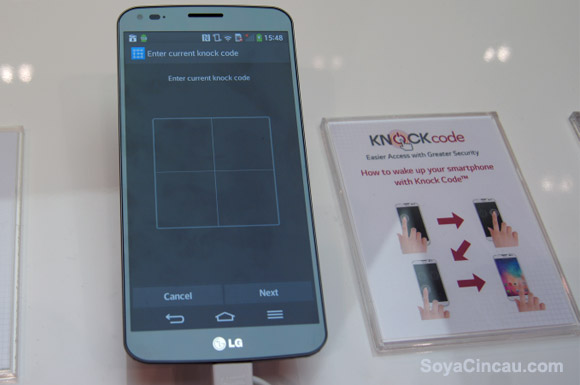
LG’s Knock Code is an interesting way of securing your Android smart phone with a sequence of taps. Not only it’s convenient but it is also rather safe since you can tap with different areas and sizes on the screen, thus reducing the chance of someone following the steps. For now, Knock Code is only used as a device lock and there’s no option of setting up custom tap sequence to launch apps directly while the screen is off. The possibility is there and LG might do this in their next release.

The Knock Code feature is available on the LG G2, LG G2 mini, LG G Flex and their latest LG G Pro 2. To set it up, you would need to create a tapping sequence which can be anything from 2 taps to 8 taps across a 2X2 grid. In case you’ve forgotten the steps, setting it up would require a fall back numeric password. For a better idea, we have recorded a demonstration video on how to set this up on a LG G Flex. Watch it in action after the break.

Knock-Knock: LG Knock Code supports up to 8 taps: https://t.co/52n1eYEneU #mwc14

— SoyaCincau (@Soya_Cincau) February 25, 2014

Tags: AndroidKnock CodeLGLG G FlexLG Knock CodeLG Knock Code Demo
soyacincau

soyacincau

POPULAR

sooka’s Gilerrr Streaming Challenge Draws 273 Participants, Clinches Malaysia Book of Records Title

December 5, 2025

JPJePlate: Is the Malaysian flag printed wrongly on EV plates?

December 12, 2025

Hands-on: LG’s Knock Code unlock feature demonstrated

February 26, 2014

U Mobile Unbeatable Phone Sale: Travel with FREE Global Roaming Across 60+ Destinations

December 10, 2025

Perodua Traz: B-segment SUV with 1.5L engine and 471L boot, priced from RM76,100

December 17, 2025

Why have Malaysia’s 5G download speeds declined?

December 16, 2025

Copyright © 2025 · SoyaCincau.com
Mind Blow Sdn Bhd (1076827-P)

  • ADVERTISE
  • DISCLAIMER

Copyright © 2025 · SoyaCincau.com – Mind Blow Sdn Bhd (1076827-P)

  • ADVERTISE
  • DISCLAIMER