• 中文版
  • BM
  • News
  • Deals
  • Reviews
    • First Impressions
    • Hands-on
    • Comparisons
  • Tech
    • Mobile
    • Computers
    • Cameras
    • Wearables
    • Audio
    • Drones
  • Telco
    • Celcom
    • Digi
    • Maxis
    • Time
    • Tune Talk
    • U Mobile
    • Unifi
    • Yes
  • Cars
  • Contribute
  • Jobs
Menu
  • 中文版
  • BM
  • News
  • Deals
  • Reviews
    • First Impressions
    • Hands-on
    • Comparisons
  • Tech
    • Mobile
    • Computers
    • Cameras
    • Wearables
    • Audio
    • Drones
  • Telco
    • Celcom
    • Digi
    • Maxis
    • Time
    • Tune Talk
    • U Mobile
    • Unifi
    • Yes
  • Cars
  • Contribute
  • Jobs
Search
  • Tech
    • News
    • Mobile
    • Computers
    • Cameras
    • Wearables
    • Audio
    • Drones
  • Telco
    • Celcom
    • Digi
    • Maxis
    • Time
    • U Mobile
    • Unifi
    • Yes
  • Reviews
    • First Impressions
    • Hands-on
    • Comparisons
  • Buyer’s Guide
  • Opinions
  • Digital Life
  • Video
  • Deals
  • How-To
  • Cars
  • Bahasa Melayu
  • EV
  • Contribute
  • Advertise
Menu
  • Tech
    • News
    • Mobile
    • Computers
    • Cameras
    • Wearables
    • Audio
    • Drones
  • Telco
    • Celcom
    • Digi
    • Maxis
    • Time
    • U Mobile
    • Unifi
    • Yes
  • Reviews
    • First Impressions
    • Hands-on
    • Comparisons
  • Buyer’s Guide
  • Opinions
  • Digital Life
  • Video
  • Deals
  • How-To
  • Cars
  • Bahasa Melayu
  • EV
  • Contribute
  • Advertise
Search
Close
Home News

VIDEO: Walkthrough of BlackBerry 10.2.1 new enhancements

  • BY soyacincau
  • 19 November 2013
  • 10:05 am
  • Comment
Share on FacebookShare on Twitter

131119-blackberry-10.2.1-update

After rolling out its BlackBerry 10.2 OS update last month, there’s a lot to look forward to in their upcoming 10.2.1 update. Although the tiny incremental in number doesn’t sound much, it brings a host of new features particularly the ease of installing Android Apps.

Previously Blackberry 10 users would need to convert or find Android apps that are in BAR file format to install. With the new 10.2.1, installing Android apps is as simple as installing an APK file which can be retrieve easily with APK downloaders such as this.

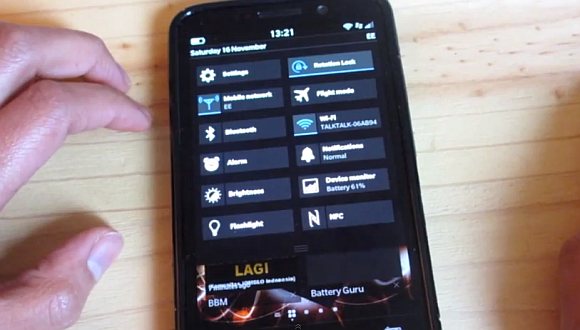
In terms of usability, the new OS update brings major UI improvements where you can tap directly into a new message from the home screen and BlackBerry Hub now comes with a customisable pinch mode which lets you Filter mails by Unread or Priority by simply pinching out. Another welcome feature is the battery percentage level which is now displayed in the lock screen or while peeking. The pull down quick settings is now customisable as well, so you can add in toggles such as NFC and even LED Flash light on it. So far there’s no word on its official roll out date but we reckon BlackBerry Q10, Z30, Z10 and Q5 users shouldn’t be waiting too long for this one.

Watch the 7 minute walkthrough video of the BlackBerry 10.2.1 OS after the break.

[ SOURCE ]

Tags: blackberryBlackBerry 10BlackBerry 10.2BlackBerry 10.2 UpdateBlackBerry 10.2.1BlackBerry 10.2.1 UpdateBlackBerry Q10Blackberry Q5BlackBerry Q5 MalaysiaBlackBerry Z10BlackBerry Z10 Malaysia
soyacincau

soyacincau

POPULAR

Upgraded To a New Phone? Cool. But When Was the Last Time you Upgraded your Shaver?

November 10, 2025

5 Reasons Every Home Should Have a Smart Security System

November 11, 2025

Solar ATAP: The new solar programme for consumers will only start in 2026

December 2, 2025

VIDEO: Walkthrough of BlackBerry 10.2.1 new enhancements

November 19, 2013
Perodua QV-E EV

Perodua QV-E is now official: Electric sportback with 201hp, 445km NEDC range, priced at RM80k not inclusive of battery subscription

December 1, 2025

GrabRewards is now GrabCoins: Now with even more ways to earn and save

November 17, 2025

Copyright © 2025 · SoyaCincau.com
Mind Blow Sdn Bhd (1076827-P)

  • ADVERTISE
  • DISCLAIMER

Copyright © 2025 · SoyaCincau.com – Mind Blow Sdn Bhd (1076827-P)

  • ADVERTISE
  • DISCLAIMER