• 中文版
  • BM
  • News
  • Deals
  • Reviews
    • First Impressions
    • Hands-on
    • Comparisons
  • Tech
    • Mobile
    • Computers
    • Cameras
    • Wearables
    • Audio
    • Drones
  • Telco
    • Celcom
    • Digi
    • Maxis
    • Time
    • Tune Talk
    • U Mobile
    • Unifi
    • Yes
  • Cars
  • Contribute
  • Jobs
Menu
  • 中文版
  • BM
  • News
  • Deals
  • Reviews
    • First Impressions
    • Hands-on
    • Comparisons
  • Tech
    • Mobile
    • Computers
    • Cameras
    • Wearables
    • Audio
    • Drones
  • Telco
    • Celcom
    • Digi
    • Maxis
    • Time
    • Tune Talk
    • U Mobile
    • Unifi
    • Yes
  • Cars
  • Contribute
  • Jobs
Search
  • Tech
    • News
    • Mobile
    • Computers
    • Cameras
    • Wearables
    • Audio
    • Drones
  • Telco
    • Celcom
    • Digi
    • Maxis
    • Time
    • U Mobile
    • Unifi
    • Yes
  • Reviews
    • First Impressions
    • Hands-on
    • Comparisons
  • Buyer’s Guide
  • Opinions
  • Digital Life
  • Video
  • Deals
  • How-To
  • Cars
  • Bahasa Melayu
  • EV
  • Contribute
  • Advertise
Menu
  • Tech
    • News
    • Mobile
    • Computers
    • Cameras
    • Wearables
    • Audio
    • Drones
  • Telco
    • Celcom
    • Digi
    • Maxis
    • Time
    • U Mobile
    • Unifi
    • Yes
  • Reviews
    • First Impressions
    • Hands-on
    • Comparisons
  • Buyer’s Guide
  • Opinions
  • Digital Life
  • Video
  • Deals
  • How-To
  • Cars
  • Bahasa Melayu
  • EV
  • Contribute
  • Advertise
Search
Close
Home News

New HTC Sense 5.5 brings host of new UI improvements, now lets you switch off BlinkFeed

  • BY soyacincau
  • 8 October 2013
  • 10:30 pm
  • Comment
Share on FacebookShare on Twitter

131008-htc-sense-5.5-update-1

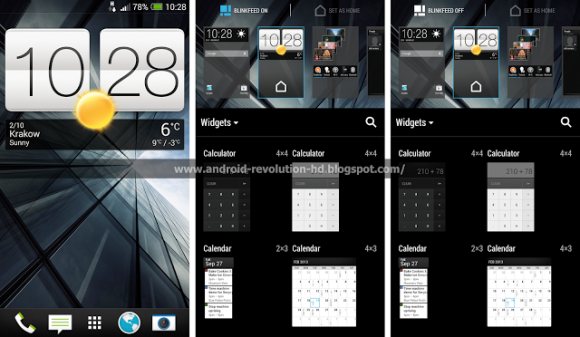
The current HTC Sense 5.0 on the latest HTC devices is rather refreshing with a clean and modern design. Now its upcoming HTC Sense 5.5 offers yet another revamp and interestingly lets you toggle BlinkFeed on or off. HTC’s BlinkFeed is the default home screen which pulls up your favourite content, RSS feeds and social stream in a nice graphical tiled format. Personally we prefer the typical home screen with a big time and weather widget followed by our frequently used shortcuts. At the moment, you can’t turn off blinkfeed and the only way to hide it is to move it to another panel and set a new one as your default home screen.

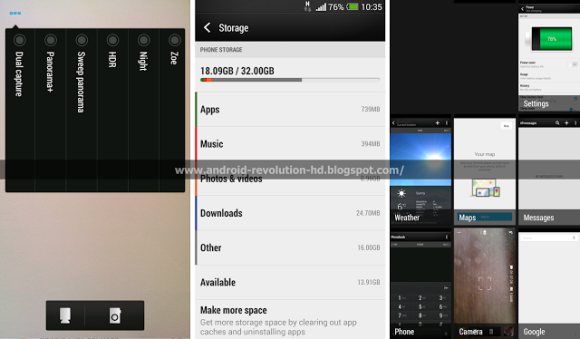
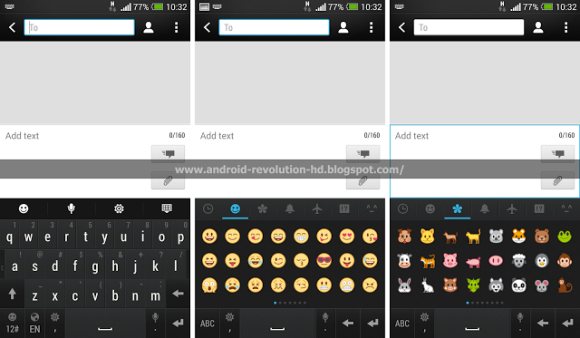
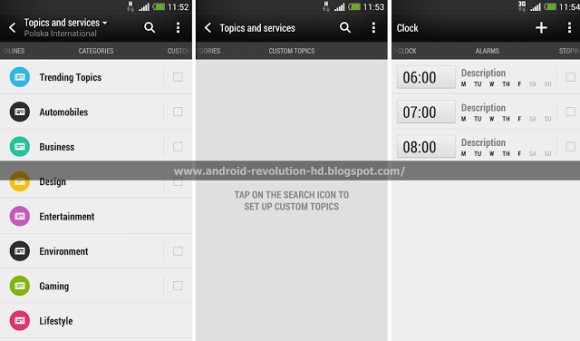
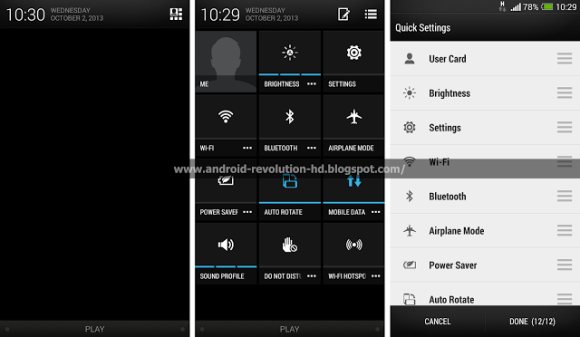
Apart from that, the new Sense 5.5 update allows you to customise the pull down quick settings panel and there’s also a new Do Not Disturb (DND) mode. In the imaging department, there’s also new features such as Dual Capture and a new Panorama+ mode. The recent apps interface is also tweaked slightly to display running apps with bigger tiles.

Apparently some of these changes are part of the Android 4.3 update that’s coming soon to HTC One and looks like the full HTC Sense 5.5 upgrade will come in the following update.

Head after the break for more sample screenshots.
131008-htc-sense-5.5-update-2

131008-htc-sense-5.5-update-3

131008-htc-sense-5.5-update-4

131008-htc-sense-5.5-update-5

[ SOURCE, VIA ]

Tags: HTCHTC Butterfly SHTC Onehtc senseHTC Sense 5.5
soyacincau

soyacincau

POPULAR

Upgraded To a New Phone? Cool. But When Was the Last Time you Upgraded your Shaver?

November 10, 2025

5 Reasons Every Home Should Have a Smart Security System

November 11, 2025

Solar ATAP: The new solar programme for consumers will only start in 2026

December 2, 2025

New HTC Sense 5.5 brings host of new UI improvements, now lets you switch off BlinkFeed

October 8, 2013
Perodua QV-E EV

Perodua QV-E is now official: Electric sportback with 201hp, 445km NEDC range, priced at RM80k not inclusive of battery subscription

December 1, 2025

GrabRewards is now GrabCoins: Now with even more ways to earn and save

November 17, 2025

Copyright © 2025 · SoyaCincau.com
Mind Blow Sdn Bhd (1076827-P)

  • ADVERTISE
  • DISCLAIMER

Copyright © 2025 · SoyaCincau.com – Mind Blow Sdn Bhd (1076827-P)

  • ADVERTISE
  • DISCLAIMER