• 中文版
  • BM
  • News
  • Deals
  • Reviews
    • First Impressions
    • Hands-on
    • Comparisons
  • Tech
    • Mobile
    • Computers
    • Cameras
    • Wearables
    • Audio
    • Drones
  • Telco
    • Celcom
    • Digi
    • Maxis
    • Time
    • Tune Talk
    • U Mobile
    • Unifi
    • Yes
  • Cars
  • Contribute
  • Jobs
Menu
  • 中文版
  • BM
  • News
  • Deals
  • Reviews
    • First Impressions
    • Hands-on
    • Comparisons
  • Tech
    • Mobile
    • Computers
    • Cameras
    • Wearables
    • Audio
    • Drones
  • Telco
    • Celcom
    • Digi
    • Maxis
    • Time
    • Tune Talk
    • U Mobile
    • Unifi
    • Yes
  • Cars
  • Contribute
  • Jobs
Search
  • Tech
    • News
    • Mobile
    • Computers
    • Cameras
    • Wearables
    • Audio
    • Drones
  • Telco
    • Celcom
    • Digi
    • Maxis
    • Time
    • U Mobile
    • Unifi
    • Yes
  • Reviews
    • First Impressions
    • Hands-on
    • Comparisons
  • Buyer’s Guide
  • Opinions
  • Digital Life
  • Video
  • Deals
  • How-To
  • Cars
  • Bahasa Melayu
  • EV
  • Contribute
  • Advertise
Menu
  • Tech
    • News
    • Mobile
    • Computers
    • Cameras
    • Wearables
    • Audio
    • Drones
  • Telco
    • Celcom
    • Digi
    • Maxis
    • Time
    • U Mobile
    • Unifi
    • Yes
  • Reviews
    • First Impressions
    • Hands-on
    • Comparisons
  • Buyer’s Guide
  • Opinions
  • Digital Life
  • Video
  • Deals
  • How-To
  • Cars
  • Bahasa Melayu
  • EV
  • Contribute
  • Advertise
Search
Close
Home News

Android Device Manager goes live, here’s how to activate remote ring, lock & data wipe on your Android device

  • BY soyacincau
  • 24 September 2013
  • 1:57 pm
  • Comment
Share on FacebookShare on Twitter

130924-android-device-manager

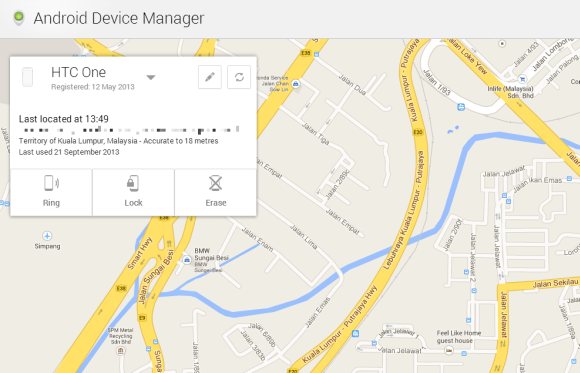
Few months ago, Google has announced the development of a web based Android Device Manager which allows Android users to remotely ring, lock and hard reset when you lose your device. This is a feature which wasn’t natively available to Android users but respective phone makers such as Sony, Samsung and HTC had offered their own proprietory solution.

Now the Android Device Manager is live and can be accessed at www.google.com/android/devicemanager. By default, you can remotely locate your devices that’s registered to your gmail account and you can force it to ring for 5 minutes until the power button is pressed. To enable remote lock and remote data wipe, there’s an additional step to activate this on your phone.

To do this, locate and open the “Google Settings” app, select “Android Device Manager” and ensure “Allow remote lock and factory reset” is ticked.

[ SOURCE ]

Tags: Activate Android Device ManagerAndroidAndroid Device ManagerFind my AndroidgoogleLocate AndroidRemote Lock AndroidRemote Wipe Android
soyacincau

soyacincau

POPULAR

sooka’s Gilerrr Streaming Challenge Draws 273 Participants, Clinches Malaysia Book of Records Title

December 5, 2025

JPJePlate: Is the Malaysian flag printed wrongly on EV plates?

December 12, 2025

Android Device Manager goes live, here’s how to activate remote ring, lock & data wipe on your Android device

September 24, 2013

Perodua Traz: B-segment SUV with 1.5L engine and 471L boot, priced from RM76,100

December 17, 2025

U Mobile Unbeatable Phone Sale: Travel with FREE Global Roaming Across 60+ Destinations

December 10, 2025

Why have Malaysia’s 5G download speeds declined?

December 16, 2025

Copyright © 2025 · SoyaCincau.com
Mind Blow Sdn Bhd (1076827-P)

  • ADVERTISE
  • DISCLAIMER

Copyright © 2025 · SoyaCincau.com – Mind Blow Sdn Bhd (1076827-P)

  • ADVERTISE
  • DISCLAIMER