• 中文版
  • BM
  • News
  • Deals
  • Reviews
    • First Impressions
    • Hands-on
    • Comparisons
  • Tech
    • Mobile
    • Computers
    • Cameras
    • Wearables
    • Audio
    • Drones
  • Telco
    • Celcom
    • Digi
    • Maxis
    • Time
    • Tune Talk
    • U Mobile
    • Unifi
    • Yes
  • Cars
  • Contribute
  • Jobs
Menu
  • 中文版
  • BM
  • News
  • Deals
  • Reviews
    • First Impressions
    • Hands-on
    • Comparisons
  • Tech
    • Mobile
    • Computers
    • Cameras
    • Wearables
    • Audio
    • Drones
  • Telco
    • Celcom
    • Digi
    • Maxis
    • Time
    • Tune Talk
    • U Mobile
    • Unifi
    • Yes
  • Cars
  • Contribute
  • Jobs
Search
  • Tech
    • News
    • Mobile
    • Computers
    • Cameras
    • Wearables
    • Audio
    • Drones
  • Telco
    • Celcom
    • Digi
    • Maxis
    • Time
    • U Mobile
    • Unifi
    • Yes
  • Reviews
    • First Impressions
    • Hands-on
    • Comparisons
  • Buyer’s Guide
  • Opinions
  • Digital Life
  • Video
  • Deals
  • How-To
  • Cars
  • Bahasa Melayu
  • EV
  • Contribute
  • Advertise
Menu
  • Tech
    • News
    • Mobile
    • Computers
    • Cameras
    • Wearables
    • Audio
    • Drones
  • Telco
    • Celcom
    • Digi
    • Maxis
    • Time
    • U Mobile
    • Unifi
    • Yes
  • Reviews
    • First Impressions
    • Hands-on
    • Comparisons
  • Buyer’s Guide
  • Opinions
  • Digital Life
  • Video
  • Deals
  • How-To
  • Cars
  • Bahasa Melayu
  • EV
  • Contribute
  • Advertise
Search
Close
Home Digital Life

Seamless photo upload and backup for Android devices

  • BY soyacincau
  • 25 February 2012
  • 7:07 pm
  • Comment
Share on FacebookShare on Twitter

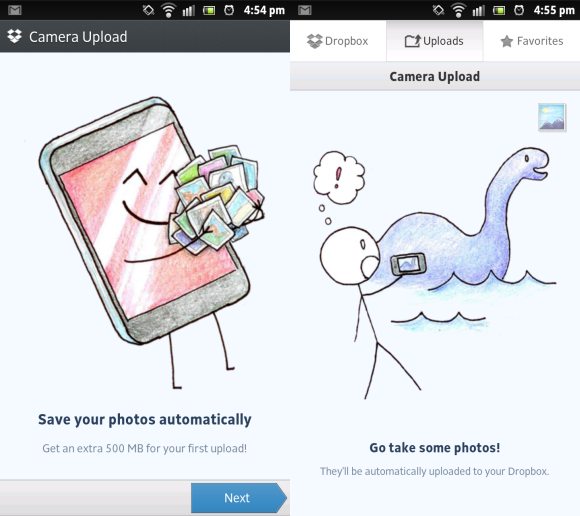
Photos taken on smart phones are priceless and the thought of losing them to theft or damage is painful. Now Dropbox has updated its version for Android where it allows automatic upload to your account. Whenever you snap a pic, you can be rest assured that it stored safely in the cloud which is accessible through your desktop and other devices.

Having a low 3G data plan? You can opt to have Dropbox upload only via WiFi so that you won’t incur surprise 3G downloads in the background. After installing, you will be prompt whether or not you wish to upload all existing photos/videos stored in your phone. Alternatively you can skip this step and Dropbox will only upload new photos. You can get your free Dropbox account here. By default, it comes with 2GB of storage but you can get more by inviting friends or purchase additional space.

Apart from Dropbox, Google+ also offers a similar feature where it automatically upload your photos and videos to your private album on Google+. This eventually would make it easier to share to your friends if you’re an active Google+ user.

If you need to stash up more than just photos, another service called Box is offering a whopping 50GB of cloud storage for Android. There’s no automatic photo uploads for Box but with a generous serving of 50GB, who would complain? You can download Box here and it is valid until 23rd of March 2012.


[ SOURCE, 2 ]

Tags: AndroidBackupBoxCloudCloud StoragedropboxPhotosSync Photos
soyacincau

soyacincau

POPULAR

JPJePlate: Is the Malaysian flag printed wrongly on EV plates?

December 12, 2025

sooka’s Gilerrr Streaming Challenge Draws 273 Participants, Clinches Malaysia Book of Records Title

December 5, 2025

Seamless photo upload and backup for Android devices

February 25, 2012

U Mobile Unbeatable Phone Sale: Travel with FREE Global Roaming Across 60+ Destinations

December 10, 2025

Perodua Traz: B-segment SUV with 1.5L engine and 471L boot, priced from RM76,100

December 17, 2025

Why have Malaysia’s 5G download speeds declined?

December 16, 2025

Copyright © 2025 · SoyaCincau.com
Mind Blow Sdn Bhd (1076827-P)

  • ADVERTISE
  • DISCLAIMER

Copyright © 2025 · SoyaCincau.com – Mind Blow Sdn Bhd (1076827-P)

  • ADVERTISE
  • DISCLAIMER