
• 中文版
  • BM
  • News
  • Deals
  • Reviews
    • First Impressions
    • Hands-on
    • Comparisons
  • Tech
    • Mobile
    • Computers
    • Cameras
    • Wearables
    • Audio
    • Drones
  • Telco
    • Celcom
    • Digi
    • Maxis
    • Time
    • Tune Talk
    • U Mobile
    • Unifi
    • Yes
  • Cars
  • Contribute
  • Jobs
Menu
  • 中文版
  • BM
  • News
  • Deals
  • Reviews
    • First Impressions
    • Hands-on
    • Comparisons
  • Tech
    • Mobile
    • Computers
    • Cameras
    • Wearables
    • Audio
    • Drones
  • Telco
    • Celcom
    • Digi
    • Maxis
    • Time
    • Tune Talk
    • U Mobile
    • Unifi
    • Yes
  • Cars
  • Contribute
  • Jobs
Search
  • Tech
    • News
    • Mobile
    • Computers
    • Cameras
    • Wearables
    • Audio
    • Drones
  • Telco
    • Celcom
    • Digi
    • Maxis
    • Time
    • U Mobile
    • Unifi
    • Yes
  • Reviews
    • First Impressions
    • Hands-on
    • Comparisons
  • Buyer’s Guide
  • Opinions
  • Digital Life
  • Video
  • Deals
  • How-To
  • Cars
  • Bahasa Melayu
  • EV
  • Contribute
  • Advertise
Menu
  • Tech
    • News
    • Mobile
    • Computers
    • Cameras
    • Wearables
    • Audio
    • Drones
  • Telco
    • Celcom
    • Digi
    • Maxis
    • Time
    • U Mobile
    • Unifi
    • Yes
  • Reviews
    • First Impressions
    • Hands-on
    • Comparisons
  • Buyer’s Guide
  • Opinions
  • Digital Life
  • Video
  • Deals
  • How-To
  • Cars
  • Bahasa Melayu
  • EV
  • Contribute
  • Advertise
Search
Close
Home Digital Life

Push mobile images to the big screen with QR Code

  • BY soyacincau
  • 19 November 2011
  • 1:01 pm
  • Comment
Share on FacebookShare on Twitter

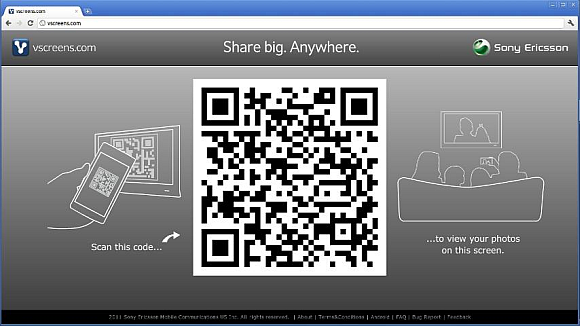
Sony Ericsson has introduced a nifty Android app called Vscreens which allows you to share your mobile phone images to a bigger screen easily. Usually if you need to share a photo onto a laptop, tablet or even TV, you would either bluetooth or connect using cables such as USB and HDMI. With Vscreens, all it takes is just a simple QR code.

How it works? Just install the Vscreen app on your Android device and point your laptop/ipad/tablet/TV web browser to Vscreens.com. The first thing you’ll see on the web browser is a big QR code which the mobile Vscreen app will be used to scan. This creates a link between the 2 devices and you can click on any photos on your phone to be pushed onto the big screen.

We tried it ourselves on a laptop computer and it works incredibly well. The only drawback is that it goes thru the Internet which means it will take sometime to load. It took us about 5-7 seconds to refresh to a new photo. Nevertheless, the easy set up without wires makes this a practical solution to share pictures. This Vscreen app is open to all Android devices.

To download, head over to the Android Market link.

[ SOURCE ]

Tags: android appMobile to TVQR codeScreen sharingSony EricssonTV outputVscreens
soyacincau

soyacincau

POPULAR

Nissan Finally Gives the Serena a Real Hybrid Powertrain in Malaysia. Estimated from RM160k to RM180k

January 16, 2026

Push mobile images to the big screen with QR Code

November 19, 2011

Tired of cracked screens or short battery life? The REDMI Note 15 Series take a durability-first approach

January 15, 2026

Is your TNG eWallet suspended? Here’s what you should do

January 27, 2026
BYD Atto 3 Ultra

BYD Atto 3 Ultra now available for as low as RM106k

January 27, 2026

Tesla introduces Model 3 Standard RWD in Malaysia, priced from RM147,600

January 23, 2026

Copyright © 2025 · SoyaCincau.com
Mind Blow Sdn Bhd (1076827-P)

  • ADVERTISE
  • DISCLAIMER

Copyright © 2026 · SoyaCincau.com – Mind Blow Sdn Bhd (1076827-P)

  • ADVERTISE
  • DISCLAIMER




