• 中文版
  • BM
  • News
  • Deals
  • Reviews
    • First Impressions
    • Hands-on
    • Comparisons
  • Tech
    • Mobile
    • Computers
    • Cameras
    • Wearables
    • Audio
    • Drones
  • Telco
    • Celcom
    • Digi
    • Maxis
    • Time
    • Tune Talk
    • U Mobile
    • Unifi
    • Yes
  • Cars
  • Contribute
  • Jobs
Menu
  • 中文版
  • BM
  • News
  • Deals
  • Reviews
    • First Impressions
    • Hands-on
    • Comparisons
  • Tech
    • Mobile
    • Computers
    • Cameras
    • Wearables
    • Audio
    • Drones
  • Telco
    • Celcom
    • Digi
    • Maxis
    • Time
    • Tune Talk
    • U Mobile
    • Unifi
    • Yes
  • Cars
  • Contribute
  • Jobs
Search
  • Tech
    • News
    • Mobile
    • Computers
    • Cameras
    • Wearables
    • Audio
    • Drones
  • Telco
    • Celcom
    • Digi
    • Maxis
    • Time
    • U Mobile
    • Unifi
    • Yes
  • Reviews
    • First Impressions
    • Hands-on
    • Comparisons
  • Buyer’s Guide
  • Opinions
  • Digital Life
  • Video
  • Deals
  • How-To
  • Cars
  • Bahasa Melayu
  • EV
  • Contribute
  • Advertise
Menu
  • Tech
    • News
    • Mobile
    • Computers
    • Cameras
    • Wearables
    • Audio
    • Drones
  • Telco
    • Celcom
    • Digi
    • Maxis
    • Time
    • U Mobile
    • Unifi
    • Yes
  • Reviews
    • First Impressions
    • Hands-on
    • Comparisons
  • Buyer’s Guide
  • Opinions
  • Digital Life
  • Video
  • Deals
  • How-To
  • Cars
  • Bahasa Melayu
  • EV
  • Contribute
  • Advertise
Search
Close
Home Digital Life

SwiftKey X: Keyboard with greater personalisation

  • BY soyacincau
  • 28 May 2011
  • 12:31 am
  • Comment
Share on FacebookShare on Twitter

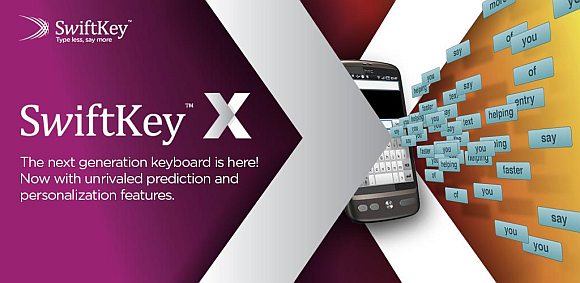
The beauty of Android platform is the open possibilities of reinventing the keyboard. We have swype which arguably is the best keyboard when it comes to speed. Sometimes speed isn’t really everything and that’s where SwiftKey comes into the picture.

For those who are new to SwiftKey, their approach is focused more on predictive input. In the previous release, we loved how it learns your typing patterns and predicts your most likely next word the moment you type in the first character. In an ideal situations, you’ll only be typing the first character of every single word instead of typing everything out.

In the current release, SwiftKey is bringing text input to the next level. Now it gets more personalised by learning your input patterns via Facebook, Twitter and even Gmail. From this data, SwiftKey understands your language pattern as well as frequently used words including short forms that doesn’t normally make sense with proper dictionaries. Of course for those who are paranoid about privacy, this is just an optional feature which can be turned off.

Next they also refined the input by offering 2 typing modes – Precise typer and Rapid typer for the sloppy types. We’ve just tried it and we are pretty impressed by it. Admittedly it isn’t as fast as swype if you’re in a hurry but the text prediction is simply impressive.

To give it a try, you can download the SwiftKey X Beta from the market by clicking here and it is available for Android 1.6 and above.

Head after the break for the demo video.

[ SOURCE ]

Tags: AndroidAndroid KeyboardSwiftKeySwiftkey XSwiftkey X Beta
soyacincau

soyacincau

POPULAR

SwiftKey X: Keyboard with greater personalisation

May 28, 2011

Malaysian government bans civil servants from using Waze navigation app

October 21, 2026

Tesla Roadster Malaysia: Reservations now open with fees up to RM1 mil

October 16, 2026

Aeon Bank customer claims he received RM1 billion in his account by mistake

October 15, 2026
Screenshot

iPhone Duo pre-orders mostly sold out in Malaysia, Apple Store delivery slips to January 2027

October 16, 2026

Ray-Ban Meta Gen 3 and Oakley Meta AI glasses Malaysia: Available 20 October, priced from RM2,069

October 14, 2026

Copyright © 2026 · SoyaCincau.com
Mind Blow Sdn Bhd (1076827-P)

  • ADVERTISE
  • DISCLAIMER

Copyright © 2026 · SoyaCincau.com – Mind Blow Sdn Bhd (1076827-P)

  • ADVERTISE
  • DISCLAIMER