• 中文版
  • BM
  • News
  • Deals
  • Reviews
    • First Impressions
    • Hands-on
    • Comparisons
  • Tech
    • Mobile
    • Computers
    • Cameras
    • Wearables
    • Audio
    • Drones
  • Telco
    • Celcom
    • Digi
    • Maxis
    • Time
    • Tune Talk
    • U Mobile
    • Unifi
    • Yes
  • Cars
  • Contribute
  • Jobs
Menu
  • 中文版
  • BM
  • News
  • Deals
  • Reviews
    • First Impressions
    • Hands-on
    • Comparisons
  • Tech
    • Mobile
    • Computers
    • Cameras
    • Wearables
    • Audio
    • Drones
  • Telco
    • Celcom
    • Digi
    • Maxis
    • Time
    • Tune Talk
    • U Mobile
    • Unifi
    • Yes
  • Cars
  • Contribute
  • Jobs
Search
  • Tech
    • News
    • Mobile
    • Computers
    • Cameras
    • Wearables
    • Audio
    • Drones
  • Telco
    • Celcom
    • Digi
    • Maxis
    • Time
    • U Mobile
    • Unifi
    • Yes
  • Reviews
    • First Impressions
    • Hands-on
    • Comparisons
  • Buyer’s Guide
  • Opinions
  • Digital Life
  • Video
  • Deals
  • How-To
  • Cars
  • Bahasa Melayu
  • EV
  • Contribute
  • Advertise
Menu
  • Tech
    • News
    • Mobile
    • Computers
    • Cameras
    • Wearables
    • Audio
    • Drones
  • Telco
    • Celcom
    • Digi
    • Maxis
    • Time
    • U Mobile
    • Unifi
    • Yes
  • Reviews
    • First Impressions
    • Hands-on
    • Comparisons
  • Buyer’s Guide
  • Opinions
  • Digital Life
  • Video
  • Deals
  • How-To
  • Cars
  • Bahasa Melayu
  • EV
  • Contribute
  • Advertise
Search
Close
Home News

BlackBerry PlayBook: How to pair with BlackBerry phone

  • BY ccsoya
  • 9 January 2011
  • 1:28 am
  • Comment
Share on FacebookShare on Twitter

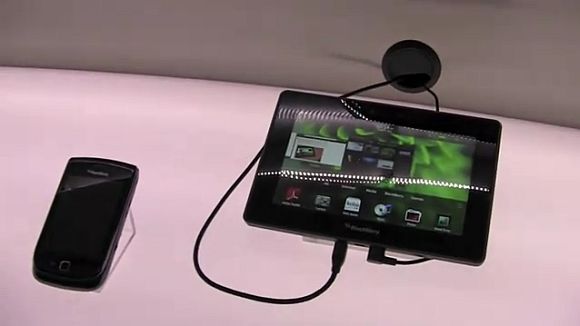
The BlackBerry PlayBook is a bit of a conundrum for us. On one hand, it has this awesome multi-app usability just like a full blown computer with live windows running in the background. It has a full-featured web browser that renders web pages just like a desktop browser with full support for html5 and Flash 10.1. We saw the demo videos here and here, and the PlayBook looks to deliver a tremendously competent multimedia and web browsing experience on par or perhaps even better than what the iPad can muster.

But on the other hand we have this ridiculous prerequisite set by RIM where for a PlayBook user to be able to have full email, calendar and BBM (and maybe even more) functions on the device, the user must first pair it with a BlackBerry phone, else you only get web access to your work emails and calendar — something like how you would access your Gmail, Hotmail or Yahoo mail account via a web browser.

We don’t understand why RIM have decided to go down this path with a tablet that clearly has the potential to win the BlackBerry brand new customers and possibly some more adoring fans. For a number of customers, this pairing thing will be a deal breaker and RIM’s betting that the number will be small, but to us it’s not a smart gamble for a company that so desperately want to turn things around.

While we leave you with that thought, here’s a video of how the pairing thing works with the PlayBook and a BlackBerry phone. First you need to install an app called BlackBerry Bridge in your BlackBerry phone. Then, on the PlayBook side, you dig in the settings menu to bring out a QR code and once that is done you use your BlackBerry phone to scan the QR and the pairing is done.

Take a look at how its done in video after the jump.

[via]

Tags: blackberryBlackBerry BridgeBlackBerry PlaybookBlackBerry Playbook MalaysiaBlackBerry Playbook pairingBlackBerry PlayBook videoPlayBookrim
ccsoya

ccsoya

POPULAR

BlackBerry PlayBook: How to pair with BlackBerry phone

January 9, 2011

KTM Komuter and ETS disrupted today: Here is what’s causing the train delays

July 23, 2026
Source: Photo by kovop58 / Adobe Stock

6 Places You Can Watch the FIFA World Cup 2026 Finals Live in Malaysia

July 17, 2026

How fast is ULTRA5G inside KL Malls? Here’s What Dedicated Indoor ULTRA5G Infrastructure Can Actually Do

July 16, 2026

U Mobile suffers nationwide network outage in the early hours of the morning

July 22, 2026

Touch ‘n Go rolls out Enhanced RFID lane at AKLEH, targets 10 lanes by year-end

July 21, 2026

Copyright © 2025 · SoyaCincau.com
Mind Blow Sdn Bhd (1076827-P)

  • ADVERTISE
  • DISCLAIMER

Copyright © 2026 · SoyaCincau.com – Mind Blow Sdn Bhd (1076827-P)

  • ADVERTISE
  • DISCLAIMER