

-
Recent Reviews
Categories
-
Archives
-
Calendar

A little over a month after U Mobile started opening registration of interest (ROI) for it’s HSPA+ network, we are now seeing a few seeding units of its 42Mbps HSPA+ broadband modem being tested in the wild.
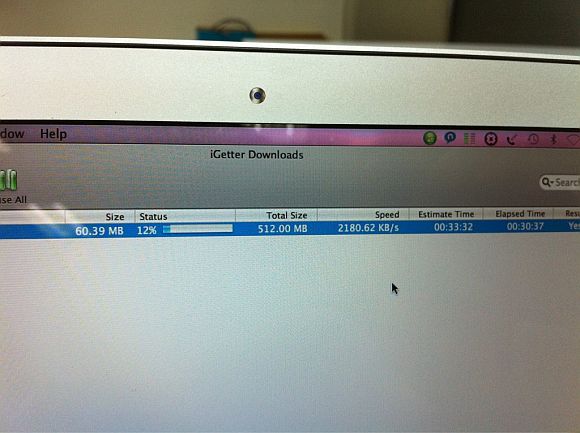
No price plans or device pricing has been revealed just yet but we are now getting an indication of what kind of speeds you can expect to see on this new HSPA+ network — possibly Malaysia’s first. This picture taken by a tester, shows a download speed of 2,180KB/s or about 17Mpbs.
17Mbps is certainly fast when you compare it with the current average speeds that you can get on a 3G network. But if you compare it with a similarly new network with very little load like Yes 4G and the fact that U Mobile is claiming download speed of up to 42Mbps, then 17Mbps might not look so spectacular but it is still very good for a wireless connection.
If you look closely at the picture, you’ll note that the download manager estimates that it takes a little over 30 minutes to download a 60MB portion of the total 512MB file. If you do the math you’ll know that a 60MB file will take much less than 30 minutes to download if you’re getting a constant 17Mbps stream. So that could mean the indicated 17Mbps is the peak speed that the tester was able to get during this particular download.
Though, we’d like to point out U Mobile does clearly state in its ROI page FAQ that users should expect an average download speeds of 3Mbps – 10Mbps and average upload speeds of 0.5Mbps to 1.5Mbps. So if that is that case then 17Mbps is well about the average speed claimed by U Mobile.
8. What are the expected download and upload speed with a 42Mbps HSPA+ USB modem?
Within 42Mbps HSPA+ coverage area, the average download speed is between 3 to 10Mbps, and the average upload speed is between 0.5 to 1.5Mbps.Connection speed may vary due to congestion, distance from the base station, local conditions, internet conditions, server speeds, location, network performance, mobile phone/modems and application used.
Whatever it is, this is exciting stuff. Users have a selection of wireless technologies to choose from, there’s WiMAX and now HSPA+ and soon LTE. Choice is indeed good for everyone.
Oh and one last thing, currently U Mobile’s HSPA+ network coverage is very limited covering Berjaya Times Square right now and is currently being rolled out in Subang Jaya and Sunway
Sources are saying that an early 2011 launch is very possible at this stage and we can’t wait.
Thanks anonymous tipster for the tip!
[source]
The screenshot was taken at 12% complete with 60MB downloaded with elapsed time of 30 minutes.
Of course it is fast. U Mobile hq is at Time square. They cover places so slow they would be overtaken by maxis or Digi later. I think there are more wimax covered places that umobile today.
Hi Soya Cincau, you need to update the above article. It is downloading a 512MB file not 60MB file. Also, you will need to take back the negative statement on U Mobile since its a 512MB file.
Cheers!
We are not denying the file is 512MB but only 60MB was downloaded at that point. We will update the post to make it clearer. By the way, we don't see how we are painting U Mobile negatively on this post and we're looking forward to trying it out ourselves.
eh guys. the file is 512MB but soyacincau is correct.
look at the elapsed time. it took 00:30:37 to download 60.39MB (12% of total download)
it estimates another 00:33:32 to complete the 512MB, so therefore, roughly about 1hr to download 512MB ler.
blur blur sotong lar
You got it right but we've updated our post to make it clearer as well. Thanks for the help
Which technology standard are they exactly using? HSPA+ is being touted here and there on their pages, yet the current 42 Mbps delivery is via Dual Carrier HSPA. Are they planning to combine MIMO techniques in the future?
In terms of coverage, I suppose U Mobile would try to consolidate in more densely populated areas rather than trying to cover as many places. Thus their limited roll out does make economic sense,
We'll have to check with U Mobile on the technology but you're right, the FAQ makes it confusing.
Makes more sense to cover heavily populated areas, yes but U Mobile's expansion as been very slow.
Anonymous is wrong. It took 30 minutes to download the 60MB. See 'Elapsed time'.
Full preview of the 42 Mbps service by the tester below, if you don't mind me posting the link =)
http://mytechnews.info/b/2010/12/preview-u-mobile…
I think SC is OK. He doesn't sink to the low level like another particular blog being run by a person who touts himself as an expert (but resorts to blow below the belt when he cannot compete with SC)
LOL! This i defitnately have to agree!
No not at all. Internet is meant for sharing and thanks a lot for the supports guys! Really appreciate it.
screenshot gives a static snapshot, not realtime.
hence, the elapsed time on the screenshot is superficial.
the tester may have been testing downloads (stop/resume/stop/etc.) for some time before taking the screenshot.
the point of the screenshot, i think, is the achievable speed.
now, as soyacincau said above, better try it ourselves next year.
Yes indeed. Not fair to judge a network's performance with just picture. A lot more testing and suage needs to be done.
Try before you buy is by far the best approach.
[...] you get really depends on the coverage and congestion of their sites. Earlier on, their network was spotted doing a respectable 17Mbps. At RM128/month for 20GB and with speeds above 10Mbps, U Mobile HSPA+ [...]
"If you look closely at the picture you’ll note that the download manager estimates that it takes a little over 30 minutes to download a 60MB file." A small correction about your statement, the download manager is downloading a 512MB file not 60MB.





