
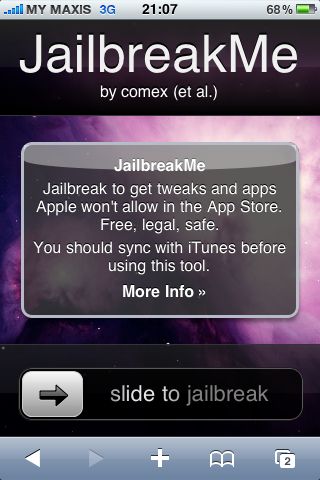
iPhone 4 jailbreak made easy via Safari Browser

Posted:  August 2, 2010   By:    2 comments   


There’s a new jailbreak for iPod/iPod/iPhone 3G/3GS and the latest iPhone 4 by the iPhone Dev Team (Comex). If you haven’t jailbreak for phone because it’s too complicated, this is good news for you. You can now jailbreak your iPhone by simply visiting a website. Just launch your Safari Browser and head to http://jailbreakme.modmyi.com to jailbreak. It can’t get any simpler than that.

According to early reports, the first few users had problems using MMS or Facetime but this is fixed with the latest updated version. If you still can’t use it, you might need to follow some steps here.

Vides on how to jailbreak after the jump

iPhone 3GS

iPhone 4

[ SOURCE, 2 ]

Related Posts with Thumbnails


iPad, iPhone, iPhone OS, Mobile Devices, Mobile OS
, , , , , , , , , ,
Wanna say something?


2 Comments for iPhone 4 jailbreak made easy via Safari Browser

Using FaceTime over 3G and data usage | SoyaCincau

[...] you need to do is jailbreak with the fairly easy Safari Browser method and download My3G from the Cydia for US$3.99. My3G is an [...]

Give your iPhone a new lease on life with a fresh Jailbreak | SoyaCincau

[...] Planning to get an iPhone 4 or replace your old iPhone with an Android device? On the borderline of Jailbreaking your iPhone but not really sure what’s the point of doing [...]





