
• 中文版
  • BM
  • News
  • Deals
  • Reviews
    • First Impressions
    • Hands-on
    • Comparisons
  • Tech
    • Mobile
    • Computers
    • Cameras
    • Wearables
    • Audio
    • Drones
  • Telco
    • Celcom
    • Digi
    • Maxis
    • Time
    • Tune Talk
    • U Mobile
    • Unifi
    • Yes
  • Cars
  • Contribute
  • Jobs
Menu
  • 中文版
  • BM
  • News
  • Deals
  • Reviews
    • First Impressions
    • Hands-on
    • Comparisons
  • Tech
    • Mobile
    • Computers
    • Cameras
    • Wearables
    • Audio
    • Drones
  • Telco
    • Celcom
    • Digi
    • Maxis
    • Time
    • Tune Talk
    • U Mobile
    • Unifi
    • Yes
  • Cars
  • Contribute
  • Jobs
Search
  • Tech
    • News
    • Mobile
    • Computers
    • Cameras
    • Wearables
    • Audio
    • Drones
  • Telco
    • Celcom
    • Digi
    • Maxis
    • Time
    • U Mobile
    • Unifi
    • Yes
  • Reviews
    • First Impressions
    • Hands-on
    • Comparisons
  • Buyer’s Guide
  • Opinions
  • Digital Life
  • Video
  • Deals
  • How-To
  • Cars
  • Bahasa Melayu
  • EV
  • Contribute
  • Advertise
Menu
  • Tech
    • News
    • Mobile
    • Computers
    • Cameras
    • Wearables
    • Audio
    • Drones
  • Telco
    • Celcom
    • Digi
    • Maxis
    • Time
    • U Mobile
    • Unifi
    • Yes
  • Reviews
    • First Impressions
    • Hands-on
    • Comparisons
  • Buyer’s Guide
  • Opinions
  • Digital Life
  • Video
  • Deals
  • How-To
  • Cars
  • Bahasa Melayu
  • EV
  • Contribute
  • Advertise
Search
Close
Home News

Microsoft’s KIN: What we think

  • BY ccsoya
  • 13 April 2010
  • 3:33 am
  • Comment
Share on FacebookShare on Twitter

Check out the product demo videos of the KIN and the KIN Studio app after the jump!

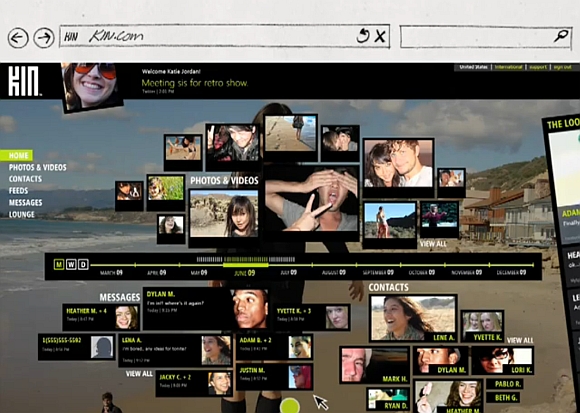
From what we’re seeing, the device UI is pretty slick with built-in editing features that lets you edit and uploads pictures and videos fairly quickly.

Having all the content of the phone backed up automatically to Microsoft’s cloud is awesome too. Being able to access photos, videos, contacts and more on any computer at any time is something very compelling for us. The KIN Studio web app is quite feature packed and having unlimited storage up in the cloud is great for snap happy Tweeples and Facebookers as well.

The keyboard on both KINs looks good too but we can only imagine how it’s going to feel like and we will only find out how good the camera is once the reviews come in but that’s not our biggest worry.

The biggest problem that we have with the KIN is the lack of an app store and the flexibility for developers to create apps for the device. This seriously limits the device’s adaptability and usability. Essentially, without additional apps to transform it into a do-it-all, the KIN is just a social media device. We don’t even see gaming in the device.

Apps are the next big thing for mobile phones and Microsoft’s move to not allow apps to be developed for KIN could very well be what’s stopping the device from becoming a real must have.

But, it is still be very early days for the KIN. We’ll keep a close eye to see if this no-app approach by Microsoft can work.

(Update 1103hrs 13042010) So much for KIN being a social media device for the social media crowd. Drilling down the features list on the official website, instant messaging is not supported by the device. Not even Window’s own Live Messenger!

The makers of KIN says that the device is more focus on text messaging and making sending text to multiple contacts easy. KIN also makes texy threads look like IM thread, Microsoft says, there is a demand for such a feature. Apparently, the KIN target users “are very focused, on the phone, on text versus IM”

KIN Camera

KIN Studio, Spot and Loop

Tags: KINmicrosoftsocial media phonewindows 7 phonewindows mobile phonewindows phonewindows phone 7windows smartphone
ccsoya

ccsoya

POPULAR

Photo by Vitaly Gariev

Countdown to Kickoff: Unifi TV Brings All 104 FIFA World Cup 2026 Matches Live in HD

June 11, 2026

Microsoft’s KIN: What we think

April 13, 2010

WhatsApp is finally getting usernames: Here’s why you should reserve yours now

June 30, 2026

We’ve been accepting broken laptop designs for 20 years. Here’s what finally changed

June 9, 2026

DNB activates additional 100MHz 5G spectrum as U Mobile exits its network

July 1, 2026
Screenshot

Why some ATMs are still charging RM1 for cash withdrawals despite the fee waiver

July 3, 2026

Copyright © 2025 · SoyaCincau.com
Mind Blow Sdn Bhd (1076827-P)

  • ADVERTISE
  • DISCLAIMER

Copyright © 2026 · SoyaCincau.com – Mind Blow Sdn Bhd (1076827-P)

  • ADVERTISE
  • DISCLAIMER





