
P1 W1MAX DS300 Modem Unlocked with tweaking possibilities

Posted:  March 11, 2009   By:    32 comments   


Update: New login password found! Read all about it here.
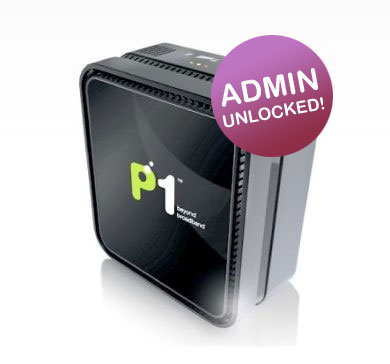
DS 300 unlocked

When P1 W1MAX was launched with its DS300 LAN based modem, it claims to be a pure Plug & Play device with no configuration needed. All the user has to do is simply connect the power & LAN cable and they are ready to surf (provided that their network settings are set as AUTO by default).

However this seems to be a barrier for gamers and network experts that require manual network tweaking to get the best performance for selected applications. Settings such as  Port Forwarding, DMZ and DHCP is simply not possible as the web admin access for the modem is not given out.

Fortunately, a lowyat.net user by the name of yong888 has obtained the username/password for the DS300 and it was very generous for him to share it on a public forum.
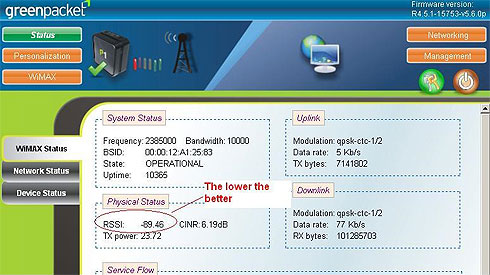
DS 300 Web Admin

To access the P1 W1MAX DS300 Web Admin, enter http://10.1.1.254 on your web browser. Login using the following:

Username: p1admin
Password: 769973

Password has been changed after firmware upgrade. Please read more here.

Here’s a trivia, the password is actually the company number for P1.COM SDN BHD (769973-T).

Once you’re in, you will have access to all the network status/settings you would need to configure your WiMAX connection according.

Editor’s Note: We do not encourage amendments to your default DS300 settings. Do not proceed unless you are fully aware of what you’re doing. Soyacincau is not responsible if your service is suspended or interrupted as a result of your own changes to the settings.

The options in the DS300 Web Admin are as follows:

  • Status
    • WiMAX Status
    • Network Status
    • Device Status
  • Personalization
    • Account
    • Date
  • WiMAX
    • Scanner
    • Authentication
  • Networking
    • Bridge/NAT Mode
    • Firewall
    • DHCP Server
    • NAT ALG
    • Port Forwarding
    • Port Trigger
    • DDNS
  • Management
    • TR-069
    • Log
    • Upgrade
    • Recovery
  • Logout
  • Reboot

For those who are still unable to find the best WiMAX Base Station direction, yong888 has mentioned that the lower RSSI value as shown above would indicate better reception. With this, you can try different placements and see which gives you better signal.

[ SOURCE ]

Related Posts with Thumbnails


P1, Players on the Field, WiMAX
, , , , , , , ,
Wanna say something?


32 Comments for P1 W1MAX DS300 Modem Unlocked with tweaking possibilities

Danesh

Thanks dude, god sent!!!

Danesh

Just tested it out. Worked like a charm

mayandi

what is the current password as 769973
is not valid anymore

jamesjan

they’ve just sorta updated the modem firmware and now we’re all locked out of the settings/status pages. *sobs*
luckily i think they retained whatever changes that was saved into the modem prior to the firmware update.
I’ve placed my 10.1.1.1 IP into the DMZ zone of the modem and entered my dyndns account info into the modem’s dynamic dns client. seems to be working still. :)

in any case, i still need to get into the modem pages. haven’t do the fengshui location hunt around the house yet.

Chris

Thanks for the info. I have tried the above mentioned username and password on my P1 DS300, but didn’t seem to work. Any other possible username and passowrd?

Hisham

erm…P1 already update the firmware over the air. so all modem can access using the password given by yong888. useless

Hisham

sory…can’t access using password given…

Danesh

looks like we are locked out again :(

P1 changes DS300 Web Admin Password via firmware update | SoyaCincau

[...] weeks ago, we reported that P1 W1MAX’s DS300 Web Admin password has been leaked on the Internet. This of course had been good news to the techie community as [...]

Deen

Guys,

Let all of send P1 a petition to provide the user with modem password. It is our right to have the password. P1 makes us look stupid with their stupid answer. Did anybody called their service centre asking for Port Forwarding or DMZ set-up? 1 of the answer is we cannot tell you because the modem technology belongs to US Army. It is a top secret!!!! They really think that their customer are stupid.

Exercise our right as customer. We subscribe to service which means we are entiteled for every feature that comes with it. P1 cannot block us from using it. Some more we cannot do any changes on the speed of the connection.

If there is anybody who support this motion please tell me so. I will personally fight for it using any means possible even if I have to go to court.

Deen

skOoL

if i not mistaken P1 already provide username&password but you need to walk in to HQ

M S N

guys..

try this one..

username: admin
password: admin123

P1 WiMAX DS300’s NEW Admin password but with limitation | SoyaCincau

[...] P1 WiMAX DS300 Web Admin is now accessible again, thanks to a comment made by “M S N” on our previous [...]

NanoTech

It works! Great stuff!

ayeen2

how can we ever boost up the TX power?
is it possible?
due to distance of 1.5+ km, i only manage to get upload rate @ 0.05MB/s.
can any1 help?

NanoTech

I don’t think we can do anything on the TX power. Try different position and angle. Turn the modem 90 degrees on the sides might be better.

amsama

Thanks! Its work for me!

amsama

Hey, i was wondering, why 1st time i login and 2nd time the index was change? there is no greenpacket logo.
and 1st time i login user is p1admin second 1 is admin. why eh? im curios ._.

Nobody

Well, They Have Already Upgrading The Firmware To The Latest Version, And It Change All The Layout And Login Data

M S N

Guys,

Announcements from P1..

Dear Valued Subscribers,

In this past week, there have been several network outages due to stormy weather conditions. Heavy rain and lightning have caused power outages, degraded our network, and hampered service restoration efforts. Our team is tirelessly working around the clock to resolve the outage occurrences to provide you with continuous good connectivity. We apologise for any inconvenience caused and assure you once again of our attention in restoring services soonest possible.

Thank you.

hmm..
i wonder why my wimax speed never reach more than 500kps for the past few days even though the signal always green..
Does anyone also effected..?

gtrsoucre

hi. i am new to p1 wimax. i just want to know how to portforward my wimax so that my torrents downloads are better. need assistance asap.
thank you

Lau Chin Yun

hi M S N, can u please teach me step by step on how to set up the IP address?

Thanx in advance. I’m a small small noob potato here. =)

ulooksostupid

p1 speed very bad,even i get the green light for de modem but i only get 30% of de speed.in one day more than 10 times disconnect.wat kind of service p1 providing?every month i paid 199 for 2.4mbps of the speed but i dun ever enjoy the good speed.

tan

can i ask y some ppl say RSSI the higher the better ….

Angeline

hi,

can some1 please tell me how to do port forwarding or any tweaks that i can do to improve my downloads???im sick of getting 3-5kB/s for my downloads….pleaseee

soyacincau

@tan & @angeline – You may refer to the lowyat forum discussion on this at http://forum.lowyat.net/topic/959378

Cleo

The lower RSSI, the better signal? Mine got negative. Around-37dBm. Is this better? My connection is super slow. Checked with speedtest.net, only 0.21 mb/s when actually i should get 0.40 mb/s

bob

ada sapa2 tahu log in wimax modem dengan telnet ? ada penah cuba ?

Heheh

O yea..success modding this modem !! littke assembly language change..

Hehehe

Modding is not difficult as long you now the chip spect, capability and dumping firmware method. Nothing is difficult like mooding ps2 or xbox 360..

kacang soya lover

do you really forgot or do you want to access someone else P1 wimax admin login page…

hehehehehe..

online university te

online university teaching jobs
There are many ways to use the Internet to make money. There several different business models and Web business structures that you can use to create a long-term business and succeed in making money via the Internet.





